I recently worked on a project focused primarily on Defender for Cloud (Defender for Servers). It’s always valuable to validate a Defender for Servers deployment to ensure no configuration has been overlooked that could weaken an organisation’s security posture.
There are some known challenges when deploying to Windows Server 2012 R2, 2016, and 2022, less so with Server 2025, which benefits from more modern integration.
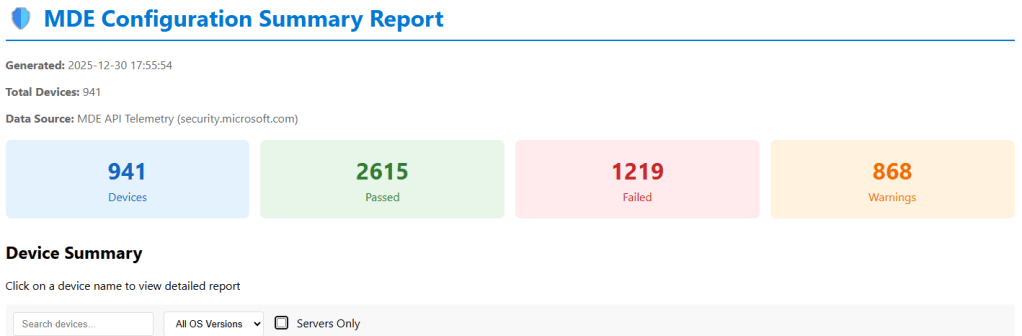
To help with this, I’ve developed a PowerShell script that scans every device connected to a security.microsoft.com tenant and generates a comprehensive HTML summary report, as shown in the image below.
The script also exports a csv report on the status of each machine and recommendations on how to remmediate any machine that has a low security posture.
A app registration is required, the permission requirements are detailed in the readme.md included in the script dowload available : HERE
Open the script get-mdeconfurationreport.ps1 and modify these variables. [string]$TenantId = “YOUR-TENANT-ID-HERE”, # 👈 Your Tenant ID [string]$ClientId = “YOUR-CLIENT-ID-HERE”, # 👈 Your App ID [string]$ClientSecret = “YOUR-CLIENT-SECRET-HERE” # 👈 Your Secret
For the purpose of this blog, the organisation will be referred to as Contoso. When new devices are onboarded in Defender for Endpoint, one of Microsoft’s recommendations is to run a full scan initially. Subsequent scans will then be quick scans.
Executing a full scan can be challenging for various reasons, such as devices going to sleep or being turned off before the scan completes.
Microsoft Defender for Endpoint is a next-generation EDR solution that provides real-time protection against malicious behaviour on endpoint devices. No security vendor can claim their service can protect against a zero-day exploit. However, a next-gen EDR solution like Defender for Endpoint does not need to know the file hash of a malicious file or attack process.
Mimikatz is one of the most notorious malware programs. However, the Mimikatz.exe file could simply be renamed, resulting in a new file hash.
Legacy EDR solutions typically depend on the file hashes of malicious files like Mimikatz.
Microsoft Defender for Endpoint guards against malicious behaviour and connects to the Microsoft Security Center, which quickly learns from trillions of daily transactions to detect new and emerging threats.
If an organization is managed by SCCM, the following query can be run against all machines to establish the full scan status:
Select SMS_R_System.ResourceID from SMS_R_System
Where SMS_R_System.ResourceID in
(Select SMS_G_System_ANTIMALWAREHEALTHSTATUS.ResourceID from SMS_G_System_ANTIMALWAREHEALTHSTATUS Where SMS_G_System_ANTIMALWAREHEALTHSTATUS.LastFullScanAge = -1)
To query the full scan status on machines using the security.microsoft.com portal, the following KQL query can be used:
DeviceEvents
| where ActionType == "AntivirusScanCompleted"
| summarize arg_max(Timestamp, *) by DeviceId
| extend ScanType = tostring(parse_json(AdditionalFields).ScanTypeIndex), DaysAgo = datetime_diff('day', now(), Timestamp)
| project DeviceName, ActionType, ScanType, DaysAgo
| where DaysAgo > 0
| sort by DaysAgo
Multi-tenant management in Microsoft Defender XDR (MTO) is designed to provide security operation teams with a single, unified view of all the tenants they manage. This feature allows teams to quickly investigate incidents and perform advanced hunting across data from multiple tenants, thereby improving their security operations.
Multi-tenant management in Microsoft Defender XDR became generally available (GA) on February 20th, 2024.
A copilot search can provide more details 🙂
Blog Purpose
The goal of this blog post is to show you how to set up multi-tenant management in Microsoft Defender XDR with the least privilege needed. Multi-tenant management in Microsoft Defender XDR allows you to manage and monitor multiple tenants from a single console. This feature was released for general availability (GA) on February 20th, 2024.
Typically, I choose a hub and spoke topology. Source and target tenants’
Roles
Global Admin Role, is required for the initial set up in the ‘Contoso.com’ source tenant, when configuring the ‘cross tenant’ configurations
Browser Sessions
Sometimes using multiple Microsoft Edge profiles to sign into the source tenant and the target tenants can cause problems, due to cookies and too many Edge active browser sessions.
Typically, I use the Microsoft Edge browser in private window option to sign into the source ‘Contso.com’ tenant
And then Google Chrome ‘Incognito Mode’ session to sign into the target ‘Fabrikam.com’ tenant.
#####Step 1
Log into the target tenant ‘Fabrikam.com’, browse to https://entra.microsoft.com/ / external identities/ cross-tenant access settings
Select ‘Add organization’ and add the tenant id for ‘Contoso.com’
When the Contoso organization has been added to Fabrikam.com, select the inbound access/ cross-tenant sync and select ‘Allow users sync into this tenant’
Select the inbound access/ trust settings ‘Automatically redeem invitations with the tenant’ (Typically, this setting will automatically be selected, but just in case, it needs to be checked)
#####Step 2
Log into the target tenant ‘Contoso.com’, browse to https://entra.microsoft.com/ external identities/ cross-tenant access settings
Select ‘Add organization’ and add the tenant id for ‘Fabrikam.com’
When the organisation ‘Fabrikam.com has been added, select Outbound Access/ trust settings/ automatically redeem invitations with the tenant Fabrikam
#####Step 3
Now login to ‘Contoso.com’ and browse to , browse to https://entra.microsoft.com/ / external identities/ cross-tenant access settings
Select ‘Add organization’ and add the tenant id for ‘Fabrikam.com’
In the source tenant ‘Contoso.com’ / cross-tenant access settings, select ‘Fabrikam.com’ outbound settings / trust settings
#####Step 4
This section is where global admin privileges are required in the source tenant ‘Contoso.com’
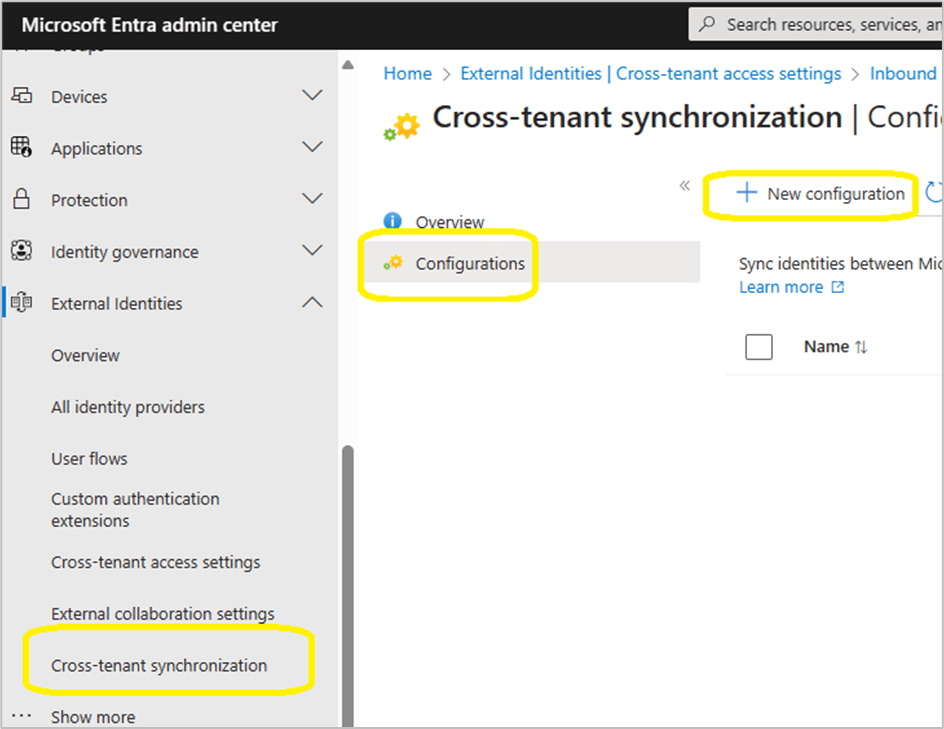
Browse to Contos.com | cross-tenant synchronization > Cross-tenant synchronisation
Select new configuration
Provide a name for your configuration
It can take up to 60 seconds for the configuration to be created, if the browser session appears like it is hung, JUST WAIT!
Select ‘Get Started’
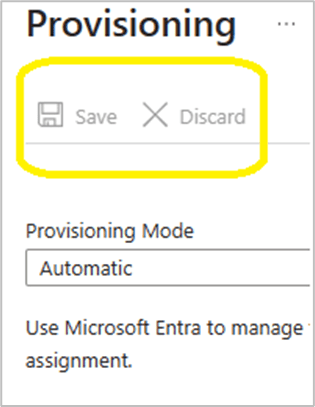
Change the provisioning mode, authentication mode and tenant ID as per the image below.
When pressing save, the browser session does not revert to the global cross-tenant synchronization / cross-tenant synchronization / configurations GUI.
#####Step 5
At this stage we will configure the provisioning configuration.
Select the ‘Contoso – Fabrikam organization’
Add the admin user accounts from the source tenant ‘Contoso.com’ that will be provisioned into ‘Fabrikam.com’
Select the provisioning status and change it from off to on.
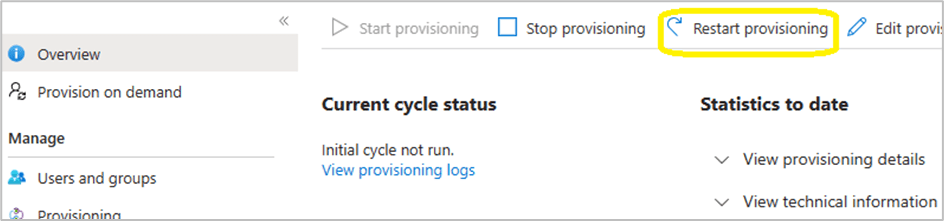
Within the provisioning overview section, select ‘Restart provisioning’
Note: Do not keep clicking on ‘start provisioning’ , ‘stop provisioning’ and ‘restart provisioning’ , be patient and wait!
#####Step 6
To access the security data of the ‘Fabrikam.com’ tenant, the admin users from ‘Contoso.com’ need to be assigned the ‘Security reader’ role in ‘Fabrikam.com’. This role allows them to view security reports and alerts, but not to make any changes.
However, if ‘Fabrikam.com’ has Privileged Identity Management (PIM) enabled and is an Enterprise Identity Protection 2 (EIP2) tenant, there is an extra step involved.
The ‘Security reader’ role assignment must be activated through PIM, either for a specific duration or as permanently eligible. Note that the permanent option is not really permanent, it still expires after 6 months and needs to be renewed manually.
Therefore, it is recommended to set a reminder to check the PIM role assignments in ‘Fabrikam.com’ and renew the ‘Security reader’ role for the ‘Contoso.com’ admin accounts when necessary.
‘Security Reader’ role can manually be added per Contoso admin in Fabrikam or a Microsoft Entra ID security group can be created and assigned the ‘Security Reader’ role. This process could make life easier for admins, they simply need to add the Contoso admins to the newly created security group.
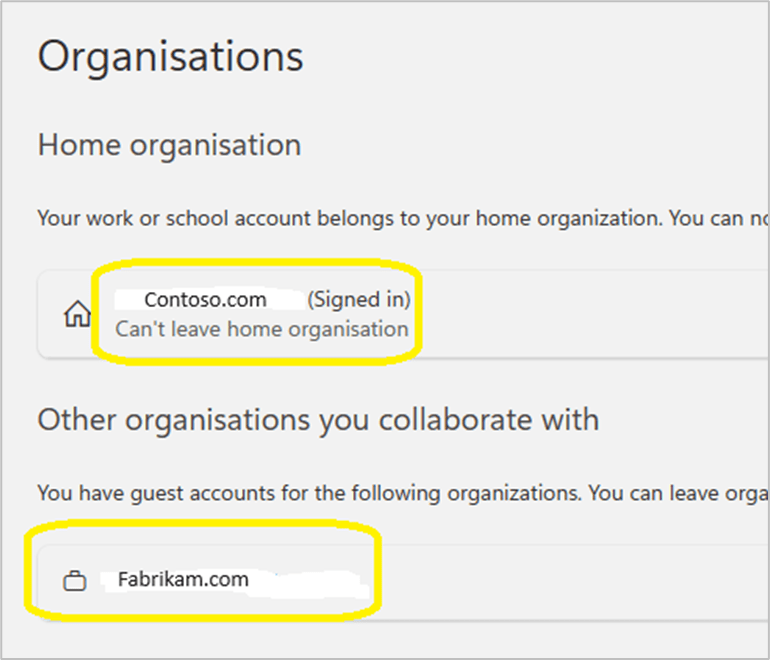
#####Step 7 Each admin account should confirm that ‘Fabrikam.com’ appears in their list of organisations that they can collaborate with via this url: https://myaccount.microsoft.com/organizations
#####Step 8
Each ‘Contoso.com’ admin must login to https;//mto.security.microsoft.com and select settings/ add tenants / and select ‘Fabrikam.com’
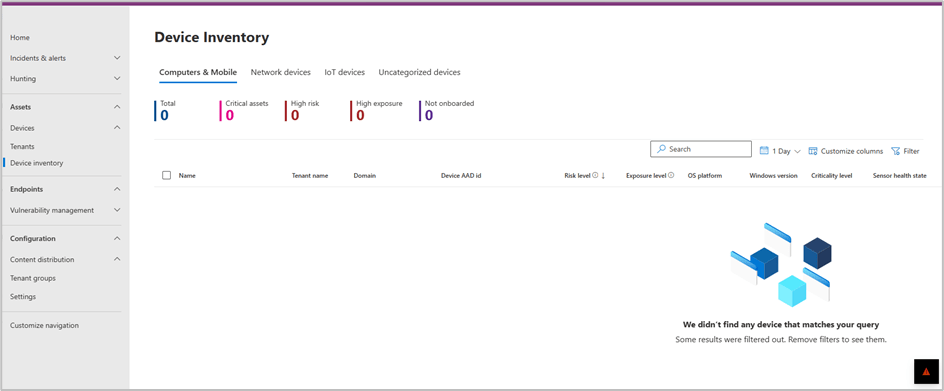
To validate successful configuration and visibility of multi tenant devices. The Contoso admin needs to browse to the Devices \ Devices Inventory
By selecting Devices/ Tenants, it will provide an image that provides a high level overview of device status per tenant.
#####Step 9
In this scenario ‘Contoso.com’ and ‘Fabrikam.com’, corporate office locations have trusted named locations in Entra ID conditional access. When a ‘Contoso.com’ admin accesses MTO, the Conditional access policies, may simply grant a ‘Contoso.com’ admin access to ’Fabrikam.com’ tenant without MFA challenge.
In the scenario where an organisation does not have ‘named locations’ configured in ‘Entra conditional access’, the source tenant admin, may be unable to view the organisations target tenant.
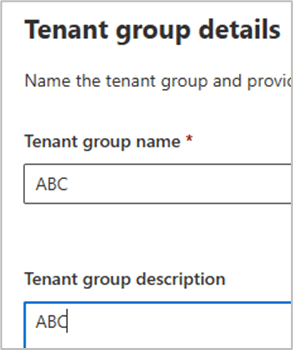
Browse to content distribution / tenant groups / create tenant group
In the bottom right hand corner, the image below may display and prompt for MFA login.
Once logged into Fabrikam , via MFA. The Fabrikam tenant will and devices will become visible in MTO
Also test login to the target tenant via https://security.microsoft.com/tenantid to ensure security admins can view all sections of the security.microsoft.com portal.
#####Step 10
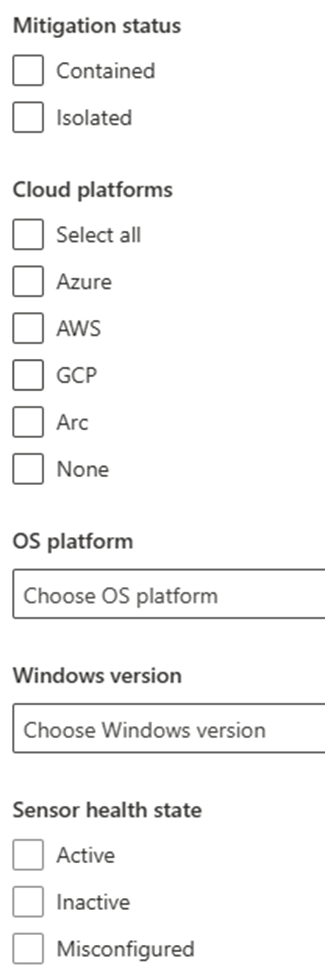
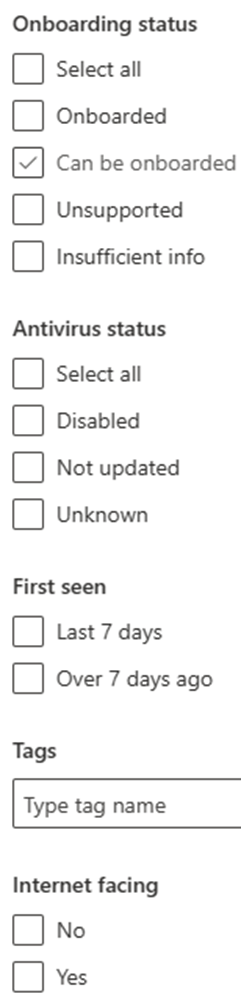
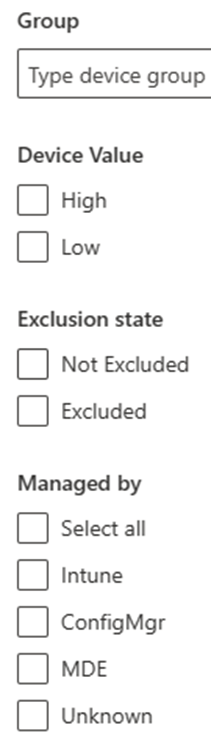
MTO device filer view
#####Step 11
Advanced hunting.
Advanced hunting queries can be executed against ‘Contoso.com’ and ‘Fabrikam.com’
#Some sample KQL queries
## All mitre attack alerts
AlertInfo // Define timerange | where Timestamp > ago(30d) | where AttackTechniques != “” | mvexpand todynamic(AttackTechniques) | summarize count() by tostring(AttackTechniques) // Define graphic | render piechart
// Filter only devices that have not performed a antivirus scan in the last day
| where DaysAgo > 0
| sort by DaysAgo
#####Summary
#Some of the positive features are:
– Simplified threat hunting with multi-tenancy support.
– Centralized view of all device inventory across all tenants and within each tenant.
– Instant insights and ability to filter views according to needs.
The most amazing feature for me is the ability to run KQL queries across all tenants. I ran some KQL queries across 8 tenants with thousands of devices and the results took between 1 – 5 seconds.
#One of the negative features is:
– The service does not provide a cross-tenant reporting functionality.
On January 30th, 2021, Microsoft discontinued the capability for administrators to customise the refresh interval of an ID or SAML token. Instead, they introduced a novel functionality within conditional access known as “sign-in frequency,” which governs the refresh and session token lifetime policy properties.
Properties governing the duration of refresh and session tokens’ lifetimes
Conditional Access Options for Sign in Frequency Microsoft has enhanced Conditional Access by introducing a new feature: sign-in frequency. The default options for sign-in frequency include hours and days, with a minimum setting of 1 hour and 1 day.
This option was a very welcome addition to the Coitional Access, session control options. Zero Trust , explained simply , ‘always assume breach’ on LAN or WAN.
However when working with an organisation on a cloud transformation journey that is moving from Microsoft Office 2010 \ 2013 , Exchange 2010, 2013. Too much change can become counter productive for an organisation. It is a black art finding the balance between security and productivity. Obviously security must always win.
The inclusion of this feature was a significant enhancement to Conditional Access session control options. In simple terms, Zero Trust advocates ‘always assume breach,’ whether on LAN or WAN. Nevertheless, when collaborating with an organisation undcontosoing a cloud transformation from Microsoft Office 2010/2013 and Exchange 2010/2013, excessive changes can potentially hinder productivity. Striking the right balance between security and productivity becomes a delicate task, with the clear understanding that security should always take precedence.
Require user reauthentication during Intune device enrolment, regardless of their current MFA status.
Require user reauthentication for risky users with the require password change grant control.
Require user reauthentication for risky sign-ins with the require multifactor authentication grant control.
There’s an additional scenario not covered in the mentioned Microsoft article—when an organisation establishes a new authentication context.
The crucial element in the depicted image is the ID of the Authentication Context policy. This ID can be allocated to critical SharePoint Online sites such as Finance, HR, Board of Management, ensuring that members of these sites are consistently prompted for authentication. This mitigates the risk associated with scheduled sign-in frequencies of 1 hour and beyond.
An hour is a significant duration, particularly in a scenario where an identity has been compromised. In just 5 minutes, a malicious actor who has compromised an organisation’s identity can swiftly pilfer intellectual and valuable information.
Summary
The current sign-in frequency control, set at a minimum of 1 hour or a specified number of days, is effective for all SAAS applications integrated with Microsoft Azure AD. .
Microsoft introduced a preview version for managing token lifetimes in Microsoft Entra ID on October 31, 2023. I haven’t had an opportunity to test it yet. Administrators lost the ability to configure refresh and session token lifetimes on January 30, 2021, and Microsoft hasn’t reinstated this capability for administrators since then. While it’s expected to function seamlessly with Microsoft applications integrated with Microsoft Entra ID, extensive testing is needed for the multitude of SAAS applications integrated with Microsoft Entra ID. Additionally, please be aware that this feature is currently in preview