
Series: This is Part 1 of 7 in my series on Microsoft Purview Insider Risk Management. New to the series? Start with the series guide, which summarises every part.
Let me start with a comment. If your organisation is licensed for Microsoft 365 E5 and has no insider risk policies turned on, that is crazy. You are already paying for one of the most effective data protection controls Microsoft makes, and it is sitting there doing nothing while your people – and now your AI agents – have full, legitimate access to your most sensitive data.
Many organisations pay for Microsoft 365 E5 and then start a Microsoft Purview project. Purview is Microsoft’s set of tools for protecting and governing data. The project usually covers sensitivity labels (tags that mark how confidential a document is), data loss prevention or DLP (rules that stop sensitive information being shared where it should not be), and retention (how long data is kept). Then the project closes, and Insider Risk Management is quietly left on the shelf.
That is rarely a deliberate decision. It happens because Insider Risk Management is the least understood part of Purview. People are not sure what it does, think it is a tool for spying on staff, or believe DLP already covers it. None of that is true.
Who should run it – and why not IT
My recommended approach is to train your compliance officers in Purview Insider Risk Management and make them its owners – not your IT team.
The reason is simple. IT administrators have the widest access in any organisation: mailboxes, file shares, laptops and admin portals. That makes them some of the most important insiders to watch. If IT runs Insider Risk Management, they end up investigating themselves and their colleagues – and nobody can fairly assess themselves. Keeping the people being watched separate from the people doing the watching is a basic rule of good governance, known as segregation of duties.
IT still has a job to do. They build the foundations – audit logging, laptop onboarding, the HR connector. They just do not see the alerts.
Access to the Insider Risk Management roles that can see alerts and reveal names should be controlled with Microsoft Entra Privileged Identity Management (PIM), which is included in E5. Instead of permanent access, a compliance officer is made eligible for the role and switches it on only when they need it – for a limited time, with a reason recorded and, if you choose, approval from a second person. Every activation is logged.
How to set it up: In Microsoft Entra, create a security group for each Insider Risk role you use – for example Insider Risk Investigators – and turn on PIM for Groups for it. Make your compliance officers eligible members, with a time limit and approval on activation. Then add that group, not the individual people, to the matching Insider Risk Management role group in the Purview portal. Microsoft documents PIM for Groups as the way to give just-in-time access to Purview role groups.
What you are exposed to without it
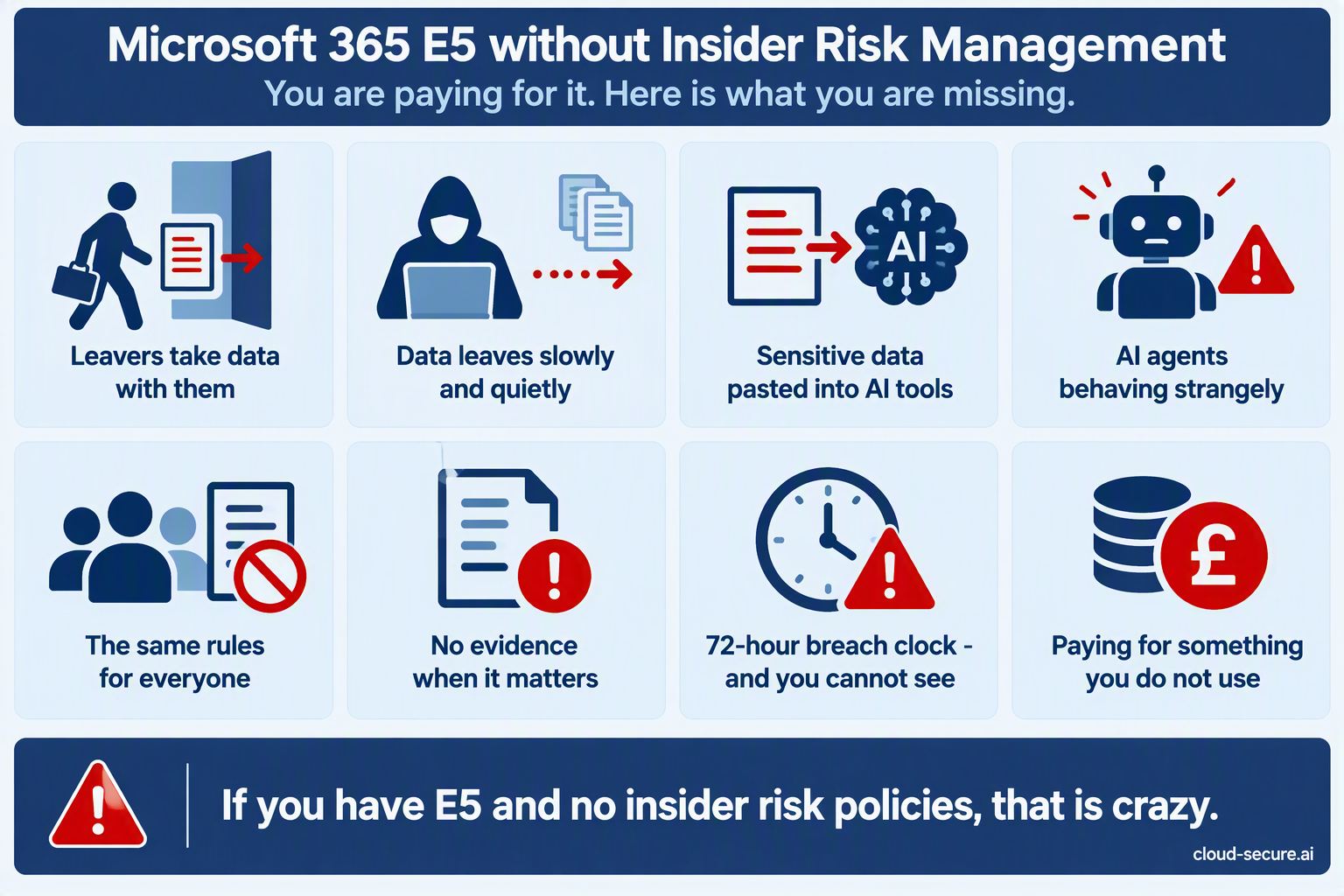
Here is what an organisation with E5 but no insider risk policies is living with today:
| Risk | What happens without Insider Risk Management |
|---|---|
| Leavers take data with them | Nobody is told when someone who has resigned downloads, copies or emails sensitive files. You find out from a competitor, a client or a newspaper. |
| Data leaving slowly and quietly | Data that leaves a little at a time never sets off a DLP rule. Nothing compares what a person is doing now with what they normally do, or with what their colleagues do. |
| Sensitive data pasted into AI tools | You may block or record a single question typed into an AI tool, but you cannot see which people keep sharing sensitive data with Copilot, ChatGPT or other AI apps. |
| AI agents behaving strangely | AI agents – software that carries out tasks on a person’s behalf – have genuine access to your data. Without risky agent policies, nobody is watching what they do with it. |
| The same rules for everyone | Without insider risk, your security controls treat your riskiest user exactly like everyone else. You either restrict everybody or nobody. |
| No evidence when it matters | When HR or legal need to act, there is no timeline of what happened and no record of what left the organisation. |
| The breach clock is ticking and you cannot see | Under GDPR you must tell the Data Protection Commission about a personal data breach within 72 hours of becoming aware of it. You cannot report – or stop – what you cannot see. |
| Paying for something you do not use | The licence, the Security Copilot capacity included with E5, and the Triage Agent are all paid for and sitting idle. |
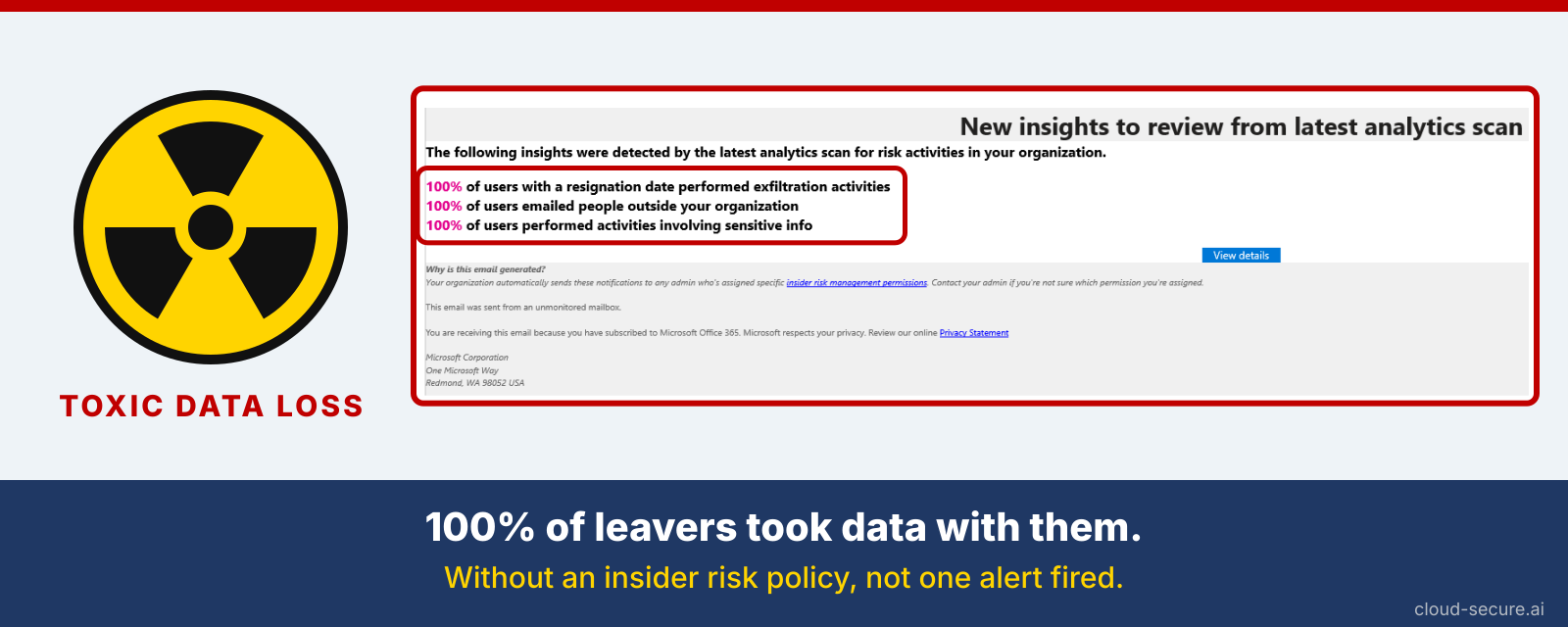
Look at the email below. Insider Risk Management sends it after it scans an organisation for risky activity. Every single person who had resigned had moved data out of the organisation. Without an insider risk policy, every one of them walked out the door without a single alert.
Why Insider Risk Management gets skipped
When I review a Purview programme, the reasons it was left out fall into the same handful of buckets:
- “It feels like spying on our people.” Without a clear explanation of the privacy controls, the business, HR and legal teams say no.
- “We already have DLP.” DLP and Insider Risk Management solve different problems – more on that below.
- “We do not know what good looks like.” Insider risk alerts and risk scores are less familiar than labels and DLP, so the value is harder to explain.
- “Licensing is confusing.” Teams are unsure what they are entitled to and what else it depends on.
- “Nobody owns it.” Insider risk sits between security, HR, legal and compliance. Without a sponsor, it falls through the cracks.
Every one of these is solvable, and most are solved simply by understanding how the product works.
What insider risk actually is
An insider is anyone who is allowed to access your data – employees, contractors, partners, and increasingly AI agents working on their behalf. Insider risk is the chance that this access causes harm, whether on purpose or by accident.
Most insider incidents are not malicious. They are a well-meaning employee emailing a client file to their personal address, uploading a spreadsheet to an AI tool the company has not approved, or copying a project folder to their personal Dropbox before leaving. The result is the same as a deliberate leak – sensitive data outside your control.
Microsoft Purview Insider Risk Management joins the dots. It brings together activity from Microsoft 365, from laptops protected by Microsoft Defender for Endpoint, from Microsoft Entra ID (where user accounts live) and from HR systems, and looks for risky patterns. It comes with ready-made policy templates for the most common situations, such as data theft by people who are leaving, data leaks, security policy breaches and risky use of AI.
Key terms in plain English: Exfiltration – moving data out of the organisation. Indicator – a specific activity Insider Risk Management watches for, such as copying files to USB. Triggering event – something that starts the watching, such as a resignation. Risk score – how worrying a person’s activity looks, which decides whether an alert is raised. Pseudonymised – names are replaced with codes, so investigators do not know who they are looking at until they need to.
Insider Risk Management is not DLP
DLP checks a single action against a rule at that moment – for example, blocking an email that contains credit card numbers. It has no memory of what that person did yesterday.
Insider Risk Management looks at behaviour over time. Picture someone who resigns, then a week later downloads far more files than usual, renames them, zips them up and copies them to a USB stick. That raises a high-priority alert, even though no single step on its own would have broken a DLP rule.
The two work best together. A feature called Adaptive Protection takes the risk level Insider Risk Management gives each person and passes it to DLP and to Conditional Access (the rules that decide who can sign in to what). Controls then tighten automatically for the few people who present a real risk, while everyone else carries on as normal.
A worked example: Contoso
Contoso is licensed for Microsoft 365 E5. A senior engineer hands in their notice. HR records the resignation and last working day in the HR system, and that information is passed to Insider Risk Management automatically. Over the following week the engineer:
- Downloads several hundred files from a project SharePoint site they have not touched in months
- Downgrades the sensitivity label on a client proposal
- Uploads a compressed archive to a personal cloud storage service
On its own, each of these looks normal. Together, and straight after a resignation, they tell a clear story. Insider Risk Management raises an alert with the full timeline, and HR and legal have the evidence before the engineer’s last day rather than after it.
Privacy is built in, not bolted on
- Names hidden by default. People appear as codes until an authorised investigator chooses to reveal who they are.
- Only the right people see alerts. Separate roles for the people who set it up, the people who review alerts and the people who investigate.
- Nobody is watched without a reason. Most policies only start looking at a person after a triggering event, such as a resignation.
- The watchers are watched. Every action taken inside Insider Risk Management is itself recorded.
Part 6 covers how these controls line up with GDPR and the Data Protection Commission’s workplace guidance.
Final thoughts
What holds organisations back from Insider Risk Management is understanding, not technology. Over the rest of this series I will walk through everything you need to make the case internally and switch it on with confidence. In Part 2, I look at how the product has changed – because if you looked at it in 2020, it is not the same product today.
The rest of the series
- Series guide: Insider Risk Management with Microsoft Purview
- Part 2: From Ignite 2019 to AI agents
- Part 3: Licensing, prerequisites and pay-as-you-go
- Part 4: Creating your first policy
- Part 5: Adaptive Protection with DLP
- Part 6: Obligation or option? Regulation, privacy and the PII gap
- Part 7: Insider risk in Conditional Access and the Data Security Triage Agent
References
- Learn about Insider Risk Management – Microsoft Learn
- Help dynamically mitigate risks with Adaptive Protection – Microsoft Learn
- Plan for Insider Risk Management – Microsoft Learn
- Permissions in the Microsoft Purview portal (PIM for Groups and role groups) – Microsoft Learn
- Privileged Identity Management (PIM) for Groups – Microsoft Learn
Seán O’Farrell | cloud-secure.ai


Pingback: Insider Risk Management Part 2: From Ignite 2019 to AI agents | Cloud-Secure.ai
Pingback: Insider Risk Management Part 3: Licensing, prerequisites and pay-as-you-go | Cloud-Secure.ai
Pingback: Insider Risk Management Part 5: Adaptive Protection with DLP | Cloud-Secure.ai
Pingback: Insider Risk Management with Microsoft Purview: the series | Cloud-Secure.ai