
Series: This is Part 3 of 7 in my series on Microsoft Purview Insider Risk Management. New to the series? Start with the series guide, which summarises every part.
Licensing is one of the reasons Insider Risk Management gets skipped, so let me make it simple. If you have Microsoft 365 E5, you already own it. The only questions are who needs a licence, what else you need, and which extras are charged on a pay-as-you-go basis – meaning you pay only for what you use.
Who needs a licence
Insider Risk Management is licensed per person. Everyone covered by an insider risk policy needs one of the following:
| Licence | Notes |
|---|---|
| Microsoft 365 E5 (or the A5 education and G5 government equivalents) | Includes everything this series uses – Insider Risk Management, Entra ID P2, Defender for Endpoint and Security Copilot – apart from the pay-as-you-go extras below. |
| Microsoft 365 E3 + E5 Compliance add-on | Adds Insider Risk Management along with the other E5 compliance tools. |
| Microsoft 365 E3 + E5 Insider Risk Management add-on | The cheaper option if you only need insider risk for some people. |
You do not need to license everyone in the organisation – only the people your policies cover. Starting with a small pilot group, or with your highest-risk roles, is a perfectly good way to begin.
What else you need
| Capability | What you need | Included in E5? |
|---|---|---|
| Seeing activity on laptops (USB, printing, uploads) | Laptops connected to Microsoft Defender for Endpoint | Yes |
| Blocking risky people at sign-in (Conditional Access) | Microsoft Entra ID P2, and Adaptive Protection switched on | Yes |
| Knowing when someone resigns | The HR connector | Yes – no extra licence |
| The AI Triage Agent | Security Copilot and Security Compute Units (SCUs) | Yes – monthly allowance included |
| Watching non-Microsoft cloud apps and AI tools | Pay-as-you-go billing through an Azure subscription | No – see below |
Is there a pay-as-you-go requirement?
For the core product, no. A standard insider risk policy that watches Microsoft 365, user accounts and company laptops – like the one built in Part 4 – is fully covered by your licence.
For some extras, yes. Watching activity outside Microsoft 365 – such as Google Drive, Amazon cloud storage or non-Microsoft AI apps – is charged on a pay-as-you-go (PAYG) basis. You are billed on how many user activities Insider Risk Management checks:
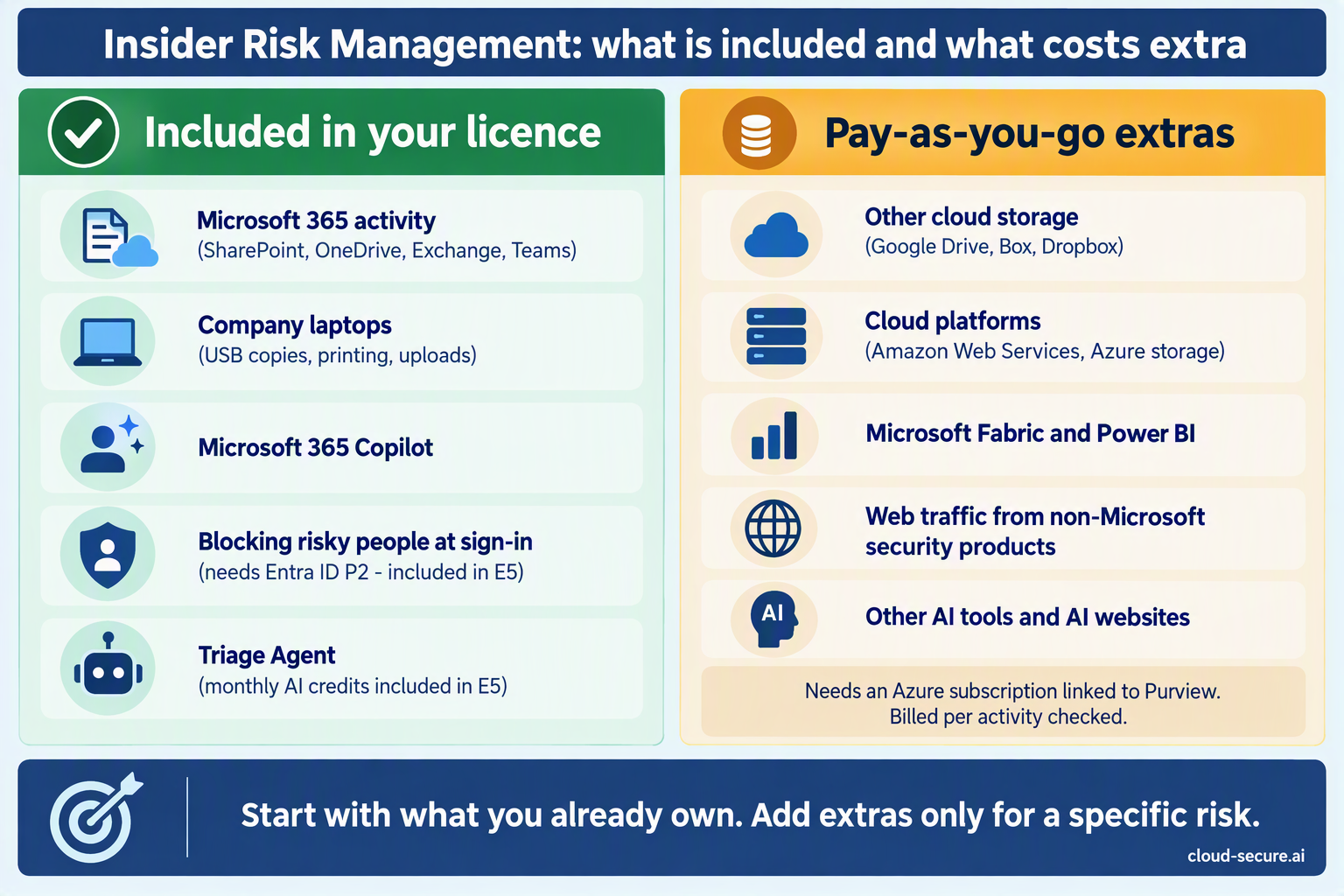
| What is watched | Examples | How it is paid for |
|---|---|---|
| Microsoft 365, user accounts, laptops and DLP alerts | SharePoint, OneDrive, Exchange, Teams, USB copies, printing | Included in licence |
| Microsoft 365 Copilot | Questions asked of Copilot and the answers it gives | Included in licence |
| Other cloud storage | Google Drive, Box, Dropbox | Pay-as-you-go (since Nov 2024) |
| Cloud platforms | Amazon Web Services storage, Azure databases and storage | Pay-as-you-go (since Nov 2024) |
| Microsoft Fabric (Microsoft’s data and reporting platform) | Power BI reports and other Fabric data | Pay-as-you-go (since Nov 2024) |
| Web traffic | Website activity reported by non-Microsoft network security products | Pay-as-you-go |
| Other AI tools | Other Microsoft Copilots, company AI apps, and AI websites people visit such as ChatGPT | Pay-as-you-go (“Other AI apps” since Apr 2026) |
To use these extras, an administrator must connect an Azure subscription (Microsoft’s cloud billing account) to Purview, then switch the extras on in the Insider Risk Management settings. If no subscription is connected, the portal will tell you before you can use them.
My advice: Start with what is included in your licence. Only add pay-as-you-go extras for a specific risk you have identified – for example, people moving data to a personal Google Drive – and set a budget alert in Azure so there are no surprises on the bill.
The Triage Agent and Security Compute Units
The Triage Agent runs on Security Copilot. Each alert it looks at uses up Security Compute Units (SCUs) – think of them as credits for AI processing. Microsoft 365 E5 now includes 400 SCUs a month for every 1,000 licensed users, up to 10,000 a month. Unused credits do not carry over to the next month.
If you use more than your monthly allowance, Microsoft has said you will be able to pay for extra SCUs as you go, at $6 per SCU, with 30 days’ notice before that option is switched on.
Prerequisites checklist
- Licences assigned to everyone your policies cover
- Audit logging turned on
- Your Microsoft 365 organisation hosted in a region where Insider Risk Management is available
- Insider Risk Management role groups assigned, ideally through PIM (Parts 1 and 4)
- HR connector set up, so Insider Risk Management knows when people resign (Part 4)
- Laptops connected to Microsoft Defender for Endpoint, so activity on them can be seen
- Azure subscription linked to Purview, only if you need the pay-as-you-go extras
In Part 4 we stop talking and build the first policy.
The rest of the series
- Series guide: Insider Risk Management with Microsoft Purview
- Part 1: The Purview workload everyone skips
- Part 2: From Ignite 2019 to AI agents
- Part 4: Creating your first policy
- Part 5: Adaptive Protection with DLP
- Part 6: Obligation or option? Regulation, privacy and the PII gap
- Part 7: Insider risk in Conditional Access and the Data Security Triage Agent
References
- Plan for Insider Risk Management – Microsoft Learn
- Configure policy indicators in Insider Risk Management – Microsoft Learn
- Microsoft Purview billing models – Microsoft Learn
- Security Copilot inclusion in Microsoft 365 E5 – Microsoft Learn
- MC917743 – Pay-as-you-go for cloud storage, cloud service and Fabric indicators
- MC1242784 – Pay-as-you-go for generative AI apps
Seán O’Farrell | cloud-secure.ai

