Series: This is Part 2 of 7 in my series on Microsoft Purview Insider Risk Management. New to the series? Start with the series guide, which summarises every part.
Many people formed their view of Insider Risk Management years ago, when it was a simpler tool with a handful of templates and a reputation for too many alerts. The product today is very different. It has grown from a tool that simply spotted problems into the engine at the centre of Microsoft Purview, feeding risk information to DLP, Conditional Access, Microsoft Defender XDR (Microsoft’s security operations portal) and now AI agents.
2019 – 2020: The launch
Microsoft announced Microsoft 365 Insider Risk Management at Ignite in November 2019 and opened a private preview. It reached general availability in February 2020, alongside Communication Compliance, as part of the Microsoft 365 E5 compliance story.
The core idea has not changed. Rather than judging single actions, it looked across Microsoft 365 – file activity, unusual behaviour and HR events such as resignations – to find risky patterns. Two principles still define it:
- Triggers. An HR event or similar starts the clock. Nobody is scored until there is a reason to.
- Privacy by design. Hidden names, restricted access and full records of who did what were built in from the start, with input from legal, privacy and HR experts.
Microsoft drew on its own internal insider risk programme and several years of research with Carnegie Mellon University.
2020 – 2022: Maturing the detections
The list of templates grew beyond data theft and data leaks. New templates covered security policy breaches, using information from laptops protected by Microsoft Defender for Endpoint, and priority users such as executives. Detection got smarter too. It began recognising chains of activity – download, disguise, move out, delete – and comparing people with their colleagues to spot data leaking out slowly over time.
In April 2022 Microsoft brought its compliance tools together under the Microsoft Purview name. Later that year it announced forensic evidence, which can record short screen clips of high-risk activity on a laptop for investigators. This only happens with explicit approval.
2023 – 2024: From detection to protection
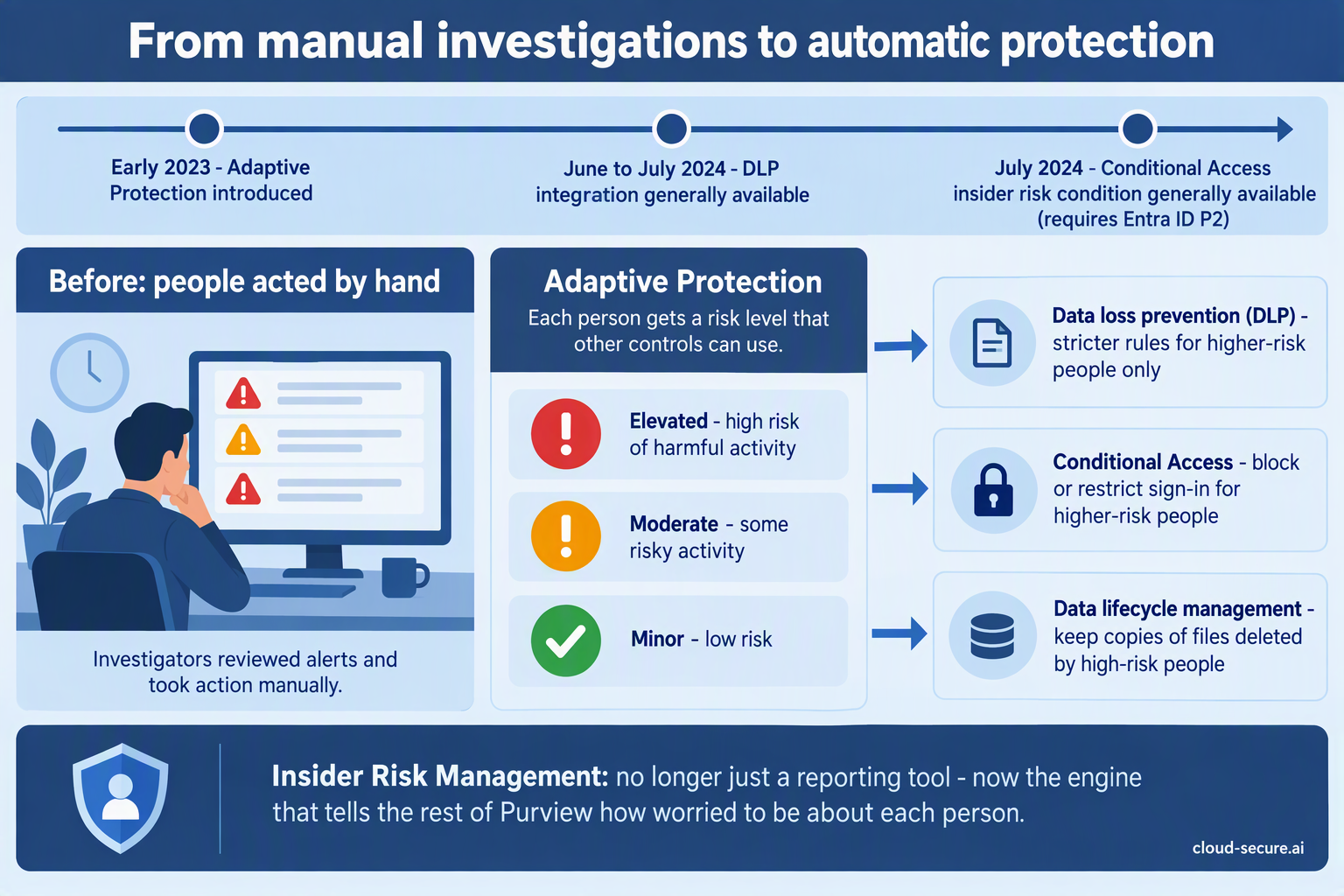
This is the turning point. Until 2023, Insider Risk Management told you about risk, and people had to act on it by hand. Adaptive Protection, introduced in early 2023, changed that. It gives each person a risk level – Elevated, Moderate or Minor – and shares it with other security controls so they can act automatically:
- DLP: from mid-2024, stricter DLP rules can apply to higher-risk people only.
- Conditional Access: from July 2024, sign-in rules can block or restrict people based on their insider risk level. This needs Microsoft Entra ID P2, which is included in E5.
- Data lifecycle management: if a high-risk person deletes files, copies can be kept automatically.
Insider Risk Management stopped being just a reporting tool and became the engine that tells the rest of Purview how worried to be about each person.
2024 – 2025: The AI era
- AI websites: from early 2024, it could spot people visiting generative AI websites.
- Risky AI usage: a dedicated template, previewed in December 2024 and fully released in August 2025, watches for sensitive information being shared with Microsoft 365 Copilot, Copilot Studio and ChatGPT Enterprise.
- Defender XDR: from late August 2025, insider risk alerts also appear in the Microsoft Defender portal, where security teams already work.
Microsoft also started using AI to help the people reviewing alerts. A Triage Agent – an AI assistant that sorts alerts so the most urgent are dealt with first – was announced in March 2025 and fully released between late November and mid-December 2025. From November 2025, Microsoft began including Security Copilot, its AI assistant for security teams, in Microsoft 365 E5 at no extra cost.
2026: Insider risk for AI agents
The latest step treats AI agents as insiders too. Insider Risk Management for risky agents was previewed in December 2025, with general availability rolling out from mid-2026. It watches AI agents built with Microsoft tools such as Copilot Studio and Azure AI Foundry. The same engine that watches for an employee taking data before they leave now watches for an AI agent behaving strangely.
The timeline at a glance
| When | Milestone | Status |
|---|---|---|
| Nov 2019 | Insider Risk Management announced at Microsoft Ignite | Private preview |
| Feb 2020 | Generally available, alongside Communication Compliance | GA |
| Apr 2022 | Microsoft 365 compliance rebranded as Microsoft Purview | Rebrand |
| Dec 2022 | Forensic evidence announced | Announced |
| Feb 2023 | Adaptive Protection introduced | Preview |
| Jan 2024 | Browsed to generative AI websites indicator | Preview |
| Jun – Jul 2024 | Adaptive Protection integration with DLP | GA |
| Jul 2024 | Insider risk condition in Entra Conditional Access | GA |
| Nov 2024 | Cloud storage, cloud service and Fabric indicators move to pay-as-you-go | Preview (pay-as-you-go) |
| Dec 2024 | Risky AI usage policy template | Preview |
| Apr 2025 | Alert Triage Agent in Insider Risk Management | Preview |
| Aug 2025 | Risky AI usage policy template | GA |
| Aug – Sep 2025 | Insider Risk Management alerts in Microsoft Defender XDR | GA |
| Nov – Dec 2025 | Data Security Triage Agent | GA |
| Nov 2025 | Security Copilot inclusion in Microsoft 365 E5 begins | Rolling out |
| Dec 2025 | Insider Risk Management for risky agents | Preview |
| Apr 2026 | “Other AI apps” indicators move to pay-as-you-go | Pay-as-you-go |
| Jun – Jul 2026 | Insider Risk Management for risky agents | GA (rolling out) |
What has changed since you last looked
- It now protects, not just detects. Risk scores tighten DLP and Conditional Access automatically.
- It covers AI. Sensitive information shared with AI tools, and AI agents themselves, are now covered.
- It is easier to run. Alerts appear where security teams already work, and the Triage Agent sorts them first.
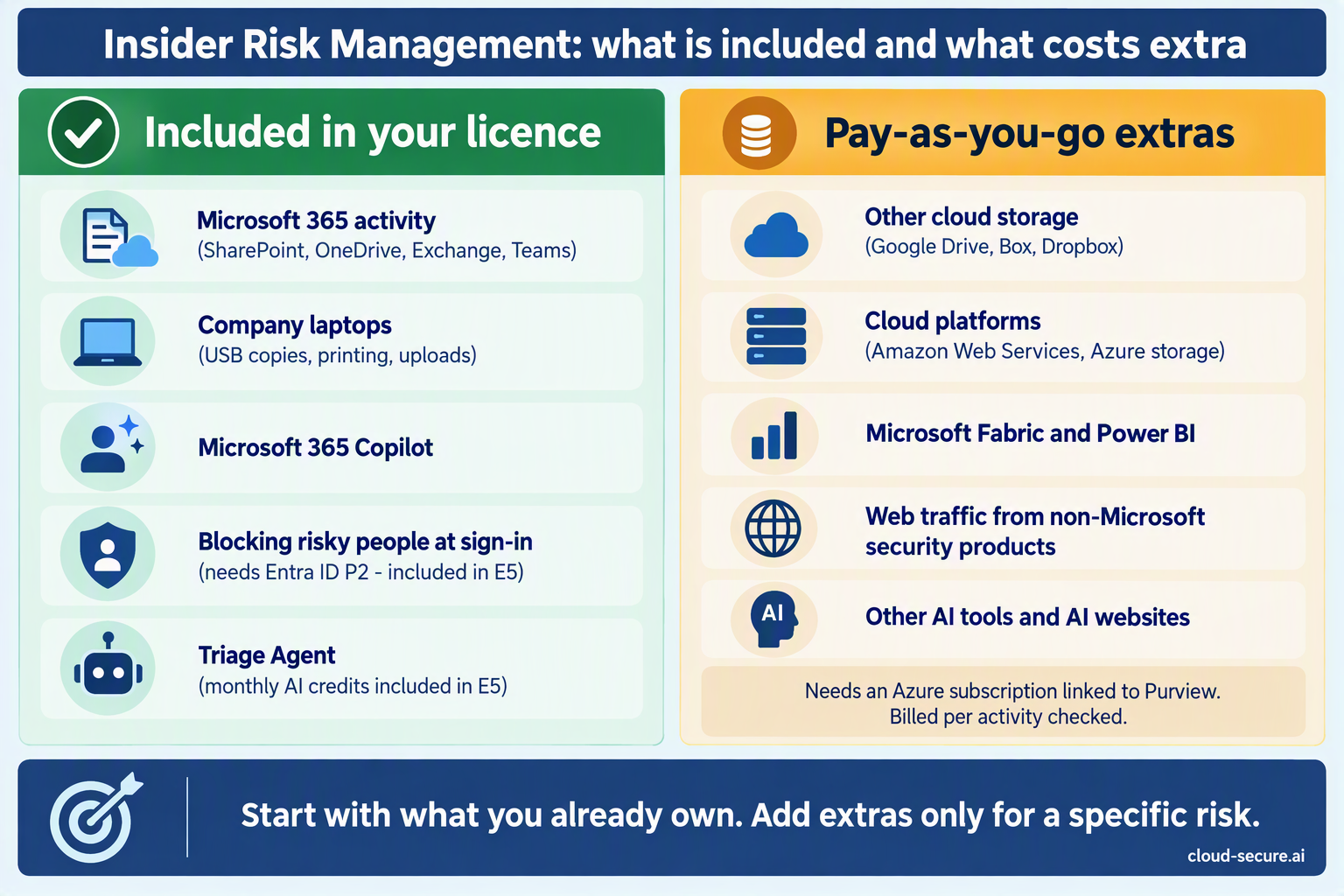
In Part 3 I explain exactly what you need to license, including the pay-as-you-go extras that catch people out.
The rest of the series
- Series guide: Insider Risk Management with Microsoft Purview
- Part 1: The Purview workload everyone skips
- Part 3: Licensing, prerequisites and pay-as-you-go
- Part 4: Creating your first policy
- Part 5: Adaptive Protection with DLP
- Part 6: Obligation or option? Regulation, privacy and the PII gap
- Part 7: Insider risk in Conditional Access and the Data Security Triage Agent
References
- Insider Risk Management and Communication Compliance now generally available – Microsoft Security Blog (February 2020)
- Collaborative innovation in Microsoft’s insider risk management strategy – Microsoft Security Blog
- MC791107 – Adaptive Protection integration with DLP generally available
- MC802699 – Adaptive Protection with Conditional Access generally available
- MC947048 – Insider Risk Management: Risky AI usage
- MC961761 – Insider Risk Management alerts in Microsoft Defender XDR
- MC1180884 – Data security alert triage agent generally available
- MC1200579 – Insider Risk Management for risky agents
Seán O’Farrell | cloud-secure.ai