Conditional Access Insights and Reporting

Conditional Access Schematic
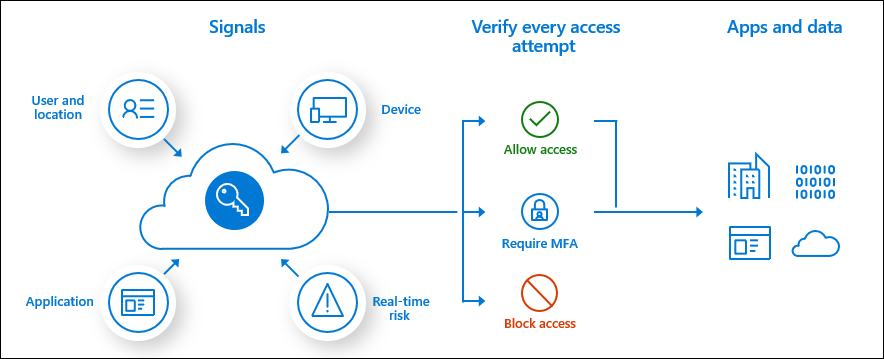
One of the most desirable Conditional Access policy controls is to only grant access to cloud applications if the Windows 10 devices are Azure AD Hybrid joined.

To ensure all Windows 10 devices are Azure AD Hybrid joined can be quite tricky , It is not as simple as enabling Azure AD Hybrid join in the AD connect wizard and simply synching an organizational unit that contains all of the Window 10 machines

The Windows 10 devices must be able to communicate with the Microsoft Office365 and Intune endpoints.

Microsoft Azure AD Conditional Access Policy – Report Mode only has been available for some time, however trying to demonstrate and analyze the impact of enabling the new conditional access policy was quite difficult when trying to review the activity for the new policy in the Azure AD sign in logs or even via a csv export of the policy activity.

Microsoft released Conditional Access Insights and Reporting : Overview and setup available HERE Power BI can also connect to the Log Analytics workspace to create custom dashboards if required.

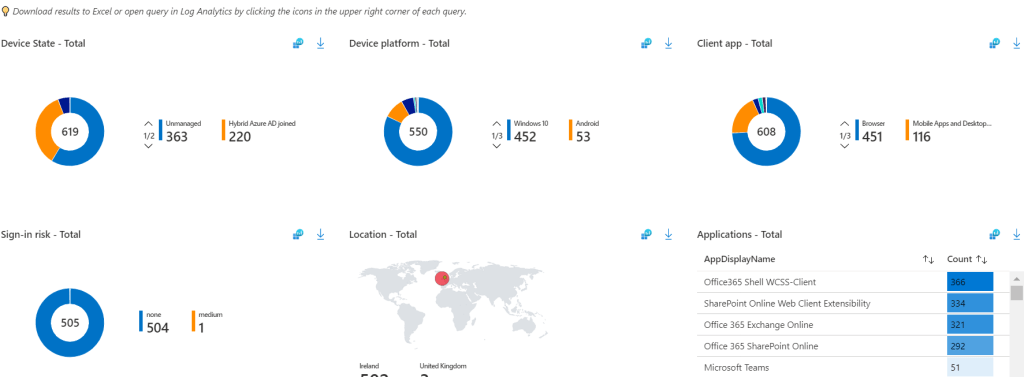
Now when attempting to review conditional access policies in report mode only and in this example the policy is a report mode only if devices were blocked from signing in unless they were Azure AD Hybrid joined.

The impact summary is simple to read and break down
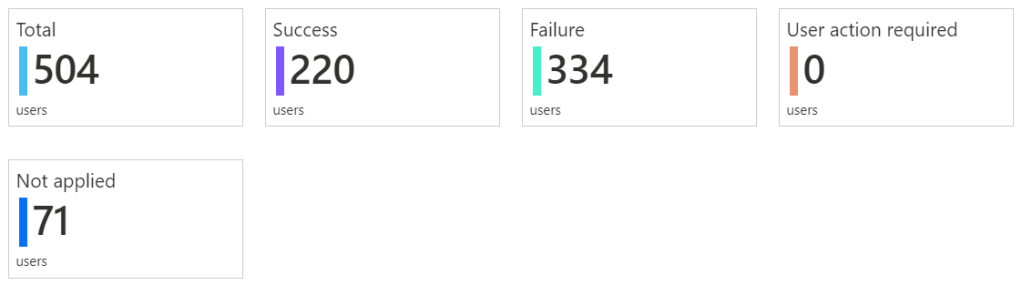
The next page summarizes user sign in details and which users would be impacted most by enabling the policy and then allow IT administrators to take action and get the users \ devices compliant before enabling the policy.
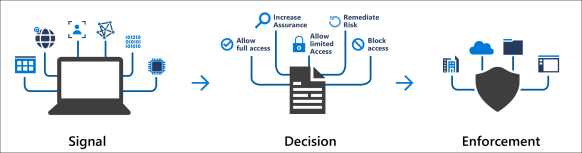

Azure AD Conditional Access Policies Best Practices

Every organisation is different and has different requirements. I have been working with conditional access for quite some time and have settled on the following policies for every organisation.

Create a security group that contains users that are permitted to access the organisations cloud services when outside of trusted locations.

Blocked Countries Conditional Access Policy

  • All Users
  • Exclude Break Glass Admin account
  • All Cloud Apps
  • Location : Blocked Countries that have been setup in the named locations section of Azure Conditional Access.
  • Access Control : Block Access

Blocked External Access

  • All users , except Break Glass Admin account and security group that contains users that are permitted access.
  • All Cloud Apps
  • Locations : Any location except trusted locations
  • Access Control : Block Access

Permit External Access 

  • Users : security group that contains users that are permitted access.
  • All Cloud Apps
  • Locations : Any location except trusted locations
  • Client Apps
    Browser
    Mobile apps and desktop clients
    Modern authentication clients
  • Grant Access : Require all of these controls
    Require Multi factor Authentication
    Require Hybrid Azure AD joined device
    Require approved client app
    Terms of Use

Mobile Device Access

  • Users : security group that contains users that are permitted access.
  • Exchange Online
  • Locations : Any location except trusted locations
  • Device Platforms : Android & IOS
  • Client Apps
    Browser
    Mobile apps and desktop clients
    Modern authentication clients
  • Grant Access : Require all of these controls
    Require Multi factor Authentication
    Require device to be marked as compliant (Enrolled in Intune)
    Require approved client app

Why still enable MFA for the mobile device access policy. When the Microsoft Authenticator application is installed on an Android or IOS device. It acts like an SSO broker and can communicate with the modern authentication Microsoft Outlook client.

Block Legacy Protocols

Simply replicate the legacy : Baseline policy: Block legacy authentication (Preview)

Azure Privileged Identity Management to lock down provision of Virtual Machines in Azure

In my previous post on how to secure Office 365 Roles and this post is about how to secure Azure Resources.

Office365 and Azure Active Directory have a number of roles that are familiar like global administrator , compliance administrator etc. One of the most common use cases for Azure PIM it to request just in time access to the global administrator role

As organisations extend their networks into Azure , Azure subscription’s costs can sometimes spiral out of control. And this post will demonstrate the technical steps required to lock down the ‘virtual machine contributor’ role with Azure Privileged Identity Management, so that it requires finance department or senior it approval to create virtual machines in Azure, and the process around making technical admin staff eligible for the ‘virtual machine contributor role’

An example of how Azure costs could spiral , An Azure Admin , provisions the most expensive high performance virtual machine available in Azure, makes the VM geo-redundant, adds in a few ultra disks and a few Terra Bytes of Azure Blob Strage.

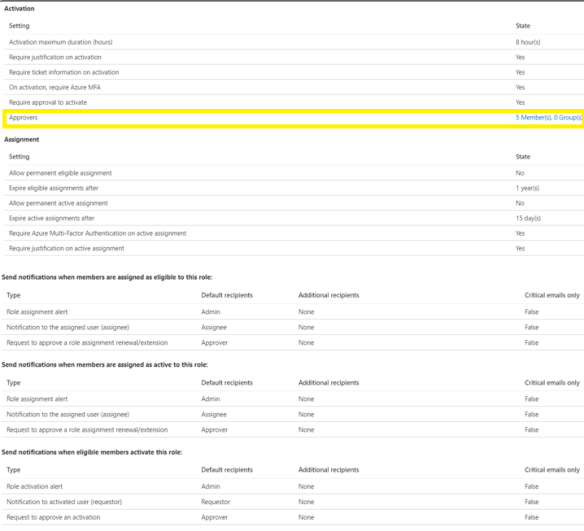
If there are multiple Azure subscriptions, The eligible users and app-rovers will need to be configured per subscription.In the image below we want to manage Azure Resources.

We click on Azure Resources and then click on settings.

Add the app-rovers for the role and ensure the app-rovers have mailboxes so that they receive the email notification
Next step is to add eligible users for the virtual machine contributor role.
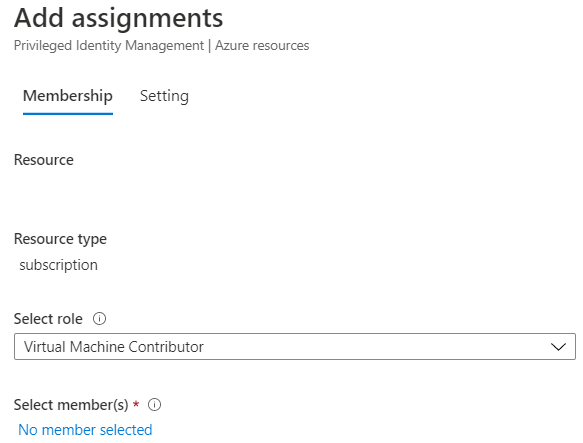
Now any admin that needs to provision a virtual machine in Azure has to follow a workflow and can only do so when senior IT resources or finance department users have approved the provision of the virtual machine
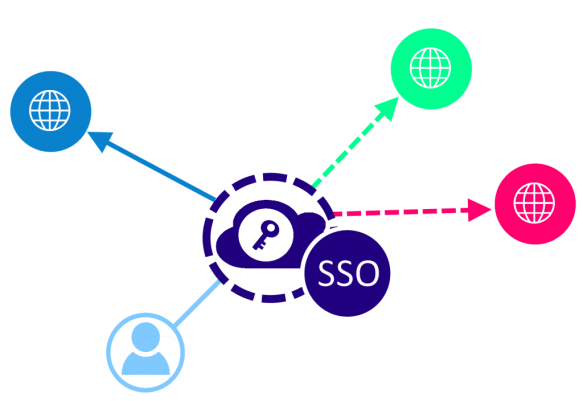
SAML Single Sign On SSO WordPress Using Azure AD

Mini Orange is a great plugin for SAML SSO integration into Azure AD.
Their documentation is located HERE

The documentation misses a few key points.

Microsoft Authentication Prompts

When securing cloud services like Office365 with Azure MFA , End User education and adoption is absolutely critical. Not all organisations’ can afford Azure Active Directory Premium Edition Plan 2 or M365 E5 subscriptions.

Azure Identity Protection provides dynamic protection against the following scenarios.

  • Atypical travel
  • Anonymous IP address
  • Unfamiliar sign-in properties
  • Malware linked IP address
  • Leaked Credentials
  • Azure AD threat intelligence

In the event of credentials being compromised the bad actor must get past the next level of authentication which will normally be the Microsoft Authenticator App or a text message.

It is critical to educate end users : DO NOT APPROVE random authentication requests. If an end user is on leave and not attempting to access their cloud resources there should be no reason to approve multi factor authentication challenges.