
Part 4 of 4 - Finding and removing the footholds
In the previous part: The accounts are contained, but the four footholds survived. Now we find them and remove them - the eradication step that makes re-enabling safe.
Stage 5 - Hunting the footholds
Three of the four footholds are visible in the CloudAppEvents table in Advanced hunting, each under a specific ActionType confirmed in the lab. Set the time window to match the incident.
Roles added (T1098.003)
CloudAppEvents
| where Timestamp > ago(1d)
| where ActionType == "Add member to role."
| project Timestamp, ActionType, AccountDisplayName, IPAddress, CountryCode, RawEventData
| order by Timestamp desc
App secrets added (T1098.001)
The ActionType Microsoft writes for this contains a dash, so match on the distinctive text rather than the whole string:
CloudAppEvents
| where Timestamp > ago(1d)
| where ActionType has "Certificates and secrets management"
| project Timestamp, ActionType, AccountDisplayName, IPAddress, RawEventData
| order by Timestamp desc
Inbox rules created (T1564.008)
CloudAppEvents
| where Timestamp > ago(1d)
| where ActionType in ("New-InboxRule", "Set-InboxRule", "UpdateInboxRules")
| project Timestamp, ActionType, AccountDisplayName, IPAddress, CountryCode, RawEventData
| order by Timestamp desc
All three in one query
CloudAppEvents
| where Timestamp > ago(1d)
| where ActionType in ("Add member to role.", "New-InboxRule")
    or ActionType has "Certificates and secrets management"
| project Timestamp, ActionType, AccountDisplayName, IPAddress, CountryCode
| order by Timestamp desc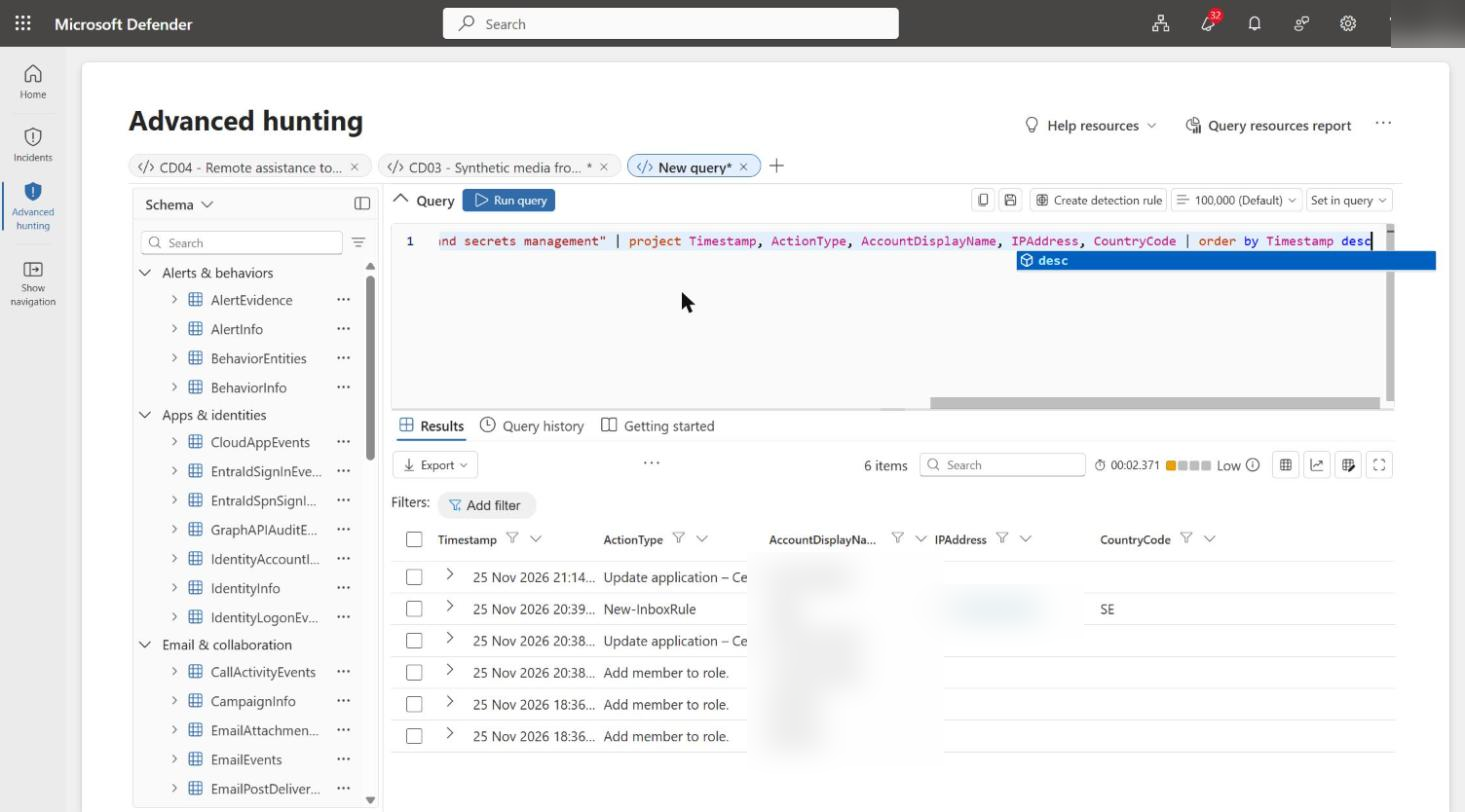
Gotcha 1 - the MFA method is not here. The attacker-registered authentication method does not appear in CloudAppEvents at all; self-service registration through the My Sign-ins page is not written to that table. This is why the companion hunt reads authentication methods directly through Microsoft Graph - KQL alone would miss the MFA foothold.
Gotcha 2 - the IP is not always populated. In the lab the mailbox action (New-InboxRule) carried the attacker IP and country, but the Entra directory actions (the role and the secret) came through with an empty IPAddress. Do not rely on IP alone to scope these; correlate on the acting account and the timestamps instead.
The Graph hunt
Because the MFA method is invisible to KQL, the companion hunt script reads authentication methods, directory roles, app secrets and inbox rules straight from Microsoft Graph and Exchange Online. It surfaces the hidden and temporary methods the portal omits, and it is read-only - run it to find the footholds, then again after removal to confirm the account is clean.
Stage 6 - Removing the footholds
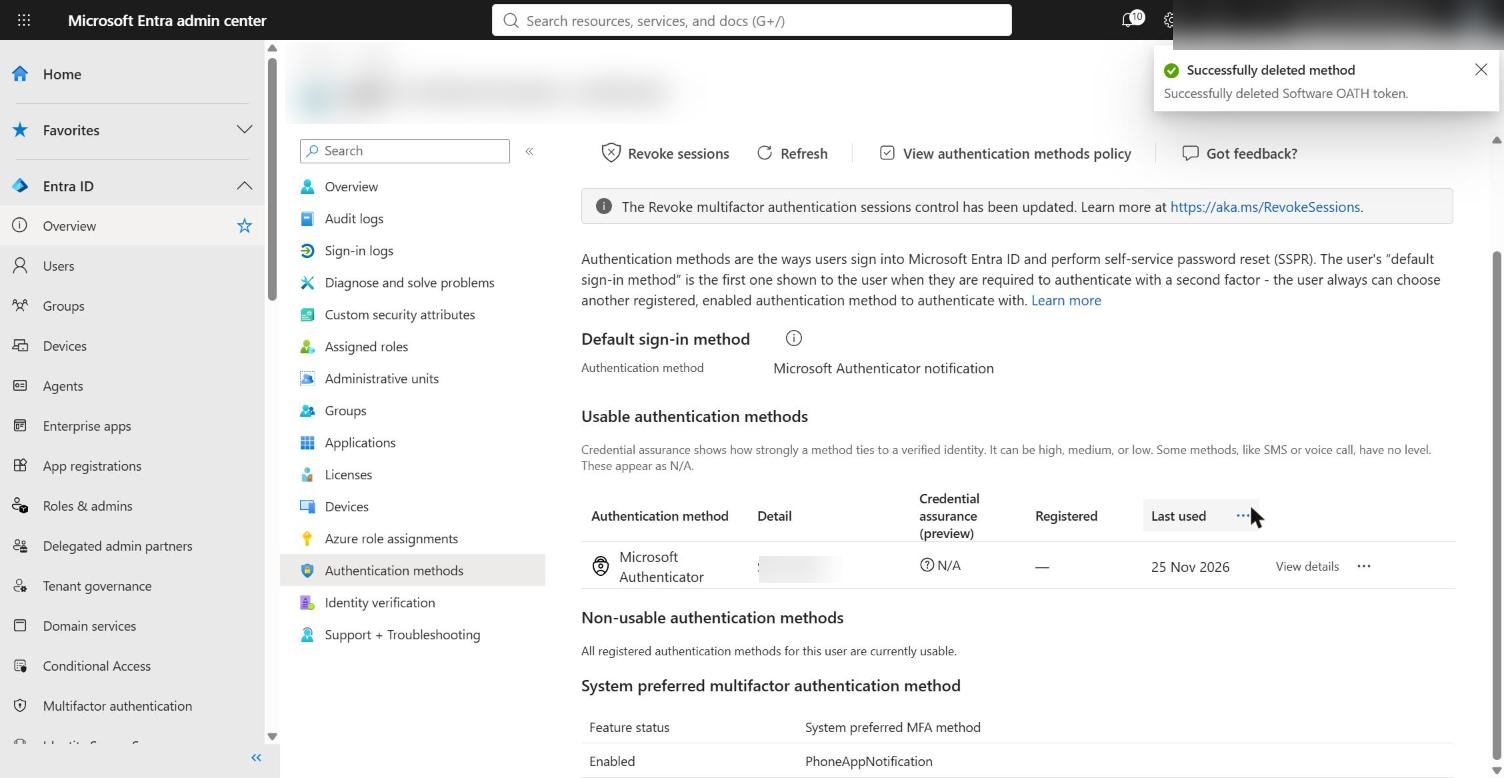
The aim is precision: remove what the attacker added and nothing else. Each foothold is removed by its own identifier - the authentication method id, the role assignment id, the secret key id, the inbox-rule name - so the user’s legitimate methods and settings are left untouched.
- MFA method: delete only the method the attacker registered. Removing it by id leaves the user’s own Authenticator in place; a blanket “require re-register MFA” would wipe the legitimate method too.
- Role: remove the added assignment, then review why the helpdesk account could assign it in the first place.
- App secret: delete the secret by its key id, then review the app’s sign-in logs for anything it was used for.
- Inbox rule: remove the rule, and check for forwarding set on the mailbox.
Gotcha - verify, do not trust the message. Some Graph removal cmdlets return an error that does not stop the script, so a naive script can report success when nothing was removed. The companion removal script checks the method’s real type, uses explicit error handling, and reports success only when the call actually succeeds. Always re-run the hunt afterwards.
Stage 7 - Verify and recover
- Re-run the hunt and confirm nothing remains - one legitimate method, no roles, no secrets, no inbox rules.
- Reset the password and revoke sessions once more, for the victim and the helpdesk account.
- Re-enable the accounts - now safe, because the footholds are gone.
- Confirm the attacker can no longer sign in.
Takeaways
- Containment buys time; eradication makes the account safe. Build a post-containment checklist for MFA methods, role assignments, app credentials and mailbox rules, and run it before anyone re-enables an account.
- Remove what the attacker added, not everything. Wiping a user’s own MFA creates a support call and a fresh social-engineering window.
- Not every foothold is in one table. The role, secret and inbox rule are in CloudAppEvents; the MFA method is only visible through Graph.
- Keep the hunt and removal ready as scripts, so the checklist takes minutes rather than hours.
Companion scripts
The read-only hunt and the precise removal script are on GitHub at cloud-secure-ai/attack-disruption-footholds-lab, with a README and the MITRE ATT&CK mapping. The repository is deliberately defensive: the script that plants the footholds is not included, because planting requires privileged access in any case and the published tooling is limited to detection and removal.
References
- Automatic attack disruption in Microsoft Defender - learn.microsoft.com/defender-xdr/automatic-attack-disruption
- Predictive shielding overview - learn.microsoft.com/defender-xdr/shield-predict-threats
- MITRE ATT&CK T1098 Account Manipulation - attack.mitre.org/techniques/T1098
- MITRE ATT&CK T1564.008 Email Hiding Rules - attack.mitre.org/techniques/T1564/008


Pingback: Contained isn’t clean, Part 3: containment and the gap | Cloud-Secure.ai