Exchange 2016 – 2019 Federation Fails with Exchange Online

When attempting to federate a domain hosted in Exchange on premises with Exchange Online. The error message displayed below appears.

To resolve this issue TLS 1.2 needs to be enabled on the Exchange Hybrid servers.

ALI TAJRAN has a excellent ARTICLE and script to enable TLS 1.2 on Exchange servers. Once this script has run on the Exchange Hybrid servers, the wizard to add a federated domain will complete successfully.

Note: TLS 1.3 is not supported on Exchange on premises yet.

How to enable Yammer SSO without ADFS

It would be great if when you click the Yammer icon in the Office365 services ribbon it actually signs you into Yammer rather than redirecting you to Yammer.com.

This blog will detail how to setup single sign on to Yammer via Microsoft Windows Azure Active Directory. When SSO for Yammer is enabled with Azure AD there is no on premise ADFS requirements.

Every Office365 Subscription also has a Windows Azure tenant in the background.When signed into an Office365 tenant , open a new tab and browse to this URLĀ https://manage.windowsazure.com/ and signup for a free trial.Ā 

You will need a credit card Ā when signing up however there will be no charge to the credit card.

  • Browse to the Active Directory section in the Azure Management Portal and then select
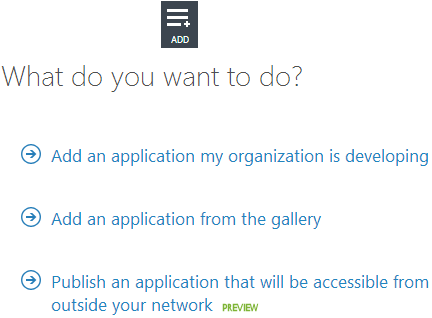
    “Add Application” Ā and “Add an application my organization is developing”
    as per the image below.
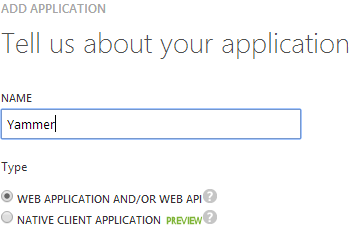
  • Name your application as per image below
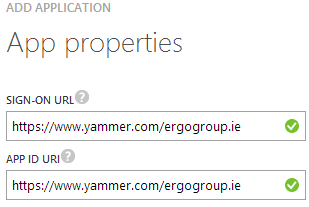
  • Then enter your sign-on url & app id uri as per image below
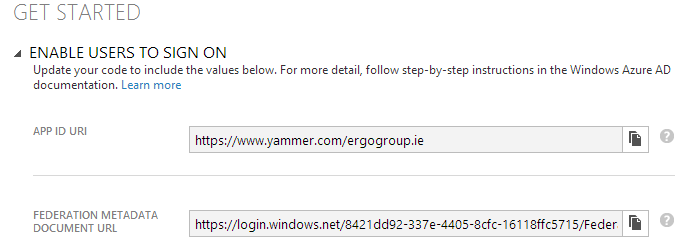
  • You then select “ENABLE USERS TO SIGN ON” and then browse to the “FEDERATION METADATA DOCUMENT URL” and save the metadata xml file as per image below.
  • Next we need to connect Windows Azure Active Directory via powershell and run the following commands
Import-Module MSOnlineExtended -Force
$replyUrl = New-MsolServicePrincipalAddresses –Address “https://saml.yammer.com/sp/ACS.saml2”
New-MsolServicePrincipal –ServicePrincipalNames @(“yammer/sso”) -DisplayName “Yammer Federation” -Addresses $replyUrl

  • The command will output an “AppPrincipalId” take note of this value and save it into a text file.
  • Then you will need to fill in the Yammer Ā SSO-Checklist.docx which you can download HERE
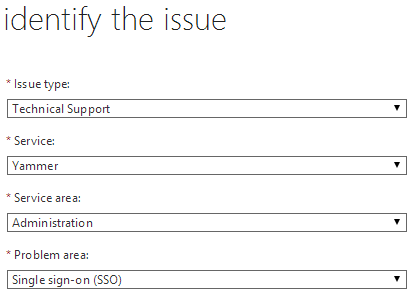
  • We now create a Service Request as per image below
  • We then create a compressed file that contains the FederationMetadata.xml, the AppprincipalId and the SSO Checklist and attach the file to the service request.
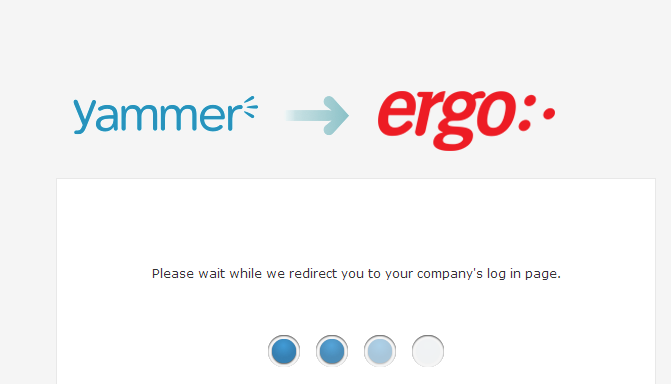
Once Yammer Support enable Single Sign On for your Yammer network. When you click on the Yammer link from the Office365 portal it will sign you into Yammer šŸ™‚ Or when you browse to your Yammer SSO URL like https://www.yammer.com/contosogroup.ie
If you sign into Yammer , You can then open a new tab to access portal.microsoftonline.com or a Sharepoint Online site without having to re-authenticate. All this with no – on premise ADFS!

Credits: Billy Harris Microsoft

Error adding second adfs server with ucc cert

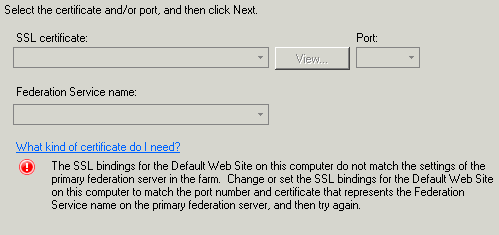
I recently tried to add a second adfs server to an adfs farm and got the error message above. I was using a ucc cert which had the adfs service name.

So to fix it you add the second server via the command line , a typical command would be as follows.

FsConfig.exe JoinFarm /PrimaryComputerName ADFS-SRV /ServiceAccount Contoso\adfsservice /ServiceAccountPasswordĀ password /CertThumbprint “ef 72 a6 78 c0 ab 4a bf 07 10 7e e4 86 f5 5e ba 2a 3c 99 6b”

And the output from the command will be as per the image below.

.

Office365 ADFS 2.0 with full SQL Server

As per my previous post about DirSync for Enterprise organisations , We also need to install ADFS farms into SQL clusters for high availability and scalability. So below are the steps to install ADFS 2.0 into a SQL Cluster.

In this example on how to set this up for the purposes of this demo , Please take note of the following items.

Domain:contoso
ADFS Server : adfs.contoso.local
SQL Cluster: sqlclus
ADFS Service Account: contoso\adfs
ADFS Service Name: signin.contoso.com

  1. Download and install ADFS 2.0 RTW which you can download HEREĀ The ADFS 2.0 installer installs the pre-requisites required for the software.
  2. Do not open the ADFS configuration wizard after the install has complete, Download and install ADFS 2.0 Rollup 3 which you can download HEREĀ 
  3. Now get your trusted ssl certificate for your adfs service name ‘signin.contoso.com‘ and bind it to the default site. I always remove any http bindings for the default website on your adfs lan server.
  4. In certificate manager. Right Click on the trusted certificate ‘signin.contoso.com‘ and select all tasks\manage private keys and then add the contoso\adfs service account permissions ‘Full Control & Read’
  5. From a command prompt with elevated privileges make this the current directory Ā C:\Program Files\Active Directory Federation Services 2.0\
  6. Now we are ready to create the ADFS farm and we do so with the following command

    FSConfig.exe CreateSQLFarm /ServiceAccount “contoso\adfs” /ServiceAccountPassword “password” /SQLConnectionString “database=AdfsConfigurationServer;server=sqlclus;integrated security=SSPI” /port 443 /FederationServiceName “signin.contoso.com” /CleanConfig /AutoCertRolloverEnabled

    And you will see the following output from the command prompt window

  7. Ideally the lan adfs servers will be load balanced , If you need to use a sql cluster for your adfs deployment then there is a good chance the customer will have load balancers like F5, Netscaler or Kemp.My preference would be Kemp.So there will be a virtual ip for the ADFS Service name ‘signin.contoso.com‘
  8. To enableĀ kerberos authentication to Outlook Wep App and Sharepoint , place the https://signin.contoso.com into the intranet settings in Internet explorer for clients via group policy.
  9. ADFS proxy servers will be in a DMZ or else TMG Servers can also act as adfs proxy servers and will point at the loadbalanced ‘signin.contoso.com‘ vip in the lan.Ā 
  10. Cloudfloor DNS provide GEO dns routing. So for example they can direct traffic from iso country codes to a location of choice. For example us adfs requests can hit us adfs servers. Irish requests can hit Irish adfs servers etc… So a service like this can take care of the external load balancing.
  11. So now we have all this done , time to federate the onpremise domain name ‘contoso.com‘ with our Office365 tenant.
  12. Before we do this we need to ensure we have done the following.
    A: Verify ownership of contoso.com
    B:Activate Active Directory Synchronisation
    C: Download and install the Microsoft Single Sign in Assistant HERE
    D: Once the Single Signin Assistant has been installed , Download and install the Windows Azure Directory Module for Powershell HERE
  13. Now we are ready to run the commands to federate ‘contoso.com‘ with Office365 and we will do so with the following command
    $cred=Get-Credential

    Connect-MsolService –Credential $cred

    Set-MsolAdfscontext -Computer
    adfs.contoso.local Ā # then enterĀ contoso\adfs credentials
    Ā 
    Convert-MsolDomainToFederated –DomainName contoso.com -SupportMultipleDomain
  14. You might have only one domain, But I always recommend using theĀ -SupportMultipleDomain switch as it can future proof your adfs service. For example your customer could acquire a company.
  15. Finally we want to brand our ADFS Proxy pages with company logos and here is a great blog posting by Laurent Bel on how to customise the ADFS 2.0 login page HERE
  16. So now that we have created our first ADFS Server to connect to a SQL Cluster , How do we add more ADFS servers. We do so with the following command as per the original ADFS server setup.

    FSConfig.exe joinSQLFarm /ServiceAccount ‘contoso\adfs‘ /ServiceAccountPassword ‘password‘ /SQLConnectionString “database=AdfsConfigurationServer;server=sqlclus;integrated security=SSPI”Ā 


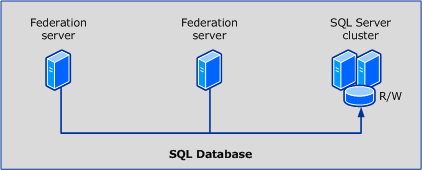
The term ā€œprimary federation serverā€ does not apply when the ADĀ FS configuration database is stored in a SQL database instance because all federation servers can equally read and write to the ADĀ FS configuration database that is using the same clustered SQLĀ Server instance, as shown in the following illustrationĀ 

I have not installed ADFS 2.1 on Windows Server 2012 into a SQL Cluster yet but I think it would be the exact same process. I will be doing this on a project coming up shortly and will create a new blog post for this.Ā 

I hope people find this blog posting useful as it took me quite a bit of time to get ADFS right when I first started working with ADFS.

SeanĀ 

ADFS Farm Highly Available between geographical sites

I am working on a project now moving 700 users to Exchange Online. I am implementing single sign on via an ADFS Farm and DirSync.


Not every organisation has loadĀ balancers or the even the ability to load balance external DNS.

A very important factor that needs to be taken into consideration is this. If the Microsoft Online Services federation gateway cannot communicate with a customers on premise active directory then users are not getting their email , lync or sharepoint.Ā 

Email will still flow, but the users will think the service is down. So because of this it is always a good idea to have some highĀ availability with the ADFS farm.

So I came across a company calledĀ Cloudfloor DNSĀ .Cloudfloor provide the ability to loadbalance the traffic via round robin or active passive to my adfs proxy servers.It is quite a simple service but a lifesaver in the event of one site going down and all users not being able to use their Microsoft online services.

Cloudfloor can also do geographical dns based rules. This could be very useful in a gloabl lync or exchange deployment. Australian traffic goes to australian exchange servers and lync servers etc…. etc…

To set it up takes 5 minutes and works perfectly when tested.Ā