Tag Archives: migration
Migrating Lotus Notes users into an Exchange Hybrid
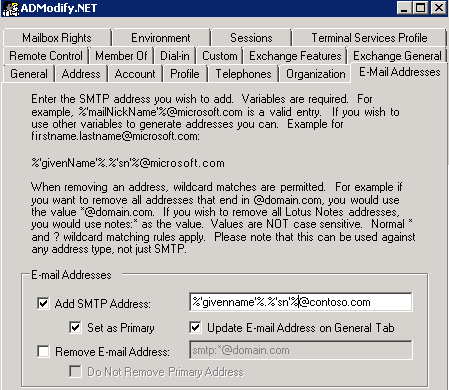
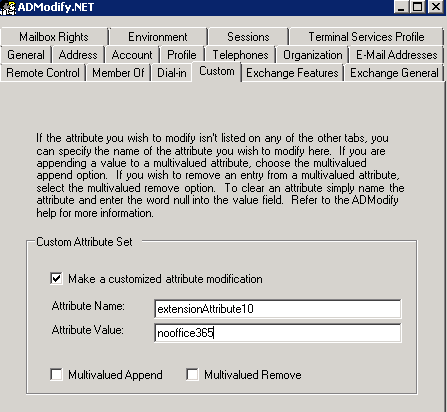
In this post I just wanted to highlight what active directory attributes need to change on a user account when you have an existing Exchange Hybrid and want to migrate Lotus Domino users into exchange online.
Primary Email Address: Sean@contoso.com
Hybrid email Domain: contoso.mail.microsoft.com
The existing users that have exchange mailboxes will already have exchange active directory attributes. So lets take a look at what happens when you migrate an on premise exchange mailbox to exchange online.
When you run dirsync , a proxy hybrid domain is created in the example above it is contoso.mail.microsoft.com. So when you initiate a ‘new remote move request‘ and move an onprem user to the cloud the user becomes a mail contact and their routing email address becomes
SO KEEP THE ADMODIFY CONFIGURATION XML FILES SAFE!
- We set the user’s location , in this example the country is US
Get-MsolUser -UnlicensedUsersOnly |Set-MsolUser -UsageLocation US - Get-MsolUser -UnlicensedUsersOnly | Set-MsolUserLicense -AddLicenses “Contoso.com”:EXCHANGESTANDARD
Note:
Quest NME will not populate the GAL as the source directory will be Lotus Notes and target directory Exchange Online.So to populate the gal after you have made all the attribute changes above run this command in the exchange management shell Enable-RemoteMailbox sean@contoso.com -RemoteRoutingAddress sean@contoso.mail.onmicrosoft.com
Tier 1 Bpos to Office 365 Transition

I recently completed Ireland’s first Tier 1 Bpos to Office 365 transition and would like to share the steps involved to achieve this.
My client was a global charity with their head quarters in Dublin and operating in 14 countries with 1400+ users spread over 90 locations and most with little or no it support.
As users were so dispersed throughout the globe the charity did not want to implement Single Sign On. One of the most critical requirements for the charity was the need to keep existing ost files on client machines. The reason for this is because some locations in Africa have poor Internet connectivity speeds and it could take weeks for the creation of a new Outlook profile to download and re-sync a local cached copy of a mailbox.So I confirmed with Microsoft that we could keep the existing OST’s and they said we could. However the Office 365 Client Prereqs needed to be installed on each client machine prior to transition.
So I am going to bullet point in order the steps.
- Engage with a Microsoft Office 365 transition manager
- Remove Office Communicator prior to transition – this can be done running this command or a batch file MsiExec.exe /I{0F3AB690-1F39-40B8-9D4A-6E8DDA850FB0}/passive
- Once that has been done install Microsoft Lync
- Then install this UPDATE on all Client computers
- Send out a communication to all staff stating that after transition they can access their web mail via https://portal.microsoftonline.com and smart phones can access m.outlook.com
- One week before transition , setup Lync SRV Records for each domain as per Microsoft’s GUIDE and internal firewall rules
- One week prior to transition , reset user’s passwords so that they comply with Office 365’s password policy I did this very quickly and easily via Messageops powershell gui for Bpos
- Then run the powershell below to ensure any mailboxes with delegated control preserve their custom permissions
Export Public Delegates
#$LiveCred = Get-Credential
#$Session = New-PSSession –ConfigurationName Microsoft.Exchange –ConnectionUri https://ps.outlook.com/powershell/ -Credential $LiveCred -Authentication Basic –AllowRedirection
#Import-PSSession $Session
get-mailbox -filter {grantSendOnBehalfTo –ne $null} select userprincipalname, grantsendonbehalfto export-clixml delegates.xml
get-mailbox -filter {grantSendOnBehalfTo –ne $null} select userprincipalname, grantsendonbehalfto export-csv delegates.csv
Import Public Delegates
#$LiveCred = Get-Credential
#$Session = New-PSSession –ConfigurationName Microsoft.Exchange –ConnectionUri https://ps.outlook.com/powershell/ -Credential $LiveCred -Authentication Basic –AllowRedirection
#Import-PSSession $Session
$logfile = “log-” + (get-date –uformat “%H%M-%Y%m%d”) +”.txt“
start-transcript $logfile
import-clixml delegates.xml foreach{
“User: ” + $_.userprincipalname
foreach($i in $_.grantsendonbehalfto){
“GrantSendOnBehalfTo: ” + $i
set-mailbox -identity $_.userprincipalname –grantsendonbehalfto @{Add=$i}
}
“———————————–”
}
“number of mailboxes with grantSendOnBehalfTo : ” + (get-mailbox -filter {grantSendOnBehalfTo –ne $null} ).count
stop-transcript
- During transition the external DNS records for autodiscover can be edited. So if you have a domain named contoso.ie you would create a CNAME record called autodiscover.contoso.ie and point it to autodiscover.outlook.com
- So once the transition has been complete, a user can still sign into the single sign in utility but Outlook will not be visible. The user can then open Outlook and will get a warning stating ” An administrator has performed maintenance on your Outlook profile, Please restart outlook” So once the user restarts Outlook , the user will then be prompted for his/her user name and password.
- Some Outlook clients may not want to connect to Office 365 via autodiscover and if that happens simply configure the Outlook profile via this website config.365.com another great site from messageops.
- Once Outlook can open and close without password prompts you can remove the single sign in utility by running this command MsiExec.exe /X{A91E3887-5185-4091-AF33-AB0048444055} /passive
- I then wanted to chat to the charity’s ICT manager so I enabled external federation by doing the following steps.
Click “Manage” from Lync Online under Admin page
If you are using E account, you will see current setting for Lync online for management page. If Domain federation or Public IM connectivity was disable under Current settings section, please enable them first.
Click Domain federation: Select “Allow federation with all domains except those I block”
Click Public IM: click “Enable” to active Public IM.
After your enable federation, then you can see the External Access for particular user when editing setting
Ok so there are the technical steps and what is next for the charity. They were waiting for Office 365 before they did some customized development of Sharepoint online and now they can start this work. They absolutely love Lync and can easily communicate between 14 countries.Of the 1400+ users , there was an issue with 2 users , one in Dublin and one in Sudan!
My next blog post on Office 365 will be around the design and implementation of a ADFS 2.0 Farm which can tolerate one Active Directory site failure of a multi site Active Directory and still allow users to authenticate.
Office 365 Cutover Install

I completed an Office 365 install today and wanted to point out a few things which may help people along.
When using the office 365 mail migration program the server you are migrating from must have a trusted cert.The server I worked on today was an SBS2003 server with a self signed cert , So i just got a 30 day trial verisign cert and that did the trick.To ensure the migration tool will work you need to get all green ticks when running the Exchange Remote Connectivity Analayzer for auto discover.
Sometimes Lync wont connect even though the Office 365 Connector wizard has completed and stated the Lync setup was complete. You can manually enter the external lync server via options. The server I needed to connect to from Dublin was sipdir.online.lync.com:443
There are also some updates for Lync Clients
Lync 2010 (32-bit) (7577.256) – Download – KB2496325
Lync 2010 (64-bit) (7577.256) – Download – KB2496325
Once the Office 365 Connector has completed it will display – Additional Manual Steps required to configure Outlook.So you need to create a CNAME called “autodiscover” and point it to “autodiscover.outlook.com”
I opened up contol panel / mail / profiles then delete the existing profile and then press apply then create a new profile with exactly the same name and allow autodiscover to find your server the reason for recreating a profile with the same name is to preserve the user’s NK2 File.
What is my Outlook Web App address. Lets say my domain name was sean.com then my Outlook Web App Address would be https://www.outlook.com/sean.com
What server do I connect to for smart phones??
You can go the Mobile Phone Setup Wizard
Finding My Server Name
To determine your server name, use the following steps:
Sign in to your account using Outlook Web App.
After you sign in, click the drop-down arrow next to the Help question mark, and then click About.
Find the server name listed under External POP setting or Internal POP setting. If your server name is in the format podxxxxx.outlook.com, then your Exchange ActiveSync server name is m.outlook.com. If your server name includes your organization’s name, for example, pop.contoso.com, then your server name is the same as your Outlook Web App server name, without the /owa. For example, if the address you use to access Outlook Web App is https://mail.contoso.com/owa, your Exchange ActiveSync server name is mail.contoso.com.

Quest Migration Assessment Tool
This is cool software from Quest which is free!!! It helps you asses readiness for migration to cloud based email solutions