How to Identify Your Enterprise’s High-Level Sensitive Data with Microsoft

By Seán O’Farrell

Too often companies engage with Security professionals when a breach has occurred. They rush to resolve it as quickly as possible without thinking of how to prevent it from happening. Instead, organisations should be considering building a Security Road Map.

Here are some technical aspects that need to be considered if enterprises are to best leverage the Microsoft security suite. Generally speaking, the current high-level challenges that we come across often when speaking with EMEA clients, are:

  • GDPR
  • Personally Identifiable Information
  • Freedom of Information (for Irish Public Services)
  • Client sensitive information
  • Intellectual Property

The Microsoft Information Protection Suite

Microsoft’s Information Protection solutions such as Data Loss Prevention (DLP) are crucial in the protection of data, especially when the following Microsoft technologies are all implemented:

  • Office365 DLP
  • Azure Information Protection
  • Cloud App Security
  • Conditional Access
  • Intune Application Protection Policies
  • Windows Information Protection
  • Intune managed Bit Locker
  • Azure ATP
  • Windows Defender ATP
  • Office365 ATP

All of these technologies will help build a hardened stance against cyber threat. But when companies fail to define what sensitive data, customer or personally identifiable information types they are hosting, they quickly find themselves in the murky waters of becoming data uncompliant.

How do you identify all of the high-level sensitive information types?

My recommendation is to start with Azure Information Protection (AIP) scanner with Azure Log Analytics integration in discovery mode to assess your environment.

When I present the results of the analysis to my customers regarding their data analysis, they often have mixed reactions. Firstly, there’s delight that they can have instant business intelligence reports on their data. Then the delight is followed promptly by the worry that they are uncompliant. This process outlined below will hopefully allay the fear around compliance.

Begin with a small amount of possible sensitive information types that has been configured as part of an Azure AIP Scanner policy integrated into Azure Log Analytics.

How to configure the Azure Information Protection policy

Once this data is enabled, it empowers a business to slowly start defining what data is critical to the business and their customers. A good first sensitive information type to start with is a credit card number to familiarise the organisation’s staff on how to use this service.

TIP: To assign the responsibility to one person to review 30TB of data will not be productive. Azure role-based access control can be implemented so that Department Heads or Compliance Officers only review data that they have the right to review.

Defining sensitive information types and then continuing to update your sensitive information type library will be an ongoing process which should also include the process of upskilling existing employees. The engagement becomes difficult if the customer does not have the required Microsoft Cloud and desktop operating system versions.

Update: 01/03/2020

Customers lucky enough to have an M365 E5 or E5 subscription can ingest on-premise data into advanced e-discovery to perform bespoke queries. For example an organisation may choose to analyse a data set that is critical to the business like Research and Development of financials.

Azure Information Protection Custom Labels & Protection

I recently rolled out AIP in one my customer sites and they presented me with an interesting challenge. One of their departments wanted the option to choose whether or not to classify and protect data.

This has been made possible with custom configurations to the AIP client. At the time of writing this post there are 18 items that have custom configurations available.
More info HERE

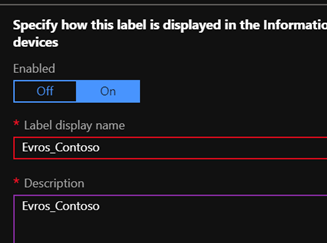
The next part of this blog is a step by step guide on how to set up a custom label that will recommend that the user apply the label, protection.

  1. Login to the Azure Information Protection portal in Azure and create  a new label as per the image below.
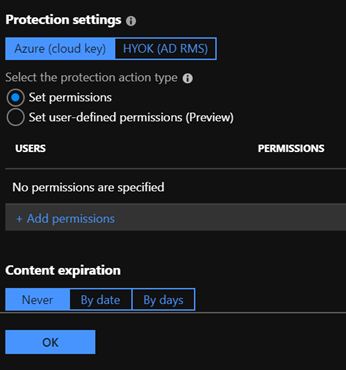
  2. Select Protect and accept defaults and add the users assigned to the label or Security Group, as per image below
  3. Add a keyword condition, as per image below
  4. Select the protect option , accept the defaults and add the users or security group that the label will apply to, as per image below
  5. Save the configuration changes, next we will create a policy.
  6. Create a policy, I always match the name of the label that the policy will apply to, add the users or security group and accept defaults except for one item. Change the selection to recommended as per the image below
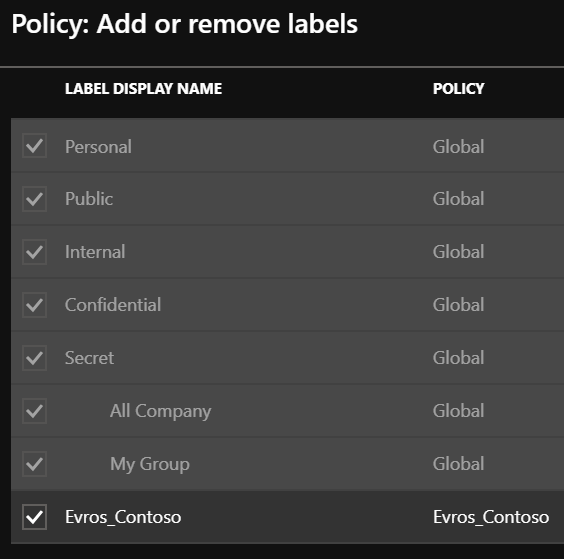
  7. Add the new label created in the previous section and ensure default label remains set to none
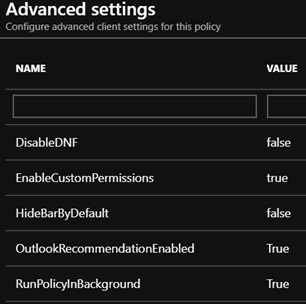
  8. The final piece is to modify the advanced settings of the policy, as per the image below
  9. Use the values specified in the image below
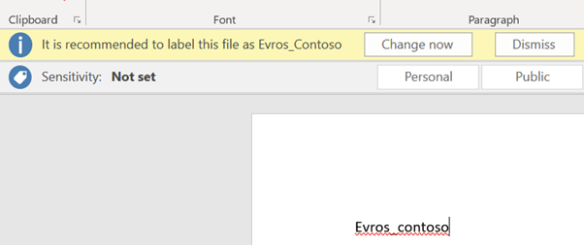
  10. Attempting to save a word document with the keyword specified, prompts the user as follows, giving the user a recommendation and not enforcing protection or classification
  11. When attempting to send an email which the key word specified, a pop up is presented from the AIP client as per the image below.

Notes:

  • The Azure Information Protection custom features,  is currently in PREVIEW
  • Always use the latest version of AIP client
  • If the label is not appearing in the Windows client , It may be due to too many Modern Authentication tokens in credential manager. This is something that happened on my laptop due to connecting to multiple Office365 tenants.
  • I will post some new blogs on more custom options,custom sensitive information types & AIP scanner.
  • When data is protected in the sample label above, Only users that are specified in the label and policy will be able to access the data.
  • Always ensure users that the label and policy applies to have an AIP license.


Microsoft Information Protection

What is Microsoft Information Protection. The Infograph displayed below , Shows all of the different areas covered by Microsoft Information Protection and it really is the fastest evolving suite of technologies in the Microsoft stack.

Microsoft recently announced two new Security SKUs which was a real sigh of relief to tell my customers that they no longer need to buy an Office365 E5 license to get all of these features.

Identity & Threat Protection—This new package brings together security value across Office 365, Windows 10, and EMS in a single offering. It includes best of breed for advanced threat protection services including Microsoft Threat Protection (Azure Advanced Threat Protection (ATP), Windows Defender ATP, and Office 365 ATP including Threat Intelligence), as well as Microsoft Cloud App Security and Azure Active Directory. This offer will be available for $12 per user per month.*

Information Protection & Compliance—This new package combines Office 365 Advanced Compliance and Azure Information Protection. It’s designed to help compliance and IT teams perform ongoing risk assessments across Microsoft Cloud services, automatically protect and govern sensitive data throughout its lifecycle, and efficiently respond to regulatory requests leveraging intelligence. This offer will be available for $10 per user per month.*

Using Azure RMS with Office365