
The container and content classification graphical representation above represents a high-level starting point around formalizing your data classification requirements. Microsoft have created an innovative solutions suite around data protection that is scalable for small, medium and enterprise requirements.
In some Sectors data classification has already been implemented and applied as part of the general operational procedures to support regulatory compliance (i.e., Pharma and Finance).
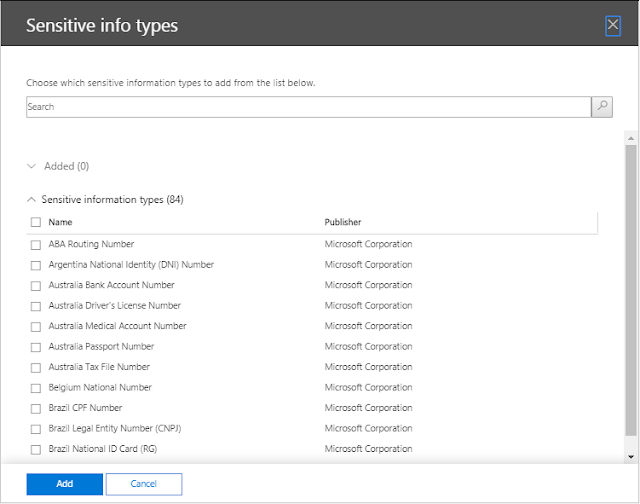
Since data classification has been established, it has been expanded to 204 different sensitive information types as defined by Microsoft in compliance.microsoft.com
Policy creation can be created easily to protect personally identifiable information via DLP (data loss prevention), classification and retention policies by using these sensitive information types that Microsoft provide as part of their Office365 platform.
Regex101.com is a free utility that provides the ability to create regular expressions (regex) and test the regex against input of a sensitive information types.
As an example, to implement – within the Office365 platform, Microsoft only provide three sensitive information types applicable to Ireland:
- Ireland Driver’s License Number
- Ireland Passport Number
- Ireland Personal Public Service (PPS) Number
There is however some more common sensitive information type unique to Ireland as follows:
- Eircode
- Mobile phone number
- Landline phone number
Regex101 also provides a regex library to cater for a particular sensitive information type.
The European Union caused quite considerable anxiety when the GDPR regulation was released during 2018.
The GDPR regulation’s primary purpose is to provide individuals control over their personal data and to simplify the regulatory environment for international business by unifying the regulation within the EU.
Regrettably, this regulation does not protect an organization’s intellectual property.
Use cases listed below could however enable organisations to protect their intellectual property more effectively:
- Food Industry: Using document fingerprinting and if working for Coca Cola or Guinness and an employee attempts to leak the secret recipe. Office365 can prevent this.
- Manufacturing Industry: If a patent or manufacturing process were attempted to be shared outside the organization to that organizations’ competitors, it could cause the source organization to lose market share or cease to exist. If an employee sends an email with 100 mobile phone numbers or 100 land line phone numbers, this could be classed as data exfiltration and the employee is leaking their employers’ customers information to a competitor.
- Technology Industry (Nokia, Ericsson or Huawei): may invent the next Wi-Fi standard and before the company that invents the technology registers the patent for this new technology and the information is leaked to one of their competitors, it could cause billions in lost revenue.
- Legal industry: GDPR in certain scenarios can mandate that data is deleted after 7 years. This can really suit legal organization’s as they are no longer liable if the data has been permanently destroyed via a retention policy.
- Pharmaceutical Industry: The first company that manufactures a permanent vaccine for Covid 19 and all Covid variants that successfully patents the solution would not like their intellectual property falling into the hands of their competitors.
AIP (Azure Information Protection) scanner is generally the initiation point of data classification as it can scan file shares and on-premises SharePoint farms. To prove the benefit of data classification, define some sensitive information types for an organization. Use AIP scanner to integrate with an Azure Log Analytics workspace and then demonstrate to an organization, how much of their critical intellectual property is not protected.
The basic overall implementation approach to enable data classification is as follows:
- Monitor
- Provide Tips
- Protect.
AIP scanner can auto classify data, depending on the organization’s Office365 license plan, but this is all useless unless the organization has begun their data classification journey. Obviously sharing a credit card number is the most common instance of data loss prevention, but what about protecting critical intellectual property for an organization.
Another use case is when an organization has already begun their data classification journey with another vendor like Forcepoint, Symantec or McAffee. If Office365 is in the organization’s roadmap then it is easy to transfer all the custom sensitive information types and regexs’ into Office365. Regex is a universal standard and works across all vendors.
Cyber Attacks are most commonly associated with phishing attacks and most commonly performed by BOTs on the dark web, however in a targeted attack and when the bad actor’s are trying to specify the exact information they are trying to steal from an organization, if this information is classified then there is a very strong chance the bad actors attempt to steal the information will be unsuccessful and the attack will generate alerts and notify the security admins of an organization.
Microsoft have also introduced some new technology: trainable classifiers. Trainable classifiers introduce the power of Azure and AI (artificial intelligence). An organization can choose not to classify their data but let a trainable classifier analyze their data and then report on all the known sensitive information types defined in an organisation’s Office365 tenant.
A Microsoft 365 trainable classifier is a useful tool you can train to recognize various types of content by giving it samples to look at. Once trained, you can use it to identify information for the application of Office sensitivity labels, Communications compliance policies, and retention label policies.
Source: Get started with trainable classifiers – Microsoft 365 Compliance | Microsoft Docs
The security component to complete the overall Microsoft suite was lacking but has been resolved by Microsoft releasing Microsoft Defender for EndPoint. Microsoft Defender for Endpoint integrates seamlessly with MCASB (Microsoft cloud app security broker) and enforces corporate security policies for devices that are not connected to the corporate LAN – which is a likely scenario, during the current Covid-19 Pandemic.