Azure AD Combined security information registration

One of the glaring holes in the SSPR and MFA registration process was when bad actors that had compromised credentials could register for SSPR or MFA if the compromised account had not already registered.

One of my customers highlighted this to me and the way we overcame the vulnerability was to populate Active Directory with mobile numbers and through powershell force the authentication method to text message and not give an end user the choice.

Finally Microsoft have released a feature that can lock down the SSPR an MFA registration process to a corporate ip or ip ranges, the following slides show how we enable this in a conditional access policy.

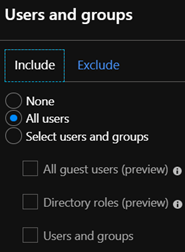
  1. Select all users and exclude the tenant Office365 admin breakglass account.
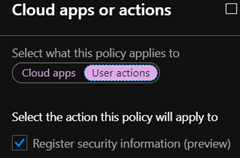
  2. Select cloud apps or actions and select the ‘Register Security information (preview)’ option.
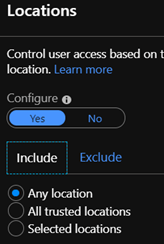
  3. In location select from any location
  4. Exclude all trusted locations
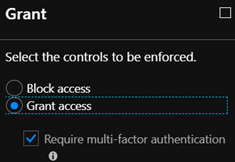
  5. In the controls section , Select ‘Grant Access’ and ‘Require multi-factor authentication.

Reference: https://techcommunity.microsoft.com/t5/Azure-Active-Directory-Identity/Conditional-access-for-the-Azure-AD-combined-MFA-and-password/ba-p/566348

Office365 & Intune White list URL and IP Range

For years I have fought tooth and nail with Security vendors on my enterprise customer sites that will typically have a corporate proxy or silent proxy like Palo Alto by tryng to get them to grant the customer,site or project access to Office365.

Microsoft have made the Office365 endpoints dynamically available as a web link which all enterprise firewall vendors support like Cisco, Juniper, Palo Alto can connect to.

Palo Alto guide HERE

Microsoft site Office 365 URLs and IP address ranges
Dynamic URL for firewalls and proxies 

I have faced on numerous occasions , issues with ip ranges that are outside the published Microsoft ranges. When my customer asked me what is this IP address , I cannot say it is mine and then need Microsoft to verify via a service ticket that they own the ip address.

My recommendation is also to white list the urls and ip ranges listed in this Microsoft article when using Intune. Intune network configuration requirements and bandwidth

Microsoft IP ranges outside the published ip ranges have affected me on customer project sites with Office365 ProPlus activation and Intune managed BitLocker encryption.

Hybrid Azure AD Joined Devices

Anyone familiar with conditional access, will have noticed this access control in Conditional Access policies. So what does it mean , How can I enable this, Is this a good feature.

This is not a good feature, it is an excellent feature. The best way to describe this control requirement is as follows. DO NOT GRANT access unless the machine is DOMAIN JOINED. Many enterprise companies have corporate wifi rolled out and only permit access to the corporate wifi via credentials and a machine certificate issued by the local certificate authority.

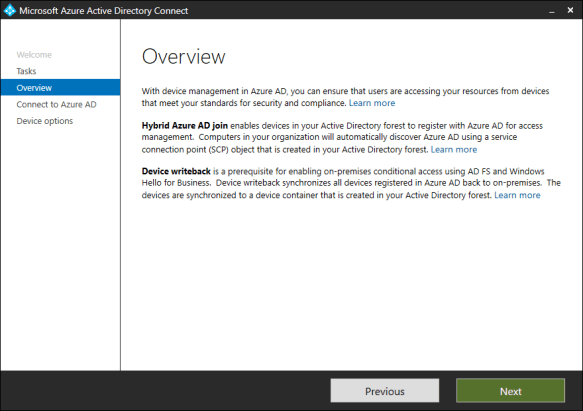
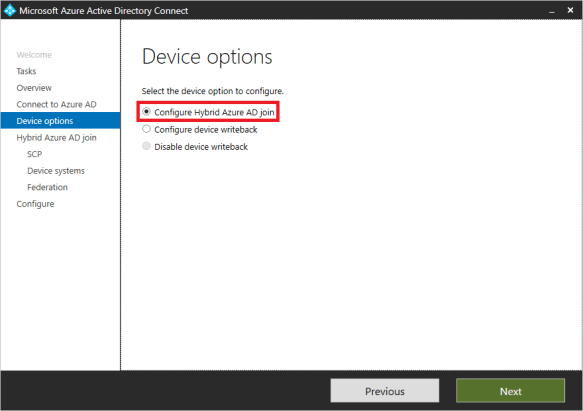
AD Connect keeps getting better and better and Microsoft have made it so easy to enable this feature. The following screenshots ill demonstrate how easy it is to enable this feature.

Modify the configuration of AD Connect and select ‘Configure Device Options’
Enter Azure AD Credentials
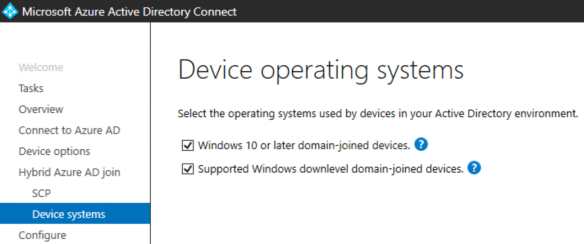
Note: Only select the second option ‘Supported Windows domain level domain-joined devices if you are using Azure Seamless Sign On, Azure Seamless Sign on provides the functionality to support Windows 7 and above operating systems.

Then enter enterprise admin on-premise credentials as per the image below.

Download and run the PowerShell script using on-premise enterprise admin credentials that AD Connect has prepared as per image above.

Next step is to follow this Microsoft Article : To enable auto enrollment of Windows Devices.

Now that we have enabled device auto enrollment into Intune, What are the benefits?

  • Intune Device Management – Intune can manage 5 devices per user license
  • Conditional Access Policy Control : Hybrid Azure AD objects
  • Intune – Bitlocker Management
  • Azure Dynamic Machine groups can be a useful method for managing global or large enterprise organisations.
  • Windows 10 Security Base Lines
  • Intune integration with Windows Defender ATP

These are just a small number of benefits , Open to comments on more benefits.

Update: 24.05.2019

Follow THIS Microsoft guide and block downloading from SharePoint Online on no domain joined devices

eDiscovery for Exchange Online Data at Rest

  • It is not possible to search for sensitive information types when selecting Exchange Online mailboxes as the data source , Office 365 User Voice REQUEST
  • It is possible to search for the items specified in this Microsoft ARTICLE and via KeyWord

The screen shot below is from an Office365 E5 Advanced eDiscovery query that shows these types of searches are not supported

LETS HOPE MICROSOFT RESOLVE THIS ONE!

Office365 & AIP Sensitive Information Types

  • Sensitive Information Types defined in Azure Information Protection are not visible in the Office365 Security Center
  • Sensitive Information Types defined in the Office365 Security and Compliance center are not visible in Azure Information Protection
  • So this means sensitive information types need to be defined in each service.
  • @MSignite2018 Microsoft announced a change in search technology in Exchange Online and Exchange 2019 , they will now use Bing technology. The front end of the Office365 Security and Compliance Center seems to be using SharePoint search technology. I would love Microsoft to enable Exchange Online, AIP, & Sharepoint Online to use the same search technology used in Azure Log Analytics.
  • Microsoft state that when creating custom sensitive information types via an XML file and then importing them into the Security and Compliance center that it is not possible to have multiple regex values. It is possible to combine multiple regex values by using the PIPE value |. When combining multiple regex values , they can be tested in Office365 and in RegEx101.com
  • Using multiple regex values in AIP can also be combined by using the PIPE value |
  • This is an example of a regex for different pattern types for Irish mobile phone numbers that could be used in the Security and Compliance center GUI or the AIP GUI when defining regex sensitive information types.
    08[3|5|6|7|8|9]\d{7}|3538[3|5|6|7|8|9]\d{7}|003538[3|5|6|7|8|9]\d{7},
    notice the | that defines the different type of patterns.