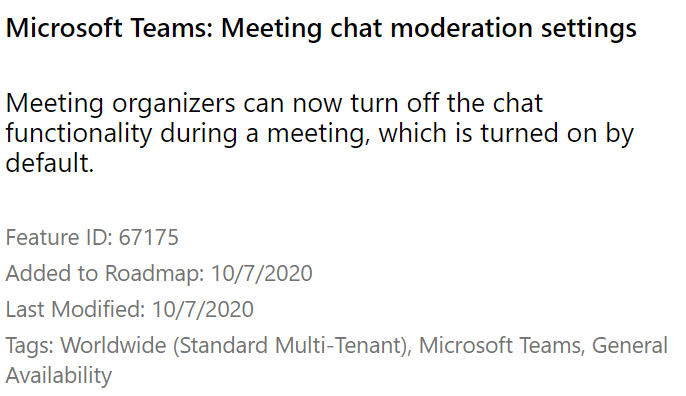
How to delete Teams Chats and Meeting Chat Moderation Settings

A customer recently asked me how can we delete chat history in Microsoft Teams and the answer was really simple. Provided the tenant has the correct Office365 licensing. The solution was to create a retention policy and delete all chat history older than 1 day.

How to delete Teams Chats and Meeting Chat Moderation Settings

https://www.microsoft.com/en-us/microsoft-365/roadmap?filters=&searchterms=67175

Exchange Online to Exchange On-Prem Free \ Busy Not Working

Free busy not working in an Exchange 2016 CU17 Hybrid environment.

When a customer forgets to tell you that they previously configured Exchange Hybrid using the Modern hybrid agent, The modern hybrid agent leaves behind some configuration settings that prevent free-busy working from EOL to EOP.

I always use the classic hybrid wizard for organisations that require long term rich co-existence.

The frustrating this with this issue is that the Exchange Remote Connectivity analyzer tests WORK, which would lead you to believe everything is ok and configured correctly. But when you attempt to query availability requests for a user or resource from OWA or Outlook , the look up fails.

What does the Hybrid Agent leave behind in Exchange Online?

Two values are populated that will prevent free \ busy from EOL to EOP working.

  • OrganizationRelationship -targetsharingepr
  • Intraorgconnector -targetsharingepr

When you query these values , You may see a value like   https://a75aa21a-2f8d-4b2e-85fe-1234.resource.mailboxmigration.his.msappproxy.net/EWS/E
xchange.asmx

To resolve the issue run the following commands

  1. set-intraorgconnector -TargetSharingEpr $null
  2. set-OrganizationRelationship “Name of Org Relationship” -TargetSharingEpr $null

Teams Calendar Integration with on-premise Exchange calendars

One of the pre-requisites for Teams (online) integration with Exchange on-premise calendars is oauth authentication.

Sometimes solution providers just install a single or multiple Exchange 2016 servers to ensure the oauth pre-requisite is delivered. However if the project scenario requires Exchange on-premise mailboxes to be migrated as quickly as possible to  Exchange Online then it may seem overkill to implement Exchange 2016 servers during this transition period.

Exchange 2013 CU24 and above does not complete the oauth authentication part of the Hybrid wizard, however Microsoft do have an article on how to configure OAUTH for Exchange 2013.

Configure OAUTH for Exchange 2013 :
https://docs.microsoft.com/en-us/exchange/configure-oauth-authentication-between-exchange-and-exchange-online-organizations-exchange-2013-help

This solution works perfectly and allows an organization to transition from Exchange 2013 to Exchange Online without the requirement for Exchange 2016 servers and enables Teams to interact with Exchange 2013 on-premise calendars.

Azure AD Conditional Access Policies Best Practices

Every organisation is different and has different requirements. I have been working with conditional access for quite some time and have settled on the following policies for every organisation.

Create a security group that contains users that are permitted to access the organisations cloud services when outside of trusted locations.

Blocked Countries Conditional Access Policy

  • All Users
  • Exclude Break Glass Admin account
  • All Cloud Apps
  • Location : Blocked Countries that have been setup in the named locations section of Azure Conditional Access.
  • Access Control : Block Access

Blocked External Access

  • All users , except Break Glass Admin account and security group that contains users that are permitted access.
  • All Cloud Apps
  • Locations : Any location except trusted locations
  • Access Control : Block Access

Permit External Access 

  • Users : security group that contains users that are permitted access.
  • All Cloud Apps
  • Locations : Any location except trusted locations
  • Client Apps
    Browser
    Mobile apps and desktop clients
    Modern authentication clients
  • Grant Access : Require all of these controls
    Require Multi factor Authentication
    Require Hybrid Azure AD joined device
    Require approved client app
    Terms of Use

Mobile Device Access

  • Users : security group that contains users that are permitted access.
  • Exchange Online
  • Locations : Any location except trusted locations
  • Device Platforms : Android & IOS
  • Client Apps
    Browser
    Mobile apps and desktop clients
    Modern authentication clients
  • Grant Access : Require all of these controls
    Require Multi factor Authentication
    Require device to be marked as compliant (Enrolled in Intune)
    Require approved client app

Why still enable MFA for the mobile device access policy. When the Microsoft Authenticator application is installed on an Android or IOS device. It acts like an SSO broker and can communicate with the modern authentication Microsoft Outlook client.

Block Legacy Protocols

Simply replicate the legacy : Baseline policy: Block legacy authentication (Preview)

Azure Privileged Identity Management to lock down provision of Virtual Machines in Azure

In my previous post on how to secure Office 365 Roles and this post is about how to secure Azure Resources.

Office365 and Azure Active Directory have a number of roles that are familiar like global administrator , compliance administrator etc. One of the most common use cases for Azure PIM it to request just in time access to the global administrator role

As organisations extend their networks into Azure , Azure subscription’s costs can sometimes spiral out of control. And this post will demonstrate the technical steps required to lock down the ‘virtual machine contributor’ role with Azure Privileged Identity Management, so that it requires finance department or senior it approval to create virtual machines in Azure, and the process around making technical admin staff eligible for the ‘virtual machine contributor role’

An example of how Azure costs could spiral , An Azure Admin , provisions the most expensive high performance virtual machine available in Azure, makes the VM geo-redundant, adds in a few ultra disks and a few Terra Bytes of Azure Blob Strage.

If there are multiple Azure subscriptions, The eligible users and app-rovers will need to be configured per subscription.In the image below we want to manage Azure Resources.

We click on Azure Resources and then click on settings.

Add the app-rovers for the role and ensure the app-rovers have mailboxes so that they receive the email notification
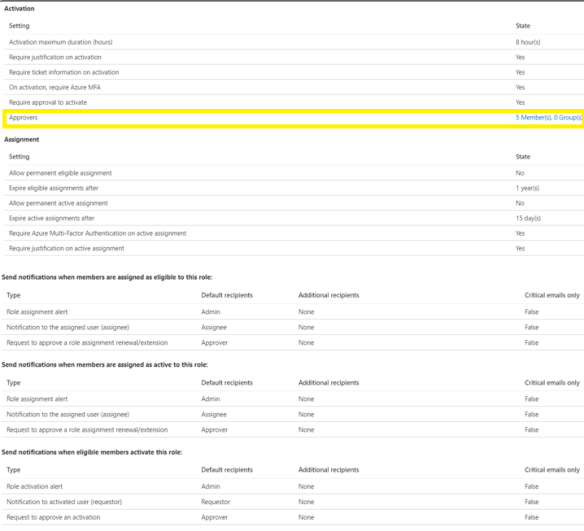
Next step is to add eligible users for the virtual machine contributor role.
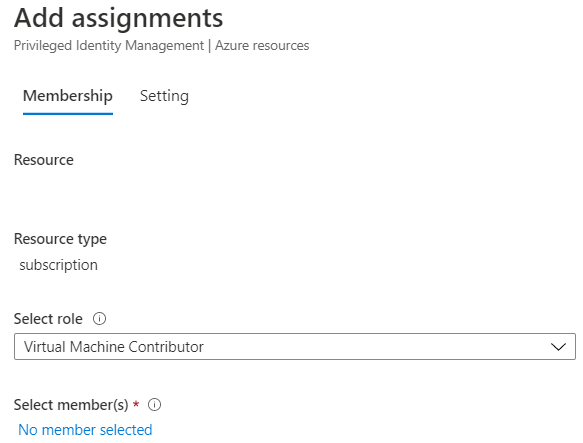
Now any admin that needs to provision a virtual machine in Azure has to follow a workflow and can only do so when senior IT resources or finance department users have approved the provision of the virtual machine