I created this video blog to demonstrate how easy it is to create an eDisovery center in Office365.
Ignite: Compliance and eDiscovery
Ignite Webast : eDiscovery
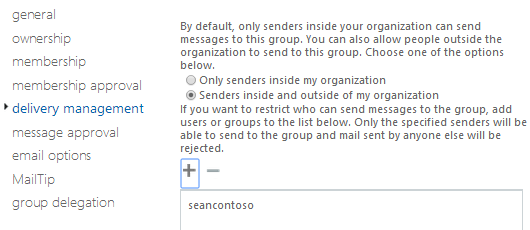
I recently carried out a large migration and my customer had 700 Distribution Groups. My customer asked me to restrict delivery of emails to the groups by members only. So end users could not email the distribution group unless they were a member.
So how do I do this for 700 users!! Powershell to the rescue.
Connect to Exchange Online via Powershell and run this command.

I recently migrated a large Google Apps tenant to Microsoft Office365 (10k + users). Google require a verification code to set up forwarding to a user’s .onmicrosoft.com alias. Which means it is not possible to automate the forwarding from Google Apps to Office365.
So the way we enable co-existence is as follows.
Domain Name : Contoso.com

I have recently began using a product called CloudAnywhere from CloudiWay which has some really excellent features like:

