Migrating Lotus Notes users into an Exchange Hybrid

In this post I just wanted to highlight what active directory attributes need to change on a user account when you have an existing Exchange Hybrid and want to migrate Lotus Domino users into exchange online.

Primary Email Address: Sean@contoso.com
Hybrid email Domain: contoso.mail.microsoft.com

The existing users that have exchange mailboxes will already have exchange active directory attributes. So lets take a look at what happens when you migrate an on premise exchange mailbox to exchange online.

When you run dirsync , a proxy hybrid domain is created in the example above it is contoso.mail.microsoft.com. So when you initiate a ‘new remote move request‘ and move an onprem user to the cloud the user becomes a mail contact and their routing email address becomes


So how do we populate the active directory users that have came into our active directory from Lotus notes with the right attributes so that when they sync with dirsync to exchange online they will have the correct PRIMARY email address and be able to co-exist with the onpremise users.

We use my good friend ADMODIFY to modify some key attributes

So in this example the default email address policy is firstname.secondname@contoso.com

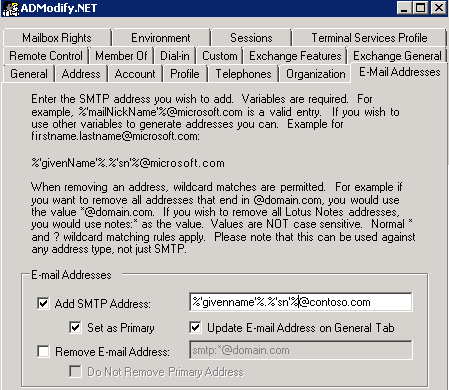
So we connect to our active directory via admodify and select all the users or organisational units we want to modify and add them to the list we then enter ‘%’givenname’%.%’sn’%@contoso.com‘ on  the email address tab


So now that we have modified this attribute the user’s primary email address will be ‘firstname.secondname@contoso.com‘ when synced with dirsync.

We need to make sure the users have the correct UPN and this can be done by viewing one of my previous blogs HERE

We need to modify one more attribute as these users will be in exchange online and will need to co-exist with the exchange on premise users.So as per the image below  we enter the following syntax ‘SMTP:%’givenname’%.%’sn’%@contoso.mail.microsoft.com‘ in the ‘targetAddress‘ attribute.


So the beauty of ADMODIFY is that you can modify thousands of users attributes in a couple of minutes and if something goes wrong it writes the config changes to an xml file. So you can quickly undo the changes you made if there were problems.
SO KEEP THE ADMODIFY CONFIGURATION XML FILES SAFE!

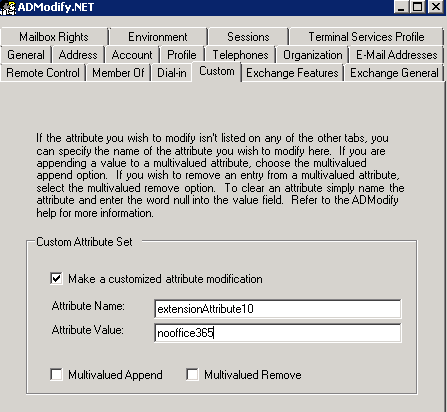
Lets say you don’t want some users to sync to exchange online , you can filter them by what organisational unit gets synced or you can use admodify again to modify a custom attribute by entering ‘nooffice365‘ as per the image below in the ‘extensionAttribute10‘ attribute


Ok so now we have users in exchange online and we have no dirsync error notification emails. How do we mass activate them. Well we run two powershell commands.

  1. We set the user’s location , in this example the country is US
    Get-MsolUser -UnlicensedUsersOnly |Set-MsolUser -UsageLocation US
  2. Get-MsolUser -UnlicensedUsersOnly | Set-MsolUserLicense -AddLicenses “Contoso.com”:EXCHANGESTANDARD
Now we have populated our Active Directory with all the correct attributes that will enable co-existence and mass activated those users via powershell.

So now its over to my choice of software for Lotus Notes migration.

I will post a step by step blog on setting up quest nme next month. This post was to show people how to prep ad and exchange online for mass migration to exchange online where an existing hybrid was in place.

Note:
Quest NME will not populate the GAL as the source directory will be Lotus Notes and target directory Exchange Online.So to populate the gal after you have made all the attribute changes above run this command in the exchange management shell Enable-RemoteMailbox sean@contoso.com -RemoteRoutingAddress sean@contoso.mail.onmicrosoft.com


Exchange Online for Enterprise

Office365 for small businesses is a great fit, it just makes sense. A small business doesn’t have the budget for large amounts of storage and infrastructure refreshes. So for a small monthly fee which can go up or down ,small business can use Office365

I don’t mean to sound like a Microsoft salesman here but recently when I was drawing some Visio diagrams for a customer proposal it dawned on me that it does make sense for enterprise customers and I will explain why.

One of the big stumbling blocks for enterprise customers , is the monthly recurring costs.

For example 2000 users on an Exchange P1 plan would cost €7140.00 per month or €85,680 per annum. So any financial controller looking at this will say no way!!!!!!!!!!!!

However nearly all enterprise customers have Microsoft Enterprise Agreements. I am increasingly surprised at how enterprise customers don’t understand the benefits of an EA. There are many benefits but I am just going to list some relevant to Exchange Online.

  • Microsoft Planning Service Days: Microsoft can help transition to cloud services through and existing EA Agreement.
  • Exchange Core Cal: If you have an Exchange Core Cal , this covers you for an on premise exchange cal and exchange online cal

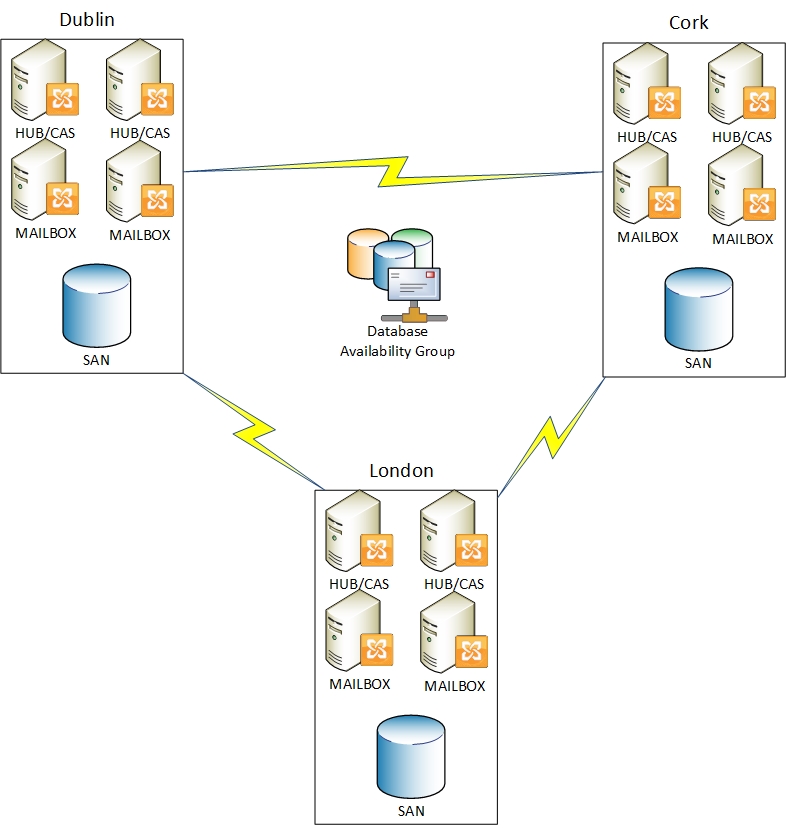
The image below shows a brief example diagram of a 2000 user company in different geographical locations and using on-premise exchange 2010.


So lets look at some of the costs associated with maintaining and running this on=premise solution.

Item  Cost
Wan Links  Possibly 60k per annum for the 3 sites
Storage How much would the storage cost for 25gb * 2000 users cost. Storage refresh after 3 years may cost 300k
Power Consumption Most likely the exchange server will be running on a virtualisation platform. A rough guess for all 3 sites 50k per annum.
Hardware Vendor Support On the Sans and virtualisation hosts , roughly 30k over 3 years
Mail Hygiene Potentially 50k per annum
Hardware Deprecation New hardware becomes old the minute it is delivered to site.
Exchange Admin Staff Cost Possibly 100k per annum
Exchange 2013 How much would it cost to upgrade this entire organisation to Exchange 2013…..
Backup Software  Possibly 10k per annum
Backup Hardware Hardware refresh after 3 years possibly 100k

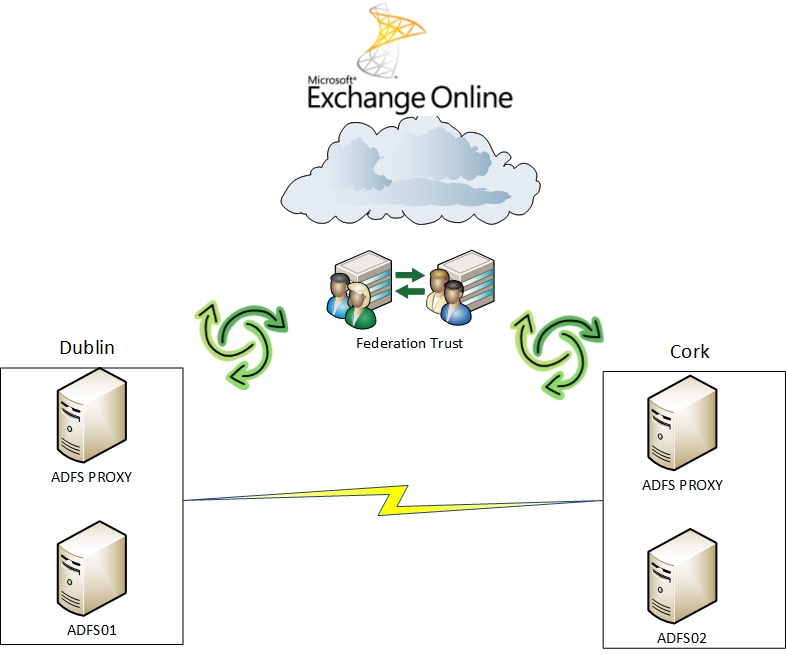
So all of the above cost and infrastructure could become like the image below.

So now it starts to make sense, and enterprise customers are licensed to do this right now and probably don’t even realise it!

Exchange Online Features & Pricing

Exchange 2010 Hybrid Wizard Fails

I have been working on a project recently and setting up an exchange hybrid deployment for 1400 users.I ran into a lot of issues with the wizard and have noticed a lot of people on the web have had some problems as well. So I thought I would post the most common issues and how I resolved them.

This is the default directory for the hybrid wizard log files
C:\Program Files\Microsoft\Exchange Server\V14\Logging\Update-HybridConfiguration

  1. “” isn’t a valid SMTP domain – This is when there is still a self signed certificate that has iis & smtp services applied to it Delete the certificate and ensure iis & smtp are assigned to a trusted certificate and rerun the wizard.
  2. An unexpected result was received from Windows Live. Detailed information: “InvalidUri InvalidUri: Passed URI is not valid.”.

    This is when the federation gateway services have blocked the domain you are trying to federate.Your DNS TXT confirmation record shows up fine when you query it on mxtoolbox.com txt:yourdomain.com. So you need to escalate it with Microsoft and get it white listed. The unfortunate part for me was that the particular domain that wasn’t trusted was the external facing domain on my hybrid server and had the domain name linked to my wild card certificate and because of this the wizard would not complete.

  3. ERROR:Updating hybrid configuration failed with error ‘Subtask Configure execution failed: Creating Organization Relationships.

This is an update which I am posting today 12.12.2012 (great date)

Before you run the hybrid configuration wizard or need to do any of the below , run this command in the exchange management shell

Set-AutodiscoverVirtualDirectory “casservername\Autodiscover (Default Web Site)” -WSSecurityAuthentication $True

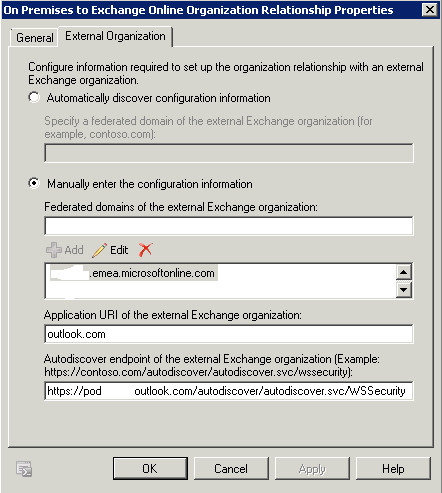
    Now the last error is the most common one which I have seen people having problems with on the web and drove me crazy. So i just manually created the onpremise and online organisation trust.The hybrid wizard even though it fails , still manages to create the “On Premises to Exchange Online Organization Relationship” and it will populate the autodiscover endpoint of your office 365 tenant.

    So now browse to the federation tab on your onpremise organisation and take note of the application URI

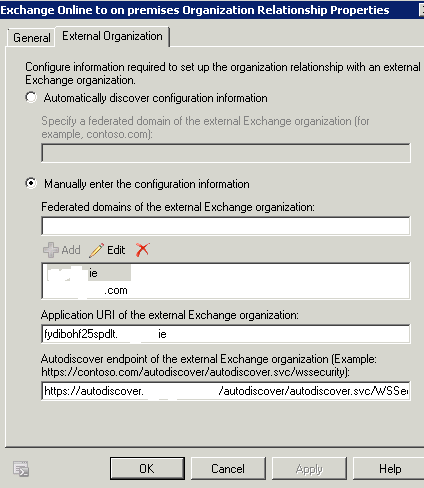
    Now browse to the Online tenant and create a new organisation relationship and call it “Exchange Online to on premises Organization Relationship” Then manually enter the settings as per the image below. Adding in your already federated domains. You can simply add the domain that is blacklisted at a later stage. Enter the application uri that you previously took note of and finally enter https://autodiscover.yourdomain.com/autodiscover/autodiscover.svc/WSSecurity and this will be the domain that can access your hybrid server and the wild card certificate.
    Enable free/busy on both the onprem and online organisation relationship.
    Then add in a send connector and add the default onmicrosoft.com domain. If you were transitioned from bpos to office 365 add in that domain as well.Add in the smart hosts as per the image below and your source servers.

    Then create a receive connector and only allow email from the following ip addresses and ranges. These addresses may change pending on what part of the world you are in.


    Lastly you need to enable the mailbox replication proxy service which you can do so by running this command in the exchange management shell

    Set-WebServicesVirtualDirectory -Identity “EWS (Default Web Site)” -MRSProxyEnabled $true –MRSProxyMaxConnections 100

    This will enable the MRSProxy correctly in SP2. If you have changed the timeout values of the data move then you will again need to go to your web.config file and update the timeout value again. If you are not familiar with this it is the timeout value of the MRSProxy when performing a remote mailbox move. When you are performing bulk migrations of users to Office 365 it is a good idea to increase this so you don’t get failures during overnight data loads if you are using virtual machines for the Mailbox or CAS roles.Open the web.config file located in C:\Program Files\Microsoft\Exchange Server\V14\ClientAccess\exchweb\ewsGo to the bottom of the file and locate the new smaller MRSProxy section and make the change shown:

    So this worked for me , I could see free busy between onprem and an online tenant, and move mailboxes between onprem and office 365 even though the hybrid wizard had been failing.