This series:
Part 1 - SMS and voice MFA is ending: lock down your passkey profiles first
Part 2 - Who is actually ready?
Part 3 - Enforcing the right passkey at sign-in
Part 4 - The people problem (you are here)
In short: Some staff will refuse to install an app on a personal phone, and some do not have a smartphone at all. Until now the answer was a text message. From February 2027 it is not. This part gives an option for every type of user, sample acceptable usage policy wording, and a communication plan, and finishes with a rollout checklist for the whole series.
Parts 1 to 3 covered the technical controls. In my experience, the technology is rarely what delays an authentication change. People are.
Three groups that will push back
- BYOD users who refuse Authenticator. Many organisations run a mix of corporate and personal devices. A BYOD user can reasonably say: “I am not installing a work app on my personal phone - buy me a phone.” Until now, the answer was SMS or voice.
- Users without a smartphone. Some staff do not have one, or have a phone that cannot run current Authenticator. Again, the old answer was SMS or a voice call.
- Shared and frontline workers. Staff who share a device, or have no device at all during a shift.
From 1 February 2027, that old answer is gone. A user whose only method is SMS or voice meets a blocking passkey registration prompt, and there is no opt-out.
The nudge is already running
In the Contoso tenant, the registration campaign was already set to Microsoft managed, targeting Passkey (FIDO2) for All users. By default users can snooze it as many times as they like - so a user who does not want to engage can keep putting it off until the blocking prompt arrives.
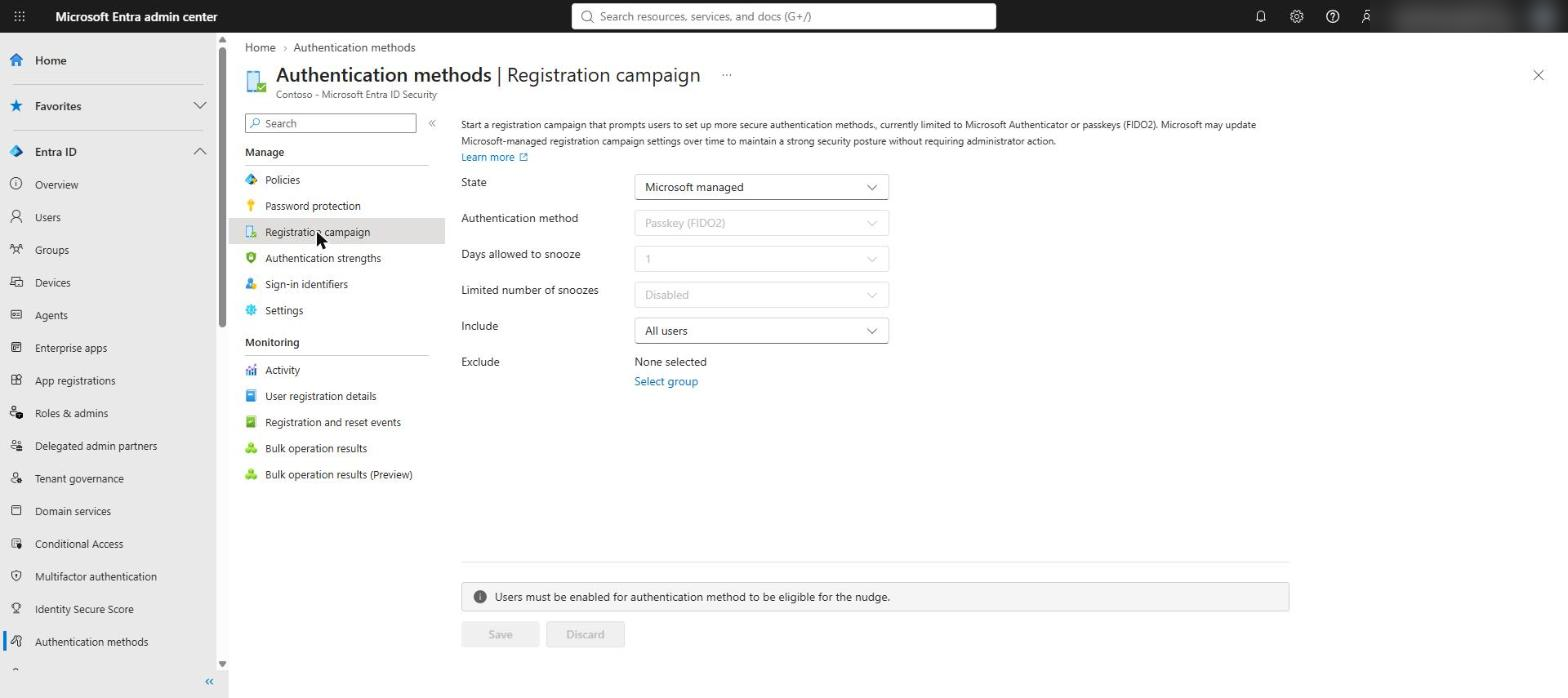
Do not wait for that. Target the SmsVoiceOnly group from Part 2 with communications now, so the first conversation happens on your timeline, not at the login screen.
An option for every user
| User | Option | Passkey profile |
|---|---|---|
| Corporate phone | Microsoft Authenticator passkey | Microsoft Authenticator - All users |
| BYOD, willing | Microsoft Authenticator passkey (in an Intune-managed work profile where possible) | Microsoft Authenticator - All users |
| BYOD refusal or no smartphone | FIDO2 hardware security key issued by the organisation | A third profile for the key model, assigned to a dedicated group |
| Desk-based, single Windows device | Windows Hello for Business | Not a passkey profile - covered by its own method policy |
| Tier 0 | YubiKey 5 NFC from a PAW | YubiKey 5 NFC - Privileged access |
| Onboarding and recovery | Temporary Access Pass to register the long-term method | Not applicable |
A FIDO2 hardware security key turns “buy me a phone” into “here is your key”. It costs a fraction of a handset, needs no app, and is a stronger credential than the SMS code it replaces. Use the same pattern as Part 1: a profile restricted to the key model you issue, assigned to a group such as Contoso-MFA-SecurityKeyUsers.
What about keeping SMS?
Organisations with a documented regulatory or operational need can configure a third-party telephony provider from the Microsoft Security Store. The initial providers were Soprano and Telesign. Microsoft’s own guidance is to use passkeys for every user segment and reserve telephony for documented exceptions - and that is the right default. Paying a third party to keep a phishable method alive should be the exception that needs sign-off, not the easy way out.
Update the acceptable usage policy
The most effective change is often not technical. Update the acceptable usage policy so the position is clear before anyone asks. Two points make it land:
- Access to Contoso’s Microsoft 365 tenant, and other SaaS services that use Entra ID sign-in, requires a phishing-resistant method issued or approved by Contoso.
- The change is driven by Microsoft retiring SMS and voice across the platform. It is outside Contoso’s control, and it is not a policy choice IT can reverse for an individual.
Sample wording:
“Access to Contoso’s Microsoft 365 services and other cloud services that use Contoso sign-in requires a phishing-resistant authentication method: a Microsoft Authenticator passkey on a supported mobile device, or a FIDO2 hardware security key issued by Contoso. SMS text messages and voice calls are no longer accepted, following Microsoft’s retirement of these methods across its platform. Staff who cannot or prefer not to use a mobile device will be issued a FIDO2 hardware security key on request.”
Communicate in three waves
- Awareness - what is changing, when, and why. Make clear it is a Microsoft platform change.
- Action - device-specific instructions: Authenticator on Android, Authenticator on iOS, and how to request a FIDO2 hardware security key.
- Reminder - targeted at whoever is still in the SmsVoiceOnly bucket, with a date.
Microsoft publishes end-user communication templates at aka.ms/mfatemplates as a starting point.
Rollout checklist
The series explains the controls in the order that makes them easiest to understand. In production, roll them out in this order:
| Step | Part | Action |
|---|---|---|
| 1 | 2 | Run the readiness report, load the buckets into groups and re-run weekly |
| 2 | 4 | Update the acceptable usage policy, start communications and issue FIDO2 hardware security keys to those who need them |
| 3 | 1 | Create the Authenticator and YubiKey passkey profiles and assign the YubiKey profile to Tier 0 |
| 4 | 1 | Move All users off the Default passkey profile once the report shows no one would be locked out |
| 5 | 3 | Enforce the YubiKey for Tier 0 with a custom authentication strength and Conditional Access, report-only first |
Done in that order, 1 February 2027 is just another day for Contoso users rather than a wave of blocked sign-ins.
References
- Microsoft Learn - SMS and voice retirement in Microsoft Entra ID
- Microsoft Learn - Choose a telephony provider for SMS and voice authentication
- Microsoft Learn - Registration campaign (nudge) for authentication methods
- Microsoft - MFA end-user communication templates (aka.ms/mfatemplates)


Pingback: Replacing SMS and voice MFA, Part 1: Lock down your passkey profiles first | Cloud-Secure.ai
Pingback: Replacing SMS and voice MFA, Part 3: Enforcing the right passkey at sign-in | Cloud-Secure.ai
Pingback: Replacing SMS and voice MFA, Part 2: Who is actually ready? | Cloud-Secure.ai