
Just in Time Access for M365 Purview Roles

Microsoft’s unwavering commitment to security and compliance has consistently driven innovation and adaptability to meet evolving industry demands. Their dedicated security and compliance portals have left the legacy portal, portal.office.com, in the not too distant past.

One common frustration for M365 administrators is the inability to assign the following roles within Microsoft Privileged Identity Management:

  • Microsoft Purview roles’
  • Microsoft Defender roles’
  • Microsoft Dynamic roles’

    This blog post will primarily delve into the assignment of Microsoft Purview roles. The image below showcases the default role assignment choices available in Microsoft Privileged Identity Management.

Microsoft Purview Roles

Microsoft has invested significantly in their portal redesign at compliance.microsoft.com. In traditional scenarios, IT administrators often find themselves tasked with configuring, executing, exporting e-discovery case results, and subsequently reporting to compliance officers, data protection officers, or HR departments. However, entrusting IT admins with these compliance tasks raises initial concerns about data protection. It’s imperative that IT admins remain unaware of sensitive information contained within e-discovery case results, as these results might encompass IT admin staff within the search criteria.

As of the time of this post, there are approximately 95 role groups within M365 Purview. Here are some practical use cases illustrating how these roles can be assigned to fulfil various compliance roles and organizational requirements:

  • e-discovery
  • Insider Risk Management
  • Privacy Management
  • Data Investigator

How to Assign Microsoft Purview Roles to Microsoft Entra ID Groups

Note: For the purposed of this blogpost, I created a Microsoft CDX tenant, all users and screenshots are fictional.

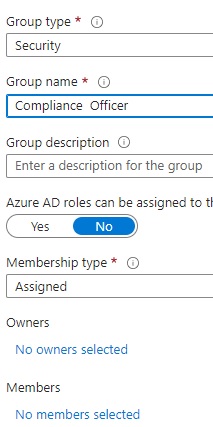
1: Create a Microsoft Entra id group. Important, to not add any members or owners
2: Login to Microsoft Entra Privileged Identity Management and select Groups.
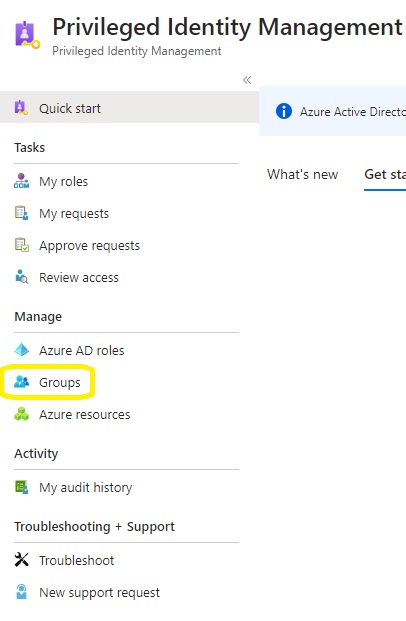
3.Seclect Discover Groups

4.Search for the previously created group and then select manage groups
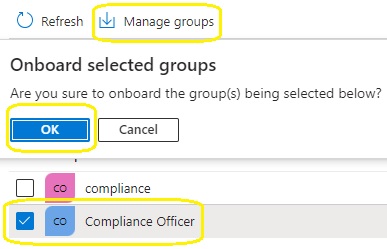
5.Select groups in Privileged Identity Management

6. Click on assignment, add members to eligible assignments, this is why , we did not need to add any group members in step 1

7. Click on settings and member
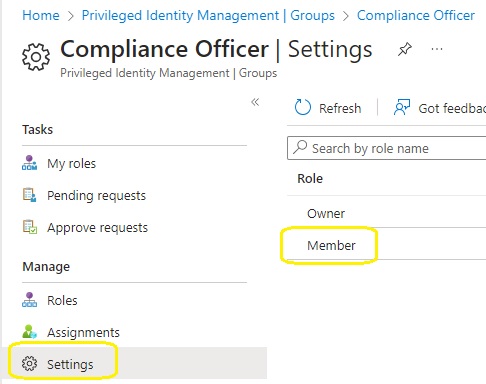
8. Edit the member settings
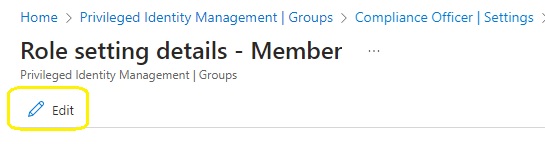
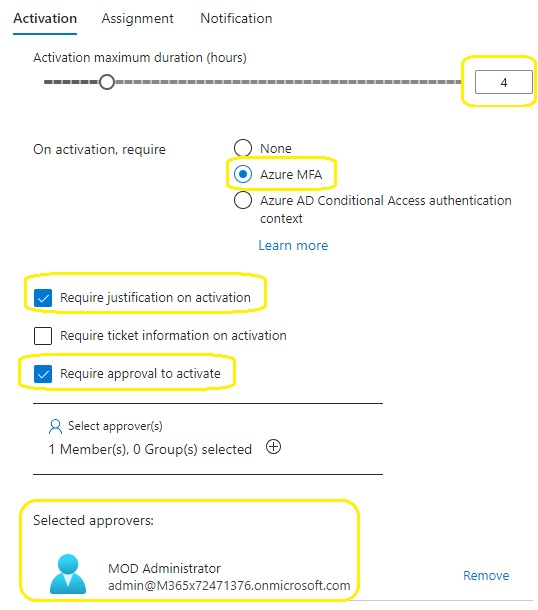
9. Set hours to 4, require justification on activation, require approval to activate and then finally select the approver. The approver may be different per role that requires activation.
10. Create a role group in the compliance.microsoft.com portal : Microsoft Purview Permissions

11. Name the role group

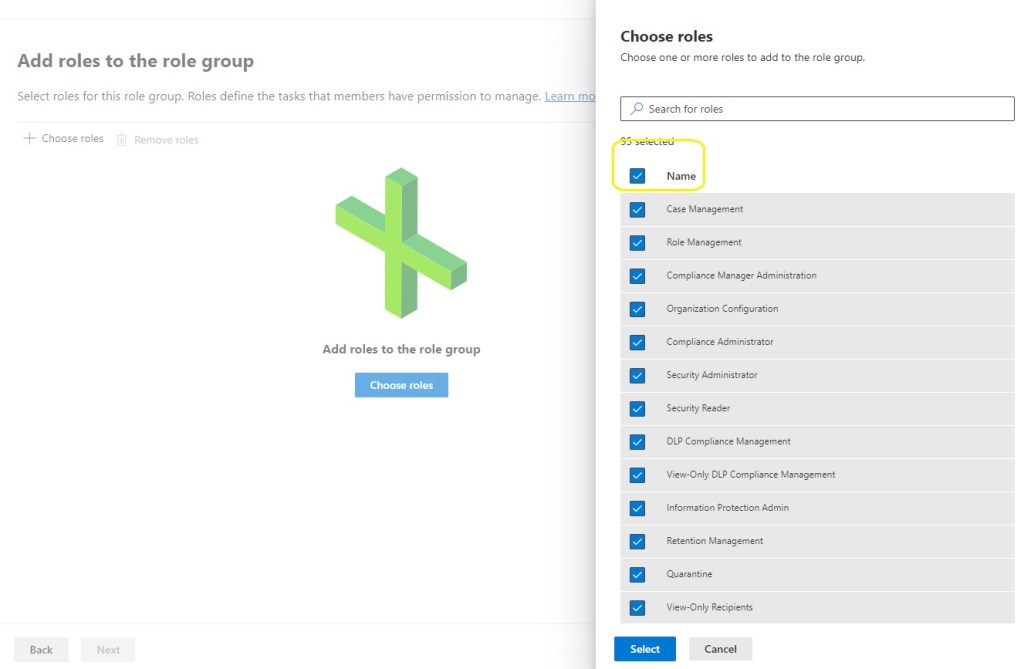
12. Add the roles.

Select all roles
13. Choose groups and add the group that was created previously

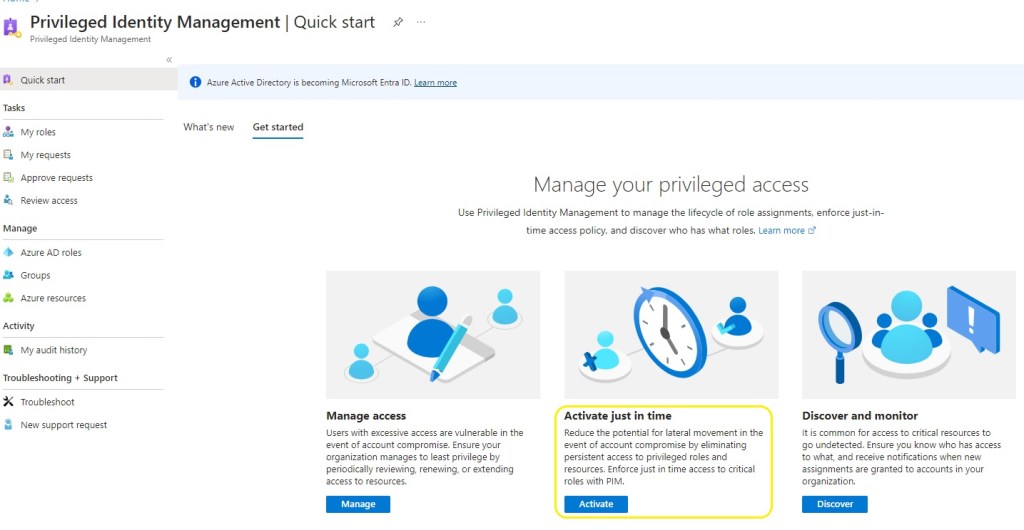
14. Now the end user Adele Vance can login to https://entra.microsoft.com /identity governance / Privileged Identity Management and select ‘Activate just in time’
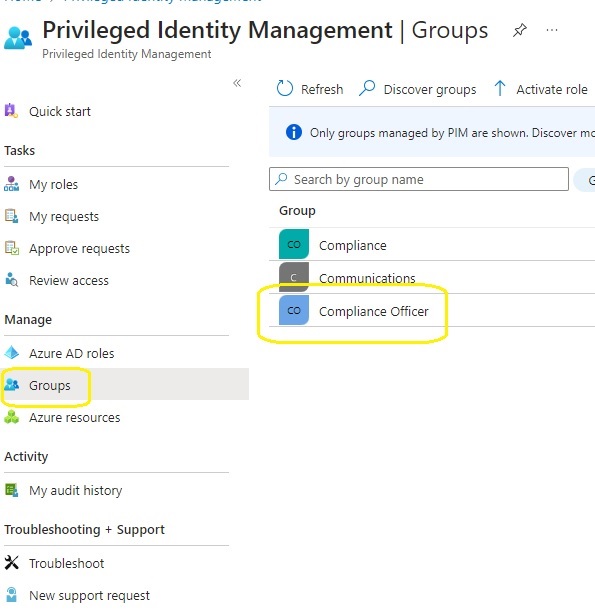
15. The user then selects group, activate and provides a business justification.
16. The group owner and admin , receives an email notification, that there is a pending just in time access request and can choose to approve or deny the request.

17. The compliance officer can then login to complicane.microsoft.com and perform his\her compliance activities. During my testing, no license was required for the compliance officer. I am sure Microsoft would insist that the compliance officer has an M365 E5 or E5 compliance add-on license:)

Summary

The technical steps outlined in this blogpost, enable organisations to apply Privileged Identity Management policies to roles \ permissions control in services like

  • Microsoft Purview roles’
  • Microsoft Defender roles’
  • Microsoft Dynamic roles’

M365 Purview roles are not available in M365 roles or Microsoft Entra ID Privileged Identity Management, for really good reasons. M365 Purview role \ permission elevation , can be typically required for legal disputes.

Every organisation, should consider compliance and governance with a cloud transformation journey where services, data and line of business workflows, transition from on-premises to Microsoft cloud services.

If anyone, or any organisation would like some further assistance with this, please get in touch with me via LinkedIn : https://www.linkedin.com/in/seanofarrelll/

How to protect an organisation against brute force password spray attacks

What is password less authentication?

What is Microsoft’s Password less strategy?

There have recently been an increased amount of brute force password spray attacks against M365 \ Azure AD tenants.

The obvious protection is to implement (MFA) Multi Factor Authentication as the first line of defence.

A complex 8 character password that is not protected with MFA can be cracked in 24 hours or less.

I recently worked on a project where some M365 user accounts were brute force password sprayed attacked over 20,0000 times in a single month.

A lot of organisations make the mistake of having a ‘Meet the Team’ section on their corporate website, including the senior team member’s email addresses, which is one of the first places a bad actor will target.

Bruce force password spray attacks are not performed by human beings, they are performed by bots, hosted on private cloud networks or some public cloud networks……

A simple solution to protect an organisation against brute force password spray attacks is to enable Microsoft password less, gps authentication and biometric authentication via the Microsoft Authenticator application.

Conditional access policies that allow or block countries are not effective as a bad actor can simply mask their IP and pick any country code IP that they choose.

Microsoft password less authentication methods

Microsoft Authenticator
FIDO2-compliant security keys 
Windows Hello for Business
Microsoft password less methods wizard

Microsoft Authenticator password less authentication mechanism
To enable password less and GPS location authentication , please implement and test the following configuration.
1. Browse to Azure Active Directory\ Security \ Authentication Methods
2. Select Microsoft Authenticator

3. Enable and target a test group before enabling the feature for all users

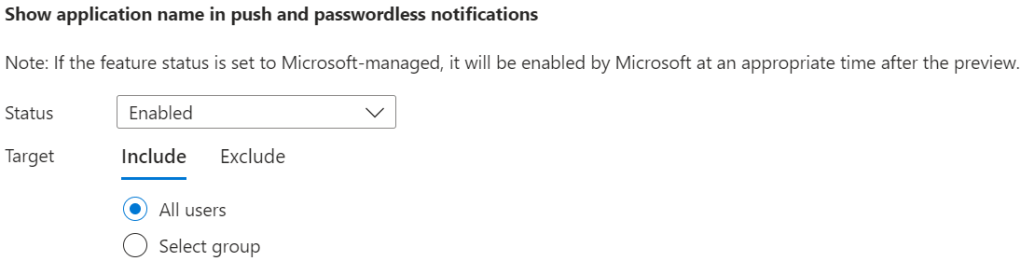
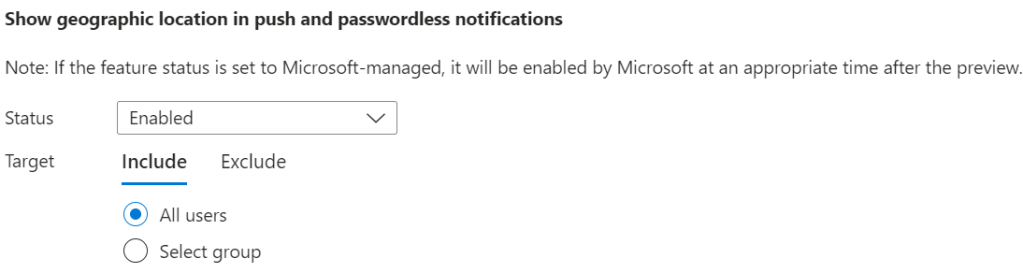
4. Select the following 3 configurations


Microsoft Authenticator Application Configuration

The end user must enable phone sign in on the Microsoft Authenticator application. Currently, this can only be enabled for one password less account on Android, but multiple accounts on iOS.


End User Experience

No password

Click yes if you are in Dublin, no if the GPS notification is displaying an incorrect location. The GPS location, protection mechanism must be communicated to end users. Do not click yes if the GPS co-ordinates specifies Hong Kong, if you are in Dublin

The final step is to validate via biometric thumbprint on your Android or iOS device.

Summary

Brute force password spray attacks cannot succeed when the following authentication methods are in place.

1: Password less
2: GPS verification
3: Biometrics validation on the Microsoft Authenticator application

The end user experience is much more user friendly, and most importantly a lot more secure.

Microsoft Defender for Endpoint Automation with Power Automate

This blog post will focus on the triggers and actions available in the ‘Microsoft Defender ATP API’ and how Power Automate can, automate tasks using this API.

The number 1, recommendation is to use Microsoft Sentinel. In my view SIEM without SOAR is useless.

When can an organisation be truly ready to enable SOAR automation for Windows 10\11 endpoints?

The Microsoft portal security.microsoft.com/Vulnerability Management/recommendations section provides recommendations on all endpoint vulnerabilities.

How does this section of the Microsoft security portal, provide recommendations on devices that have not been enrolled into Microsoft Defender for Endpoint management? This can be controlled via the Microsoft security portal device discovery configurations.

Typically organisations do not transition, straight away to using (MEM) Microsoft Endpoint Manager to provide software update services.

A remediation task in MEM to update a version of Google Chrome or Notepad ++, can only be actioned if, MEM is controlling software updates and if the latest versions of Google Chrome or Notepad ++ are available in the MEM Microsoft Windows application repository for Windows 10\11 devices.

I recommend that an organisation, responds to all security.microsoft.com/Vulnerability Management/recommendations, via their existing software update service prior to transferring update services to MEM. MEM provides excellent automated software update services to Microsoft software products, but can be quite cumbersome when it comes to updating 3rd party software products, like Google Chrome and Notepad ++

Some organisations, make the mistake, and think that enabling (MDFE) Microsoft Defender for Endpoint – auto remediation, will just work and protects endpoints from all threats.

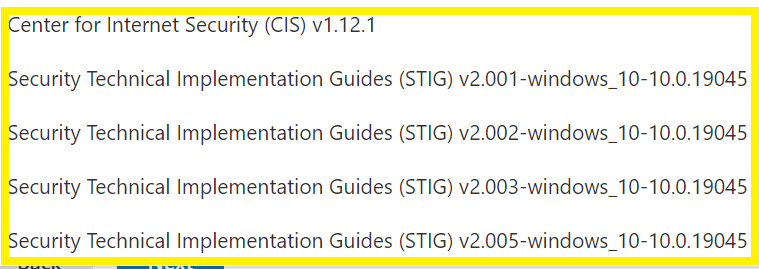
The Microsoft ‘Defender Vulnerability Management add-on license‘, provides the ability to create some of the following, security baseline assessments.


Run these baselines , my preference is the CIS security baseline and improve the security posture of an organisation’s Windows 10\11 devices as much as possible before implementing, Microsoft Defender for Endpoint – Auto Remediation, or Microsoft Defender automation tasks via Power Automate or Microsoft Sentinel.

The Microsoft : security.microsoft.com portal provides a service called ‘Custom detection rules’, however the frequency of ‘custom detection rules’ is ‘every hour’, which is not good enough.

Power Automate – automated protection via the ‘Microsoft Defender ATP API’

Firstly, there are two amazing blog posts that describe the process of using Power Automate on how to auto isolate, Windows 10\11 devices, based on their severity risk level.

Nächster Artikel : extending-mdatp-alerting-sending-text-messages-sms-and-push-notifications
Ammar Hasayen: MS Flow and MS Defender ATP Integration

Microsoft Defender ATP API’ Triggers

‘Microsoft Defender ATP API’ Actions
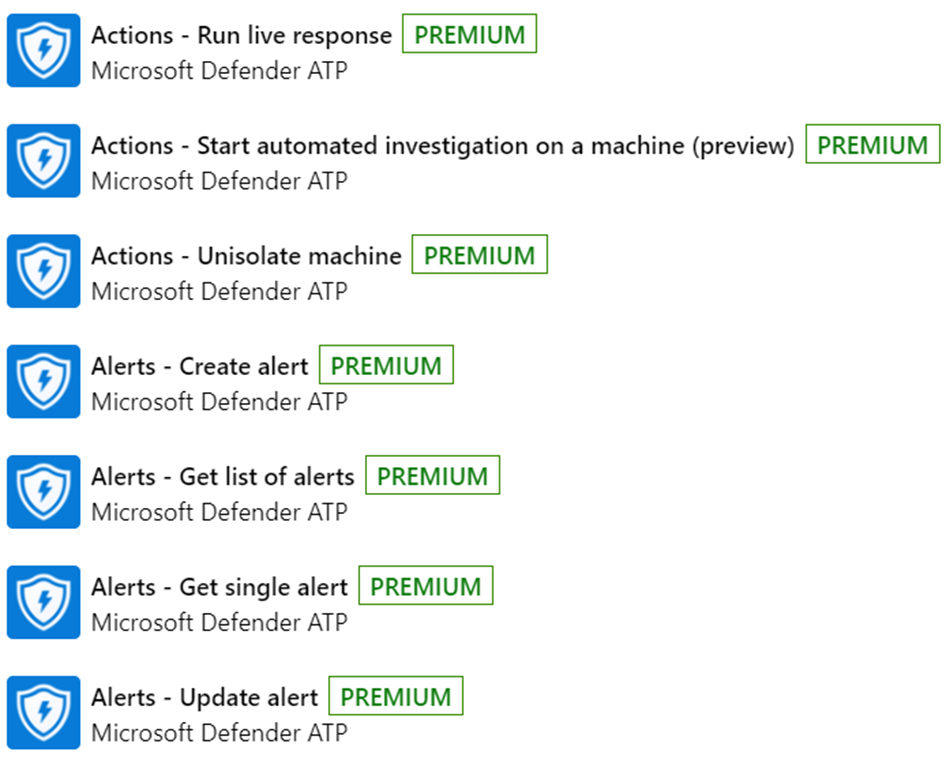
The following actions, clearly illustrate the power of the ‘Microsoft Defender ATP API’, when an organisation has improved their security posture with Windows 10\11 devices. With some Power Automate or Microsoft Sentinel runbooks, these actions can enable an organisation to protect a bespoke line of business work flow on endpoint devices.

Some organisations may say, ‘Why MDFE, cannot, just provide this protection as standard’, and the simple answer is, every organisation’s line of business applications or workflows are different and require, custom, granular control, that the ‘Microsoft Defender ATP API’ can provide via Power Automate but, most preferably : Microsoft Sentinel.

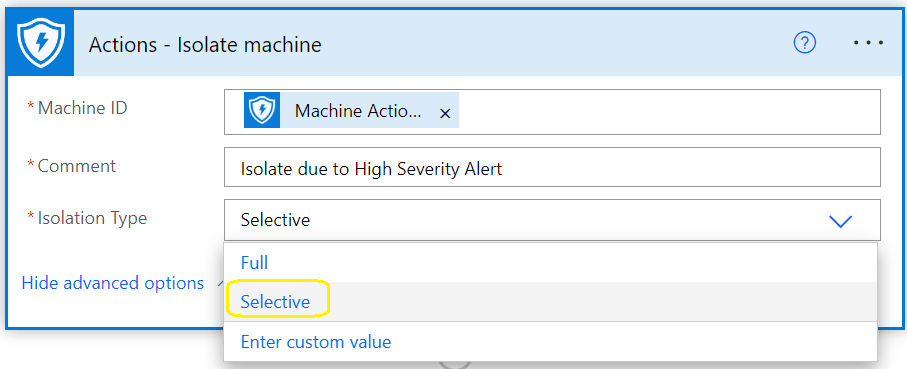
The following images outline the actions that are possible using the ‘Microsoft Defender ATP API’

Microsoft Defender Auto Isolation new Feature
It is now possible to ‘isolate’ devices but continue to allow end users to use ‘Microsoft Outlook and Teams’

This feature, ensures that end users can continue to remain productive in their daily work routines when using Windows 10\11 devices, yet be isolated from their corporate network, probably the best use case, is to prevent the spread of ransomware or Mimikatz credential theft.

How is this Auto Isolation feature to allow users to continue using ‘Microsoft Outlook and Teams’ controlled in the ‘Microsoft Defender ATP API’


Azure Dynamic Groups for all Microsoft Defender for Endpoint Licensed Users

I always find using Microsoft Azure Active Directory dynamic groups much easier to use when assigning policies, for example Defender for Endpoint onboarding policies via Intune.

Microsoft Defender for Endpoint included with M365 licensed user rule syntax

user.assignedPlans -any (assignedPlan.servicePlanId -eq “871d91ec-ec1a-452b-a83f-bd76c7d770ef” -and assignedPlan.capabilityStatus -eq “Enabled”)

Microsoft Defender for Endpoint plan 1 licensed user rule syntax

user.assignedPlans -any (assignedPlan.servicePlanId -eq “292cc034-7b7c-4950-aaf5-943befd3f1d4” -and assignedPlan.capabilityStatus -eq “Enabled”)

Microsoft Defender for Endpoint DLP

user.assignedPlans -any (assignedPlan.servicePlanId -eq “64bfac92-2b17-4482-b5e5-a0304429de3e” -and assignedPlan.capabilityStatus -eq “Enabled”)

Microsoft Defender for Vulnerability Management add-on

user.assignedPlans -any (assignedPlan.servicePlanId -eq “36810a13-b903-490a-aa45-afbeb7540832” -and assignedPlan.capabilityStatus -eq “Enabled”)


Data Classification via Microsoft Technologies

Data Classification : Where to start?

I have created Blog Posts about this in the past, but Microsoft continue to innovate and develop new technologies that can simplify an organisation’s data classification journey.

GDPR
The European Union introduced a new regulation called GDPR in 2016. There is a new

Wikipedia: https://en.wikipedia.org/wiki/General_Data_Protection_Regulation
Regulation on the protection of natural persons with regard to the processing of personal data and on the free movement of such data, and repealing Directive 95/46/EC (Data Protection Directive).

The European Union’s GDPR regulation was a big step in forcing organisations to consider implementing and controlling personally identifiable information.

In Ireland some of the core unequally identifiable attributes could be as follows.
-PPS – Personal Public Service Number
-Driving License
-Passport
-Mobile Phone Number
-Date of Birth

The unequally identifiable attributes mentioned above are directly related to individuals.

When it comes to an organisation’s intellectual property, how is this their data protected. It could be for example.

-Milk – The ingredients and process of manufacturing and distributing milk
-Bread – The ingredients and process of manufacturing and distributing bread
-Beer – The ingredients and process of manufacturing and distributing beer

Data Classification and protection is such a critical requirement for any organisation, and most organisations find it difficult, on where to begin their data classification journey. Not knowing where to begin a data classification journey can often pause or completely halt an organisation’s data classification journey. Microsoft have developed multiple solutions to try and speed up and enhance an organisation’s data classification journey.

A lot of organisations are not aware of the amount of compliance technologies, machine learning, and artificial intelligence that Microsoft Purview can provide, and organisations are typically licensed for these services and not using them.

The way forward: DORA sets a benchmark

DORA is expected to be published in the Official Journal of the European Union by the end of 2022 after final adoption by the European Parliament and other procedural steps are completed. Following the publication, there will be a 24-month implementation period before the rules enter into force, therefore, the rules under DORA will apply as of late 2024 at the earliest—thus allowing Microsoft and financial institutions to ensure compliance with the new rules ahead of that time. During the implementation period, the Regulatory Technical Standards (RTSs) will also be under development to facilitate DORA’s implementation. The RTSs are expected to be completed ahead of DORA application.

The key requirements under DORA cover the following: ICT risk management, ICT-related incident reporting, digital operational resilience testing, and oversight of critical ICT providers. The legislative framework will also require compliance by critical ICT third-party service providers.

At Microsoft, we support our financial services customers and will continue doing so under DORA implementation—specifically, but not limited to the following key areas:

  • ICT risk management: DORA establishes a comprehensive management mechanism of ICT risks with which financial entities would be required to comply—including the identification, protection and prevention, detection, response, and recovery of such risks in scope. Microsoft already provides a broad set of built-in ICT risk management capabilities in our services today. This includes, by way of example: Microsoft Defender for CloudMicrosoft 365 Service Health Dashboard, and Microsoft Secure Score.
  • ICT-related incident reporting: DORA will harmonize the classification of incidents while streamlining the reporting processes to develop a more systematic approach to monitor, control, and follow-up on such incidents. DORA foresees a coordinated approach to ICT incident reporting and tackling reporting overlaps such as the NIS2 Directive. Microsoft provides such capabilities, such as with Microsoft Defender
  • Digital operational resilience testing: DORA introduces digital operational tests that should be conducted on critical ICT systems and applications on an annual to triennial basis (regarding advanced threat-led penetration testing). This new testing approach will bolster the testing capabilities of financial entities—fostering timely recovery and business continuity. Microsoft already enables customers to do so through our penetration program. Learn more about the Microsoft Cloud Penetration Testing Rules of Engagement program.
  • Oversight of critical ICT providers: DORA foresees a communication mechanism between financial regulators and ICT critical service providers for the management of ICT third-party risks. Microsoft already partners closely with its customers and has ongoing and rich engagement with regulators—including audit and regulatory examinations. We think such processes should include inter-agency cooperation amongst other regulators not limited to Europe. For example, alignment and communication among the Bank of England and the United States Regulators (FDIC, OCC, Federal Reserve), would be helpful from a regulatory oversight perspective, drive synergies, avoid fragmentation, and maintain a level of clarity and communication that would benefit regulators and Microsoft alike.

    Legacy on-premises data classification

Typical vendors like Broadcom (formally Symantec), Forcepoint (formally WebSense), McAffee, did a really good job of analysing on-premises data stores like ; file shares, sql databases, exchange servers. But these vendors were unable to bridge the gap between on-premises workloads and cloud workloads, most organisations work in a hybrid environment and host data between on-premises infrastructure and private or public cloud services.

Microsoft Windows Information Protection (WIP), previously known as enterprise data protection (EDP). Was a service that Microsoft introduced to provide data loss prevention services on Windows 10\11 devices. This service was quite difficult to configure and provide meaningful insights and recommendations to organisations. Microsoft then deprecated Windows Information Protection in July 2022.

What is the point or how effective is data protection without data classicisation?

Modern data classification

https://www.microsoft.com/en-ie/security/business/microsoft-purview

Microsoft have bridged the gap between on-premises and cloud workloads with technologies that help organisations define their unique sensitive information using technologies like:
-Advanced e-Discovery
-Data Map and Data Catalog
-Auto-classification
-Microsoft Purview Insider Risk Management policies
-Microsoft Purview Insider Risk Management
-Microsoft Defender for Cloud Apps
-Microsoft Purview document fingerprinting

Microsoft Classifiers
A Microsoft Purview trainable classifier is a tool you can train to recognize various types of content by giving it samples to look at. Once trained, you can use it to identify item for application of Office sensitivity labels, Communications compliance policies, and retention label policies.

Creating a custom trainable classifier first involves giving it samples that are human picked and positively match the category. Then, after it has processed those, you test the classifiers ability to predict by giving it a mix of positive and negative samples. This article shows you how to create and train a custom classifier and how to improve the performance of custom trainable classifiers and pre-trained classifiers over their lifetime through retraining

Microsoft currently have 59 trainable classifiers such as
– Wire Transfer
– Profanity
– Money Laundering

Custom classifiers can also be created for an organisation’s bespoke requirements.

Microsoft Endpoint Data Loss Prevention

Microsoft Windows Information Protection was a terrible service and it did not take long for Microsoft to retire the service.

Microsoft finally got it right, Microsoft Endpoint Data loss prevention is a superb service.

Ref: https://learn.microsoft.com/en-us/microsoft-365/compliance/endpoint-dlp-learn-about?view=o365-worldwide

Microsoft Defender for Endpoint Windows 10/11 Roll Out Strategy Part 2

When implementing Attack Surface reduction policies. The following configurations should be set in audit mode to allow you to compile an inventory of Microsoft Word, Excel , Outlook etc, add – in child processes.

If you simply block all the of the options illustrated below, then can possibly block Microsoft Office add-ins.

A good way to analyse Microsoft Office add-ins, is to review endpoint analytics in the Microsoft Intune portal.

Start with audit mode, compile an inventory of what Microsoft add – ins, create child processes, analyse the audit mode for the three controls illustrated below via KQL queries and finally a risk assessment on all Microsoft Office add-ins, only then can you whitelist line of business Microsoft add-ins that have passed a risk assessment.

Microsoft Defender for Endpoint Windows 10\11 Roll Out Strategy Part 1

Microsoft Defender for Endpoint is a next generation XDR solution

Some of the items that really What sets Microsoft’s next generation XDR solution for endpoints ahead of alternative vendor XDR solutions are listed below.

  • 5 device licenses per user , Windows, Android, iOS, Linux, macOS
  • Defender to Endpoint integration with Defender for 365
  • Defender for Endpoint integration with Defender for Cloud Apps
  • Defender for Endpoint Web Filtering
  • Defender for Endpoint Vulnerability – Inventories , Recommendations, Weakness Reports, Event Time Lines
  • Advanced Hunting
  • Custom Detection Rules
  • Azure Sentinel integration
  • Protect internet facing devices
  • Intune integration
  • Automated investigation and remediation
  • Auto Isolation of devices that are classified as a high severity risk via Power Automate or Logic Apps
  • Power Automate approval workflow for isolation of medium severity risk devices
  • Cloud Security Analytics
  • Consult Threat experts
  • Initiate Live Response Session
  • Collect investigation package
  • Run antivirus scan
  • Restrict app execution
  • Isolate device
  • Contain device

    The Microsoft Security portal can provide advanced hunting KQL queries to assess the impact on an organisation’s newly configured security policies, prior to implementation.

An organisation should always improve the Microsoft Defender Vulnerability Management dashboard : exposure score, before choosing the auto remediation policy methods.

If there is an existing endpoint detection response solution, configure Microsoft Defender for Endpoint in EDR mode, to demonstrate all the vulnerabilities that the primary endpoint detection response solution does not report or remediate.

The next step will be to configure the automation remediation level to ‘Semi – require approval for core folders’, until Microsoft Defender for Endpoint, machine learning and cloud intelligence has, provided an organisation will all security and remediation metrics. Then ‘Full – remediate threats automatically’ can be enabled, and integrated with Microsoft Sentinel. SIEM without SOAR is useless.

Simply enabling ‘Full – remediate threats automatically’, may cause problems with certain applications. Every organisation is different and has different line of business applications.

In previous times, email, black and white lists were always implemented, the same way end point detection and response solutions, processes or folders were excluded from protection.

It is now recommended to configure as few exclusions as possible, with the advances in technologies like machine learning and AI. Machine learning and AI, can identify vulnerabilities that are unique to an organisation. The Microsoft Security Center processes more IT transactions daily and globally than any other security vendor in the world, and will most likely provide protection against zero day vulnerabilities than any other global security vendor.

No security vendor can claim to provide protection against a zero day vulnerability, however Microsoft Defender for Endpoint can dynamically provide protection, when analysing malicious behaviour via multiple methods like heuristic behaviour and are not dependent on security vulnerability signatures that have already been defined.

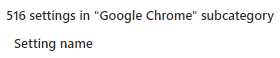
At the time of writing this blog, Microsoft Intune can provide the following amount of Microsoft Edge and Google Chrome configuration and control options.

#### Microsoft Edge

#### Google Chrome

Exchange 2016 – 2019 Federation Fails with Exchange Online

When attempting to federate a domain hosted in Exchange on premises with Exchange Online. The error message displayed below appears.

To resolve this issue TLS 1.2 needs to be enabled on the Exchange Hybrid servers.

ALI TAJRAN has a excellent ARTICLE and script to enable TLS 1.2 on Exchange servers. Once this script has run on the Exchange Hybrid servers, the wizard to add a federated domain will complete successfully.

Note: TLS 1.3 is not supported on Exchange on premises yet.

Microsoft Azure AD password protection Service vs Passwordless Authentication

When the Azure Active Directory Premium password protection service was first released, it was well received.

There a few issues with the Azure AD Premium ‘Password Protection’ service.

1: An enterprise customer will block internet access on all domain controllers
2: If using the Azure AD Premium ‘Password Protection’ service, it requires an agent installed on all domain controllers, this agent will then, communicate with a proxy agent to establish access to Azure AD. For example , ‘agent on dc’s’ communicates to agent on ‘AD Connect server’
3: Microsoft Defender for Identity domain controller agent, cannot co-exist with the Azure AD Premium ‘Password Protection’ service agent, on the same domain controller
4: Microsoft Defender for Identity service will significantly improve an organisation’s security posture in comparison to the Azure AD Premium ‘Password Protection’ service
5: A much easier and secure method of Identity Management, is to enable the Microsoft Active Directory Premium and Microsoft Authenticator services to use: Passwordless authentication.

Passwordless can protect against

BruteForce Attacks
Password Spray Attacks.

Enabling passwordless , can also help organisations, to get one step further in their Zero Trust journey

Securing M365 mail routing : SCENARIO 3

When an organisation has completely transitioned and migrated to Exchange Online and directed their MX record to contoso-com.mail.protection.outlook.com. The organisation should in line with best practices, have Microsoft Defender for Office365 Plan 2 securely configured.

Scenario 3, this my proffered choice. All Contoso *.onmicrosoft.com aliases can be blocked as they are no longer required. When Contoso’s mx record has been directed at Exchange Online protection. Exchange Online Protection & Microsoft Defender for 365 will protect all aliases. It may not even be necessary to block all Contoso *.onmicrosoft.com aliases.

It is possible to create an email address policy for Office365 groups that only use’s @contoso.com primary email addresses, which can still allow mail flow to Team’s channels. Then the usual protection of contoso.com comes into play, SPF, DKIM and finally DMARC.