When implementing Attack Surface reduction policies. The following configurations should be set in audit mode to allow you to compile an inventory of Microsoft Word, Excel , Outlook etc, add – in child processes.
If you simply block all the of the options illustrated below, then can possibly block Microsoft Office add-ins.
A good way to analyse Microsoft Office add-ins, is to review endpoint analytics in the Microsoft Intune portal.
Start with audit mode, compile an inventory of what Microsoft add – ins, create child processes, analyse the audit mode for the three controls illustrated below via KQL queries and finally a risk assessment on all Microsoft Office add-ins, only then can you whitelist line of business Microsoft add-ins that have passed a risk assessment.
Microsoft Defender for Endpoint is a next generation XDR solution
Some of the items that really What sets Microsoft’s next generation XDR solution for endpoints ahead of alternative vendor XDR solutions are listed below.
5 device licenses per user , Windows, Android, iOS, Linux, macOS
Defender to Endpoint integration with Defender for 365
Defender for Endpoint integration with Defender for Cloud Apps
Defender for Endpoint Web Filtering
Defender for Endpoint Vulnerability – Inventories , Recommendations, Weakness Reports, Event Time Lines
Advanced Hunting
Custom Detection Rules
Azure Sentinel integration
Protect internet facing devices
Intune integration
Automated investigation and remediation
Auto Isolation of devices that are classified as a high severity risk via Power Automate or Logic Apps
Power Automate approval workflow for isolation of medium severity risk devices
Cloud Security Analytics
Consult Threat experts
Initiate Live Response Session
Collect investigation package
Run antivirus scan
Restrict app execution
Isolate device
Contain device
The Microsoft Security portal can provide advanced hunting KQL queries to assess the impact on an organisation’s newly configured security policies, prior to implementation.
An organisation should always improve the Microsoft Defender Vulnerability Management dashboard : exposure score, before choosing the auto remediation policy methods.
If there is an existing endpoint detection response solution, configure Microsoft Defender for Endpoint in EDR mode, to demonstrate all the vulnerabilities that the primary endpoint detection response solution does not report or remediate.
The next step will be to configure the automation remediation level to ‘Semi – require approval for core folders’, until Microsoft Defender for Endpoint, machine learning and cloud intelligence has, provided an organisation will all security and remediation metrics. Then ‘Full – remediate threats automatically’ can be enabled, and integrated with Microsoft Sentinel. SIEM without SOAR is useless.
Simply enabling ‘Full – remediate threats automatically’, may cause problems with certain applications. Every organisation is different and has different line of business applications.
In previous times, email, black and white lists were always implemented, the same way end point detection and response solutions, processes or folders were excluded from protection.
It is now recommended to configure as few exclusions as possible, with the advances in technologies like machine learning and AI. Machine learning and AI, can identify vulnerabilities that are unique to an organisation. The Microsoft Security Center processes more IT transactions daily and globally than any other security vendor in the world, and will most likely provide protection against zero day vulnerabilities than any other global security vendor.
No security vendor can claim to provide protection against a zero day vulnerability, however Microsoft Defender for Endpoint can dynamically provide protection, when analysing malicious behaviour via multiple methods like heuristic behaviour and are not dependent on security vulnerability signatures that have already been defined.
At the time of writing this blog, Microsoft Intune can provide the following amount of Microsoft Edge and Google Chrome configuration and control options.
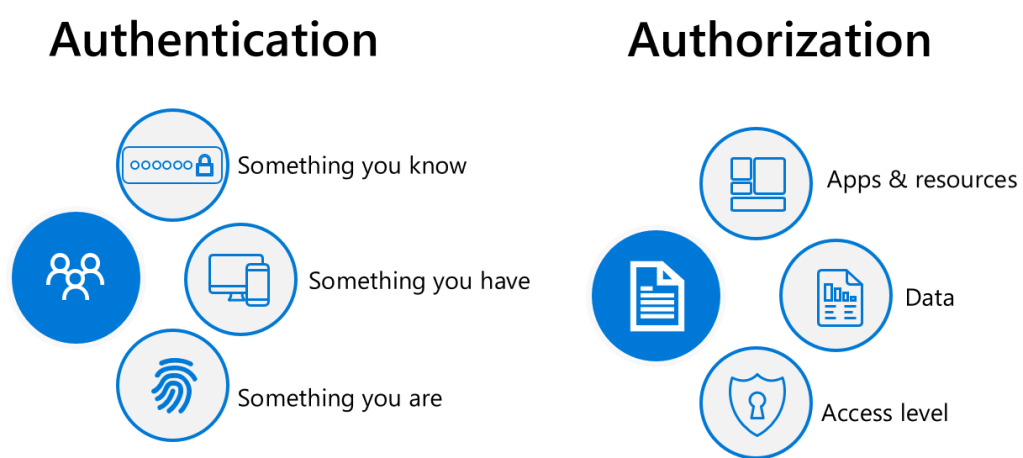
The image above is a high level overview of all identity protection methods regardless of vendor and especially when it comes to implementing Zero Trust. A lot of organisations do not really know what Zero Trust is, or how to begin their Zero Trust journey.
Zero Trust is a bit like Data Classification, it becomes an operational task that will never end. It is not implemented as a project but more as an operational procedure, that constantly evolves as threats and data protection requirements evolve. I have not yet seen a Zero Trust request from an organisation yet that are exactly the same. Zero Trust strategies can often be similar per industry like , legal, pharma, manufacturing and food industry etc..
The purpose of this blog post is to show how Azure Identity Protection and Microsoft Defender for Identity protection work together and can improve any organisation’s security posture as Identity is the new security plane and the days of protecting identity behind edge perimeter firewalls are no longer relevant.
Not all organisations’ (like SMB) can afford Microsoft Azure Identity Protection. I normally advise SMB organisations to procure Azure AD Premium plan 2 licenses to protect any privileged accounts.
For enterprise organisations that are licensed for Azure Identity protection, my preference for implementing the Azure Identity Protection controls, is via Conditional Access. This provides additional insights when placing the policies in report mode only and then reviewing the reports in Conditional Access – Insights and Reporting.
Azure Active Directory Topology
The image above illustrates Azure ADDS (Active Directory Domain Services) and Azure AD. So, think of Azure Identity Protection, as a service protecting identity at the cloud level or like the traditional perimeter edge firewall for ADDS. Microsoft Defender for Identity, protects on-premise identities.
Microsoft Azure Identity Protection
Identity Protection is a tool that allows organizations to accomplish three key tasks:
Identity Protection uses the learnings Microsoft has acquired from their position in organizations with Azure AD, the consumer space with Microsoft Accounts, and in gaming with Xbox to protect your users. Microsoft analyses 6.5 trillion signals per day to identify and protect customers from threats
Microsoft Defender for Identity
Microsoft Defender for Identity monitors domain controllers by capturing and parsing network traffic and leveraging Windows events directly from domain controllers, then analyses the data for attacks and threats. Utilizing profiling, deterministic detection, machine learning, and behavioural algorithms Defender for Identity learns about your network, enables detection of anomalies, and warns you of suspicious activities.
Microsoft Defender for Identity provides alerts to suspicious lateral movements in an on-premise network with ADDS identities. The alerts are great but can only be actioned as soon as a Security staff member can respond to the alerts.
The two automated responses that Microsoft for Identity can perform are:
Disable user – this will temporarily prevent a user from logging in to the network. This can help prevent compromised users from moving laterally and attempting to exfiltrate data or further compromise the network.
Reset user password – this will prompt the user to change their password on the next logon, ensuring that this account cannot be used for further impersonation attempts.
Typically, all enterprise organisation’s do not permit internet access on their domain controllers, except for port 53 (DNS) or port 123 (Network Time Protocol), but most normally domain controllers internet connectivity is controlled by proxies
The Azure AD Premium P1 and P2 password protection service, provides an excellent topology. An agent is installed on domain controllers that then communicates with a proxy agent installed on a server, that has internet access, like an AD connect server.
Microsoft Defender for Identity standalone sensor
The standalone sensor requires two network adapters. 1: Management Adapter: used for communications on your corporate network 2: Capture adapter: used to capture traffic to and from the domain controllers
The below ports are required to be configured for standalone sensor
Azure Sentinel
Playbooks may be available in the future that can perform more automated remediation tasks with Microsoft Defender for Identity.
Microsoft have provided an online demonstration on how to compromise an identity and take control of a domain, which I find hard to believe, however, it is a bit like ethical hacking. Security professionals must know the lateral movements of a bad actor when attempting to compromise an identity and an on-premise Active Directory domain.
Microsoft Defender for Identity also provides some recommendations, when the Microsoft for Defender Identity sensors (agents) have gathered telemetry information on an on-premise Active Directory instance. An example would be ‘implement secure LDAP’, when an organisation reviews the recommendations provided by Microsoft Defender for Identity, some careful planning is required to assess the impact of implementing the recommendations that Microsoft Defender for Identity has provided.
When Azure Identity Protection and Microsoft Defender for Identity, has been fully implemented in an organisation, it will really improve the organisation’s security posture and Microsoft will continually develop these services to protect against existing and future vulnerabilities.
The first task is to assign a security group with all users in scope for Microsoft Defender for Endpoint via Azure Licensing Mnagement.
The second part is to apply the policies to a group of users. The syntax below can be used to create an Azure Dynamic user group which will auto populate based on whether a user has a license for Microsoft Defender for Endpoint.
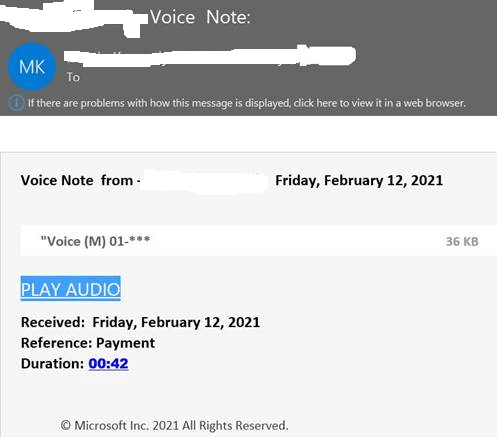
Quite a nasty phishing email that sailed past Mimecast and Microsoft Defender for ATP. It brings the user to a site and the the end user clicks on another link to listen to their voicemail and this is when the payload is delivered and it can perform the following malicious acts
Copy cached credentials Modify Outlook Rules Infect the entire global address list Attempt data exfiltration via One Drive for Business
Phishing email displayed below , Careful folks. End user security awareness training is the best defense against the phishing emails that get through and breach your message hygiene services.