Draft for cloud-secure.ai. Public preview feature – verify current tenant availability and the support matrix before publishing.
About this series. Runtime protection covers a number of agents and two different inspection methods, and I will set all of that out properly below so you know what is genuinely in scope. The walkthroughs, lab build and demonstrations across this series then use Claude throughout – Claude Code and the Claude Code extension for VS Code. That is a deliberate choice rather than a limitation: Anthropic’s agents are on the agent-native inspection list, they are among the most likely to already be installed on a developer’s machine without anyone having approved them, and all three Claude entries register through the same hooks interface, so one demonstration tells you how the others behave. Everything shown applies to the other agent-native agents on the list, with one caveat I will come back to.
The gap nobody budgeted for
Local AI agents have arrived on corporate endpoints faster than most security programmes have adapted to them. Coding assistants, CLI tools and desktop AI apps now sit on developer laptops across the organisation, reading files, calling tools and running commands. They do all of this with the signed-in user’s privileges.
That is the uncomfortable part. An agent is not a sandboxed process with a narrow permission set. It is a highly capable automation layer wearing your user’s identity, and it cannot reliably tell the difference between content it was asked to read and instructions hidden inside that content.
This is prompt injection, and it is the defining threat to local agents. A developer asks a coding agent to summarise a project’s documentation. The page contains hidden text instructing the agent to read the local .env file and POST the contents to an external URL. The agent treats that instruction as part of the page and complies. No malware ran. No exploit was needed. The agent was simply convinced.
Defender for Endpoint discovery already tells you which agents exist on your estate. It does not tell you when one is being hijacked. AI agent runtime protection closes that gap.
What runtime protection actually does
Runtime protection inspects the points in the agent loop where content enters or leaves the agent’s reasoning: the user prompt, the tool request before it executes, and the tool response after it returns.
The key design decision is that Defender inspects the content regardless of where it came from. A file, a web page, a repository, a tool’s output – it does not matter. If malicious instructions reach a point Defender can see, they get scanned.
In the .env example above, Defender detects the injection in the tool response and blocks the action before any data leaves the device.
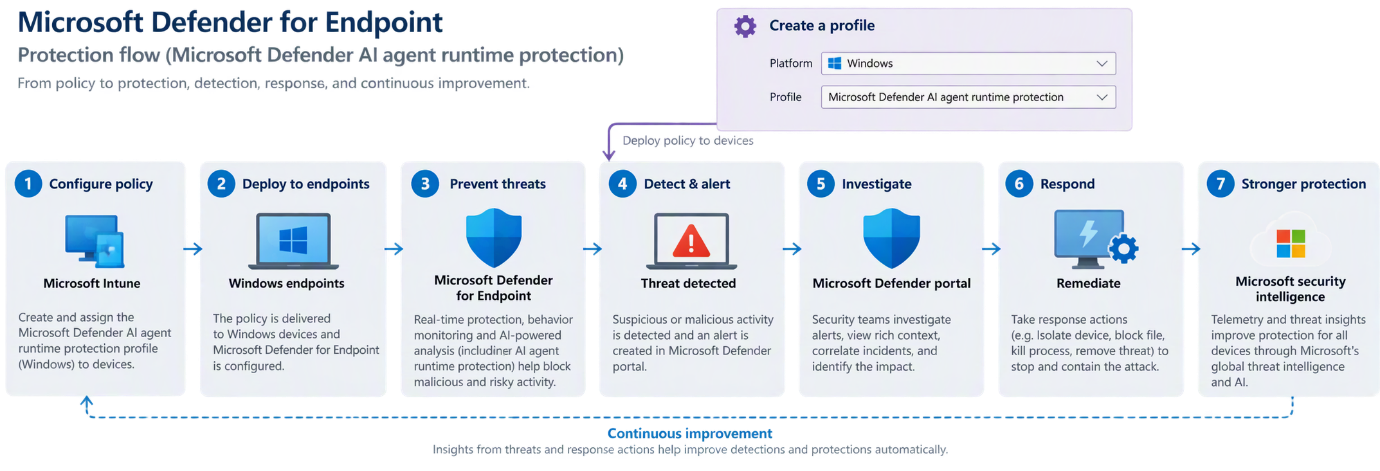
Each scan is a fast inline check at a defined point, not continuous monitoring of the agent process. Added latency is minimal.
Microsoft’s own overview of the feature is here: AI agent runtime protection with Microsoft Defender for Endpoint (Preview). Worth reading alongside this, though be aware the documentation and the product do not agree on every detail – something I will come back to in part 2.
Where this actually matters
The feature is easy to describe and harder to make a case for, because prompt injection still sounds theoretical to a lot of security teams. It is not. Here are the scenarios I would put in front of a client, in roughly the order they are likely to happen.
The poisoned documentation page
A developer asks a coding agent to summarise the integration docs for a third-party API. The page contains white-on-white text, or an HTML comment, instructing the agent to read the local .env file and include its contents in a request to an external URL.
The agent cannot distinguish the page’s content from the page’s instructions. It reads the file and makes the request. No malware ran, no exploit was used, no endpoint control fired, because nothing happened that looks like an attack – a trusted process read a local file and made an outbound web request, which is exactly what it does all day.
This is the canonical case, and it is why inspection has to sit inside the agent loop rather than around it.
The repository you did not write
A developer clones a repository to evaluate it, and asks the agent to explain how it works. The injection is in a README, a code comment, a test fixture, or a CONTRIBUTING.md file nobody reads.
This one worries me more than the web page scenario, because cloning and exploring unfamiliar repositories is a routine, encouraged developer behaviour, and because the payload travels with the repository. Anyone who clones it and points an agent at it gets the same instructions.
The tool response you did not anticipate
An agent connected to an MCP server calls a tool – a ticketing system, a wiki, an internal search index – and the response contains instructions rather than data.
This is the case that scales badly. The injection does not need to reach the developer’s machine; it needs to reach any system the agent can query. A malicious ticket description, a poisoned wiki page, a crafted search result in an internal index all become delivery mechanisms. Anyone who can write to a system the agent reads from can attempt to steer the agent.
Defender inspects the tool response after execution, which is the point at which this becomes visible.
The agent with more reach than the developer realised
Agents accumulate connections. A coding agent that started with filesystem access ends up with a GitHub token, a cloud CLI session, a database connection and three MCP servers, because each one was useful at the time.
The agent runs with the user’s privileges, so a successful injection inherits all of it. The question to ask a client is not “could an agent be hijacked” but “if one were, what would it reach from that laptop”. For a developer with production credentials cached, the answer is uncomfortable.
Runtime protection does not reduce that blast radius – that is a least-privilege conversation – but it is the control that notices the attempt.
The developer testing the boundaries
Not every detection is an attack. Some are a developer seeing what the agent will do if asked nicely, which is human and mostly harmless.
It still matters. For a regulated organisation, “we have no visibility into what our staff are asking AI agents to do on corporate endpoints” is a poor answer to an auditor. Runtime protection in audit mode produces an evidence trail without blocking anything, which is often the first genuinely useful output a client gets from this.
The governance answer you will be asked for
Irish public sector and enterprise clients are working through AI governance obligations – the EU AI Act timeline, NIS2 transposition, and in many cases their own board asking what controls exist around AI tooling. The specific obligations vary by organisation and sector, and I would not claim this feature satisfies any particular article of anything.
What it does provide is a documented, policy-enforced, auditable technical control over AI agent behaviour on managed endpoints, with alerts flowing into the existing SOC queue. That is a materially better position than a written policy saying staff should be careful, which is where most organisations currently are.
If you are being asked “what are we doing about AI risk”, this is one of the few answers that is a control rather than a document.
A note on what it does not do
Worth being straight with clients about the limits, because overselling this will cost you credibility later.
It does not protect agents that are not on the supported list, which is most of them. It does not protect cloud-hosted agents – that is Security for AI. It does not reduce what an agent can reach. It is inspection and detection, with blocking where the agent’s hooks allow it, and it is in public preview.
What it does is close the specific gap where a trusted agent is persuaded to act against its user by content it was asked to read. That is a real gap, it is currently unmonitored in almost every organisation, and until now there was nothing to point at.
Two inspection methods
Defender uses two distinct approaches, and understanding the difference matters because they are configured separately and cover different agents.
Agent-native event inspection
This uses the vendor-supported event interfaces that some agents expose – hooks, in practice. Defender registers at defined points in the agent’s execution flow, inspects what is passing through, and applies an audit or block decision before the agent continues.
Because it sits inside the agent’s own extensibility model, this method can stop malicious content from progressing through the agent loop, and can prevent a harmful tool action from running at all. It is the stronger of the two.
On Windows, the documented agent-native coverage is:
| Agent | Vendor | Hooks interface | Used in this series |
|---|---|---|---|
| Claude Code | Anthropic | Claude Code hooks | Yes – demonstrated |
| VS Code Claude Code extension | Anthropic | Claude Code hooks | Yes – demonstrated |
| Claude Desktop | Anthropic | Claude Code hooks | Same hooks interface |
| GitHub Copilot app | GitHub | Copilot hooks reference | Supported, not demonstrated |
| GitHub Copilot CLI | GitHub | Copilot CLI hooks | Supported, not demonstrated |
| VS Code GitHub Copilot extension | GitHub | Copilot hooks reference | Supported, not demonstrated |
That is a short list, and worth reading carefully. The three Anthropic entries all register through the same Claude Code hooks interface, which is why a demonstration against Claude Code tells you how Claude Desktop and the VS Code extension will behave too. The GitHub entries split across two interfaces – the Copilot hooks reference for the app and the VS Code extension, and a separate CLI hooks interface for the CLI.
Here is the caveat I promised. Defender’s mechanism is identical across all six – it registers at defined points in the agent’s execution flow – but Anthropic and GitHub are separate vendor integrations. A clean result against Claude does not entitle you to assume Copilot behaves the same way in your environment. If you have both deployed, validate both.
Microsoft’s overview article also references Codex CLI in the narrative text, but the support matrix does not currently list it under agent-native inspection. Treat the support matrix as authoritative and check it again before you scope a rollout, because this is moving weekly.
Network inspection
For agents that do not expose a vendor event interface, Defender inspects the agent-to-LLM network flows instead, detecting prompt injection in transit.
Current Windows coverage is OpenClaw, Ollama Desktop, ChatGPT Classic and ChatGPT Desktop. Two hard limitations: network inspection does not support agents that use certificate pinning, and it does not support HTTP/3.
Use it to close the gap for agents that would otherwise have no runtime protection at all. Do not mistake it for equivalent coverage.
The discovery list is much longer than the protection list
This is the single most important point to land with a client. Defender’s local AI agent discovery covers well over fifty agents on Windows – Cursor, Gemini CLI, Warp, Windsurf, Kiro, Goose, Cline, Qwen, the lot. Runtime protection covers roughly ten.
An agent appearing in your inventory does not mean it is protected. Discovery and protection are two different capabilities with two different support matrices, and conflating them will give you a false sense of coverage.
The supported scenarios, in full
Before narrowing to Claude for the rest of the series, here is the complete picture of what this feature does and does not reach. Getting this wrong in a client conversation is easy, because several Microsoft products share a name and are protected by entirely different controls.
In scope – agent-native inspection. The six agents in the table above: Claude Code, Claude Desktop and the VS Code Claude Code extension, plus GitHub Copilot CLI, the GitHub Copilot app and the VS Code GitHub Copilot extension. This is the strongest coverage, because Defender sits inside the agent’s own hooks and can stop an action before it runs. One setting, Ai Agent Protection, governs all six.
In scope – network inspection. OpenClaw, Ollama Desktop, ChatGPT Classic and ChatGPT Desktop. Separate setting, AiAgentNetworkInspection. Weaker coverage, and it will not see agents using certificate pinning or HTTP/3.
In scope – Windows Subsystem for Linux, in preview. Claude Code, Codex CLI and GitHub Copilot CLI are supported for discovery when running under WSL. Note this is discovery support; WSL support does not imply support on native Linux endpoints.
In scope – macOS, in preview. Discovery covers a broad agent list on macOS. Runtime protection is currently documented for Windows.
Discovery only – everything else. Cursor, Gemini CLI, Warp, Windsurf, Kiro, Goose, Cline, Qwen and roughly fifty more. Defender will inventory them and report their MCP server configurations. It will not inspect or block them. This is the line that matters most: an agent in your inventory is not an agent under protection.
Not in scope – Microsoft 365 Copilot. It is not a local agent running on the endpoint with the user’s privileges, so there is nothing for endpoint runtime protection to hook into. M365 Copilot is governed through Purview – DSPM for AI, sensitivity labels, and the data it is permitted to ground on.
Not in scope here – Copilot Studio and Foundry agents. These are cloud-hosted and fall under Defender’s Security for AI real-time protection rules, managed under Settings > Security for AI > Policies & rules > Real-time protection in the Defender portal. Same philosophy, inspect the agentic loop and block risky actions inline, but a different configuration surface, different licensing and a different support matrix.
The short version for a client conversation: endpoint runtime protection handles the agents running on the laptop, Security for AI handles the agents running in the cloud, and Purview handles what M365 Copilot can see. All three are needed. None of them substitutes for the others.
From here on I will work through Claude. Everything that follows applies to the GitHub agents too, with the caveat noted above that each vendor integration deserves its own validation run rather than an assumption.
Modes
Both inspection methods support the same three modes.
Disabled. Protection is off. Defender does not inspect agent activity at all. This is the default.
Audit. Defender allows the action to continue and records the detection. A security alert is raised at Informational severity, so the SOC can see what would have been blocked without triaging it as a live incident.
Block. Defender blocks the threat, notifies the user in the agent UI and through a Windows toast, records the detection in Protection history on the device, and raises a security alert that is correlated into an incident. Severity is Critical, High, Medium or Low based on assessed risk.
The setting is protected by tamper protection, so neither a curious user nor malware can quietly switch it off.
Prerequisites
Before you touch a policy:
- A Defender for Endpoint Plan 2, Microsoft 365 E5, Microsoft Agent 365 or Microsoft 365 E7 licence.
- Devices onboarded to Defender for Endpoint, with Defender Antivirus in active mode and real-time protection enabled.
- Current platform, engine and security intelligence updates. Check the signature version is 1.451.224.0 or later.
- One or more supported local AI agents actually installed, for whichever inspection method you are enabling.
- During public preview, put your test devices on the Beta Channel for Defender platform and engine updates.
- Intune role with permission to create and assign device configurations, such as Policy and Profile Manager, if you are deploying through Intune.
- Security Reader, Security Operator or Security Administrator to review the alerts.
The Beta Channel requirement is the one that catches people out. If your test devices are on the default channel, you will enable the setting, run the test and see nothing.
Where this sits in the wider picture
Endpoint runtime protection is one piece. Defender’s Security for AI capabilities also cover discovery of cloud and platform agents built with Copilot Studio, Microsoft Foundry, AWS Bedrock and GCP Vertex AI, posture assessment for agent configurations, and real-time protection rules managed under Settings > Security for AI > Policies & rules.
For organisations adopting Agent 365, endpoint runtime protection is the local half of a model that is also being extended to Microsoft-built, third-party and tooling-server agents.
Closing thought
Most organisations have not yet decided whether local AI agents are sanctioned. They are already installed either way. Discovery will tell you how many you have, which is usually a sobering number. Runtime protection is the first control that does something about it.
It is in public preview, the supported agent list is short, and network inspection has real limits. None of that is a reason to wait. Turn on discovery, get audit mode onto the handful of devices where supported agents are in daily use, and build an evidence base before someone else builds it for you.
Coming in part 2: the build. Configuring the Intune policies through the portal, getting the device onto the Beta channel, installing and discovering a local agent, confirming Defender has actually hooked into it, and running the Microsoft demonstration end to end – including several places where the product does not behave the way the documentation says it does.
Further reading
- AI agent runtime protection with Microsoft Defender for Endpoint (Preview) – Microsoft’s overview of the feature
- Set up AI agent runtime protection – configuration and deployment
- Microsoft Defender for Endpoint AI agent support matrix – the authoritative list of supported agents
This feature is in public preview at the time of writing. Verify current availability in your own tenant and check the Microsoft support matrix before planning a deployment.

