Broken Hyper-V AVHD Chain recovery

I have been helping people around the world recover data from Hyper-V avhd chain disasters since 2009. I have helped people in a lot of countries and cities , some of which include.

Newyork
California
Seattle
New Hampshire
New Orleans
Germany
Paris
London
Sweden
Belgium
Netherlands
Australia
Singapore
Korea
Russia
People find me for help via the following forum posts.
  1. Snapshots are not for production servers. They are not backups.
  2. Never delete a snapshot in a chain.
  3. If you delete a snapshot via hyper-v console , wait for it to merge back into it’s parent.
  4. Use Microsoft DPM 2012 and hardware vss writers where possible.
  5. Never increase the capacity of a base vhd when it has a broken avhd chain.
  6. Some recommendations on vhd recovery are visible on my linkedin profile
  7. Windows Server 2012 will make it easier to recover from broken snaphot chains.
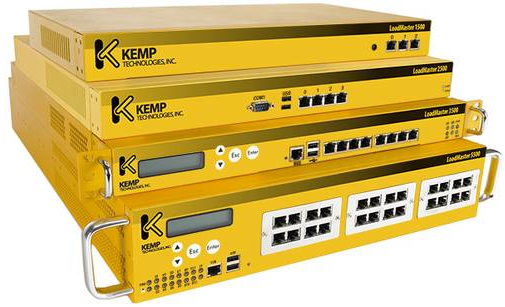
Implementing Kemp Load Balancers with Exchange 2010 Sp2


I recently implemented a 2 node Kemp Loadmaster 2200 array and I generally followed Henrik Walther articles on Msexchange.org. There are 2 articles

Load Balancing Exchange 2010 Client Access Servers using an Hardware Load Balancer Solution
Uncovering the new RPC Client Access service included with Exchange 2010

There are a couple of steps in the articles which have changed with Exchange 2010 SP2 and newer firmware on the Kemp Loadmasters which I can highlight below to help anyone out.

  1. Instead of manually editing and adding registry entries for rpc static ports you can download and run a powershell script HERE from Bhargav.Some of the registry locations are different in Exchange 2010Sp2 and you dont need to edit Microsoft.exchange.addressbook.service.exe.config
  2. The latest revisions of Kemploadmaster firmware do not include the persistence type ‘active cookie or Source IP’ the reason for this is because Kemp are phasing this persistence method out in favour of Super http. However if you would like to enable it you need to do the following.

    Go to logging options, debug options , enable l7traces then contact Kemp and they will give you a frame number which you can enter and it will allow ‘active cookie or source ip persistence’

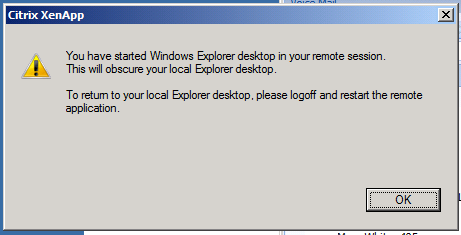
Citrix Xenapp: You have started Windows Explorer in your remote session.

I recently rolled out a Citrix Xenapp 6 farm with a published application which was a desktop. When users started to logon they began getting the error in the above image.

I was using HPT5550 Thin Clients. So I flashed the thin clients with the latest firmware which was released in April 2011 and also updated the ICA Client to 11.02.I also noticed that some standard hot keys like alt-tab , ctrl c , ctrl v were not working.

So the simple fix is to untick “view in seamless windows” on the thin client ica connection.

Citrix XenApp Clients

I recently tried to download the latest XenApp 6 client. When I go to downloads , I see offline plugin and online plugin.

WHERE HAS THE ICA CLIENT GONE!!!

It was so easy to use and I thought by installing both offline plugin and online plugin I would get access to an ICA Client but it only shows Citrix Online Plugin in start menu/all programs. So I had a look in C:\program files\citrix\ica client and clicked on the application exe’s. Still no ICA Client.

So I did a bit of looking around on the web and i am not the only one confused.

There is a good article HERE on BrianMadden.com about the different Citrix Clients.

So I eventually found what I was looking for , I needed the Citrix Quick Launch Application which you can download HERE But even when you download it , it is not straight forward as you need to register TABCTL32.OCX They dont make it easy!!

All I wanted to do is test logins and roaming profiles.

If you dont want to go through all this hassle you could always just download mRemote which will let you connect to just about anything.

Xp32x Fax Clients connecting to Server 2008R2 Fax Server

When I think of electronic faxing I always think of Microsoft Small Business Server’s built in faxing or Zeta Fax or GFI.

Zeta Fax & GFI Faxmaker work really well and integrate really well into Exchange but can cost a bit as user counts increase.So I had to setup Server2008R2 Fax Server recently which is FREE and heres how I did it.

1.Install the Fax Server Role.
2.Ensure Firewall Rules are correct.
3.Share Fax Printer out to relevant security group or domain\users
4.Add x86 driver to fax printer. Download driver HERE
5.Change the Fax Service “LOGON AS” from NETWORK SERVICE to LOCAL SYSTEM also tick “interact with desktop”

Now here is the bit that got me! When I logged on as an administrator xp x86 client I could connect to the fax server via the the fax console without any problems.But it kept saying connection errors when connecting with a standard user.So i tried adding permissions to the fax printer but that was not correct.

6.Open up Fax Service Manager, Right Click on Fax , Properties, Security add in relevant users , security group.