The technique attackers use for the foothold, and the layered defences that stop it – with the nuance Microsoft documents but few people read.
The lockouts in this series both assume an attacker who has already gained a foothold. Credential theft is how they usually get it, and the Local Security Authority Subsystem Service (LSASS) is the target. Tools in the Mimikatz family read credentials straight out of LSASS memory. This post is about the defence, not the tool – so no attack tooling is provided here – and about a nuance in how those defences interact that is easy to get wrong.
The layers that defend LSASS
Defender for Endpoint stops LSASS credential theft at several layers:
- Antivirus quarantines known credential-theft binaries on write or execution, usually before they run at all.
- The attack surface reduction (ASR) rule “Block credential stealing from the Windows LSASS subsystem” blocks processes from reading LSASS memory.
- LSA protection (RunAsPPL) runs LSASS as a protected process, so non-protected processes cannot read it.
- Credential Guard uses virtualisation-based security to isolate the secrets entirely, out of reach even of a process that opens LSASS.
The lab’s posture
The lab VM is already hardened to the recommended baseline. RunAsPPL is enabled, and both Credential Guard and memory integrity are running under virtualisation-based security.


A detail worth a line: Credential Guard shows as running but not explicitly configured by policy, because it is enabled by default on Windows 11 Enterprise when the hardware supports it. On this device, a Mimikatz run gets nowhere – the binary is quarantined by antivirus, and even past that, RunAsPPL and Credential Guard protect the secrets.
The nuance: use one, not both
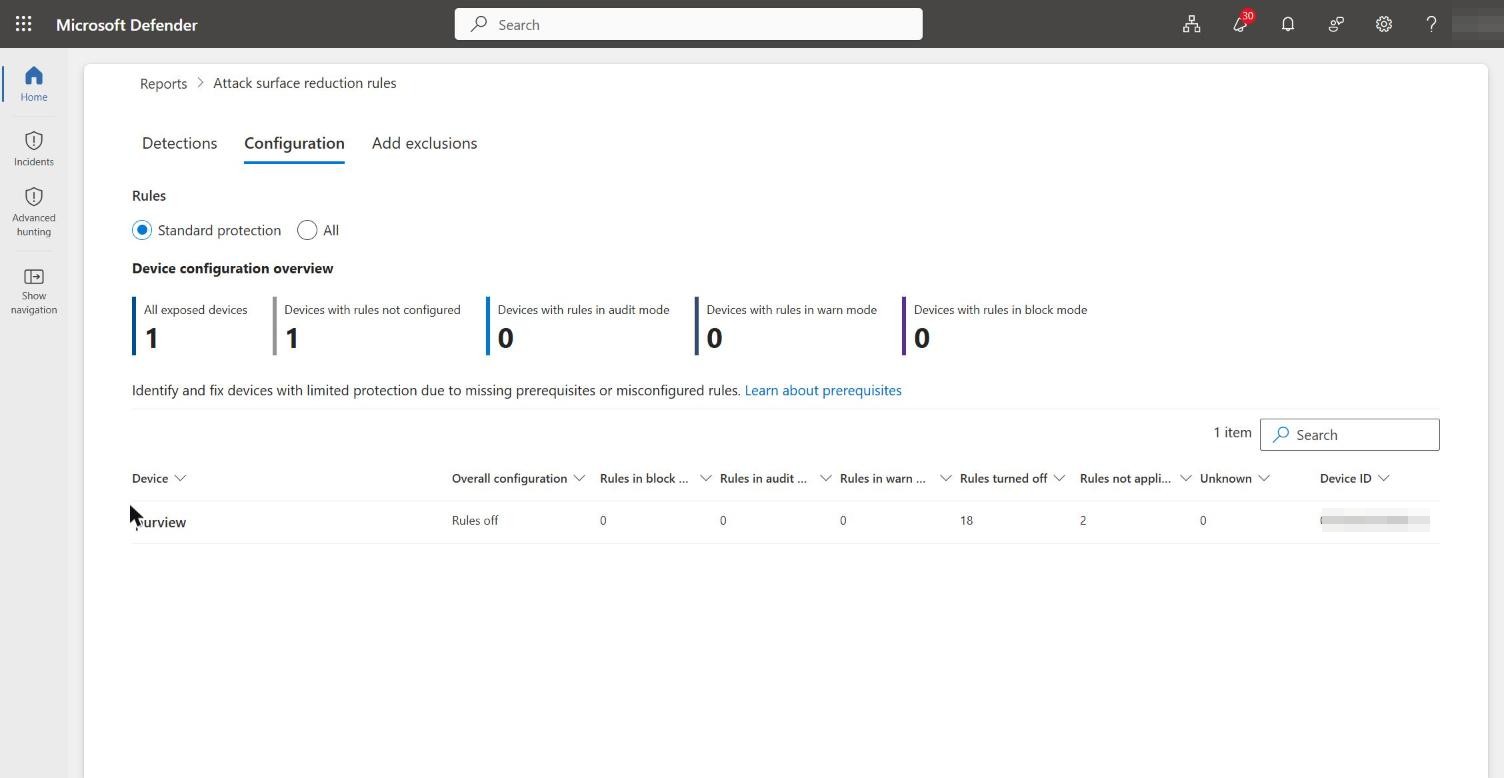
Here is the part that trips people up. When LSA protection is enabled, Microsoft’s own documentation states the ASR rule is not required, gives no additional protection (the two work the same way), and is reported as “not applicable” in the Defender portal. The ASR rule is positioned as the fallback for environments that cannot enable LSA protection or Credential Guard – not as a second layer to stack on top.
The portal bears this out. On the hardened lab device, the ASR configuration shows rules off, none in block or audit, and two rules not applicable – the credential-stealing rule among them, deactivated because LSA protection already covers it.
This behaviour is consistent with guidance Microsoft provides directly through support. Write it from experience; there is no need to reference any case.
So the practical rule is: lead with LSA protection (RunAsPPL) and Credential Guard. Reach for the ASR rule only where you cannot deploy them, and do not expect it to add anything when they are already on – it will simply read “not applicable”.
The ASR rule is noisy by design
There is a second reason the ASR rule is the fallback rather than the first choice: it is noisy, and Microsoft documents this plainly. Many processes make unnecessary calls to LSASS that do not need blocking, so the rule produces a large volume of audit events, almost all of which are safe to ignore in block mode. It blocks things like svchost.exe reading LSASS, which can usually be ignored, and a single event does not by itself indicate a threat.
Defender manages the noise by suppressing alerts and notification pop-ups for friendly processes and duplicate block actions – the deduplication that keeps the rule usable. Notably, for this specific rule Microsoft says you can skip audit mode and go straight to block, because the audit volume is so high and so benign that evaluating it first adds little. That runs against the usual “always audit first” advice, and it is worth calling out.
Hunting the technique
Where you do want visibility – on devices running the ASR rule rather than LSA protection – the companion repo’s 03-Credential-Theft-Commands.kql hunts the technique directly: Mimikatz-style command lines (sekurlsa::, lsadump::), LSASS OpenProcessApiCall events, and the AsrLsassCredentialTheft block and audit events. Set the DeviceNameFilter and run it in Advanced hunting.
In short
Protect LSASS with RunAsPPL and Credential Guard as the primary, quiet, strong defence. Treat the ASR rule as the noisy fallback for where you cannot, and understand that it switches itself off to “not applicable” when the stronger protections are present. One layer, chosen deliberately, beats two layers fighting for the same job.
Next
Defences are best understood under attack. The next post walks the full kill chain – credential theft, privilege escalation and ransomware – on a deliberately unhardened device, and watches each of these defences fire in turn.

