
Error 0x80070003 when running SBS 2003 CEICW

A customers IIS in SBS2003 recently died and everything had to be re-installed as they used RWW all the time and were lost without it.So I went to add/remove programs and selected windows small business server and selected maintenance mode for server tools and then re-install , companyweb,networking & administration.

So when I ran the CEICW wizard it kept failing on firewall config and the error “0x80070003” was listed in the ceicw log.So upon some research on the web I was pointed in the direction of the companyweb identifier in iis.

TheHKEY_LOCAL_MACHINE\SOFTWARE\Microsoft\SmallBusinessServer\Intranet\companywebpath needs to match the number listed for the Companyweb Identifier in IIS.The default value is 4.And my reg key was correct.

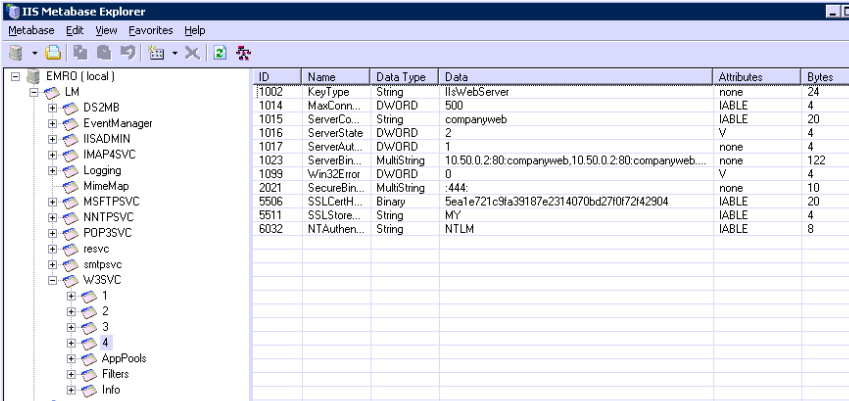
So how do you find out what the identifier value is in IIS? You need to download and install IIS 6.0 Resource Kit and open up meta database explorer.

So within metadatabase explorer which is displayed in the image above expand w3svc and you should see a number of sites.In the problem i was having the companyweb identifier was not there! So I logged onto another SBS Server which was working fine and exported the 4 key. Then re-imported it into IIS.Once it is imported into IIS you need to edit id 1023 as per image to suit that of the current server.

Then do an IIS reset and re-run the CEICW wizard.
Once you have re-ran the wizard browse default website and expand the sites within default website. Right click onthe properties of remote. Then go to documents and add in “default.aspx”

Voila RWW is backup and running.

But what about OWA.

Strangely enough the Exchange and exchange mobile application pools were not present in IIS so as per my above mentioned method I exported these applicatin pools from a healthy server and then edited the exchange sites like OMA , Exchweb to use the correct application pools and all worked fine.

I have not seen anything on the web about how to fix a problem like this, So hopefully this will help people. Sean

Companyweb Broken on SBS2008 after WSS3.0 SP2

A customer of mine recently had a problem when their companyweb stopped working. So I started to look into application event logs, services running etc.. and I discovered that a windows update (Service Pack 2 for WSS3.0) did not install correctly. It didnt finish installing and was only part installed.

Now this one absolutely broke my heart and I am not alone on this from my research on the web. So throughout my searches on the web I cam across this article from the SBS Team Blog.And another one from technet . But the simple fix is to download WSS SP2 and manually extract the contents using this command “wssv3sp2-kb953338-x64-fullfile-en-us.exe /extract:c:\extract” and then manually install each component. Now you will think the installation of each package is freezing as they are quite small in size the biggest component being 25mb but leave them alone to finish their installation, restart your server.

Make sure the bindings are correct in IIS Manager on the SBS Sharepoint site and voila your back up and running.

This took me a lot longer than I would have preferred to sort out but there you go. A Microsoft Update that breaks things if not installed correctly with no easy way to roll back.The update also changes Sharepoint authentication to kerbeos instead of NTLM.

SBS2008 Setup Checklist


I bought the first SBS2008 book that was released which was SBS2008 Unleashed by Eriq Oliver Neale and it was ok. But then the SBS2008 Blueprint book was published from SMB Nation and I found this book much easier to read and follow.

There are 2 Authors Harry B and Philip Elder , Philip is a SBS MVP and has a great blog which he keeps updated reguraly and of special interest is his SBS2008 Setup Checklist. It is currently on version 1.5 and I cant think of a better way of installing and configuring SBS2008.

You can see the setup guide here http://blog.mpecsinc.ca/2009/05/sbs-2008-setup-checklist-v111.html