
I have a lot of BPOS to Office 365 transitions coming up and these URLS are very useful to bookmark.
BPOS Admin URLS – Office 365 Admin URLS
Reply

I have a lot of BPOS to Office 365 transitions coming up and these URLS are very useful to bookmark.

I have been doing a lot of App-V Sequencing recently and thought I would post a list of App-V resources which I refer to on a regular basis.
App-V Sequencing Recipe Forum
http://social.technet.microsoft.com/Forums/en-US/prescriptiveguidance
Application Virtualization Whitepapers
http://technet.microsoft.com/en-us/appvirtualization/cc843994.aspx
Contains App-V Sequencing guide and common practices.
The Microsoft Application Virtualization Blog
http://blogs.technet.com/b/appv/
Application sequencing SuperFlow
http://www.microsoft.com/download/en/details.aspx?displaylang=en&id=5262
Must use interactive documentation on sequencing.
Sequencing articles on TechNet
http://technet.microsoft.com/en-us/library/cc817192.aspx
App-V 4.6 Sequencing Recipe – Template
App-V with AppLocker Executable Rules
App-V with AppLocker Windows Installer RulesDeploying App-V with the Microsoft Deployment Toolkit
Deploying App-V with System Center Configuration Manager
Deprovision a Virtual ApplicationLaunch a Virtual Application and Review Client Configuration
Publish a Virtual Application Using Full Infrastructure Mode
Run Microsoft Office in an App-V Virtualized Environment
Setting Up the App-V Management Server
Update a Virtual Application Using App-V
Updating and Upgrading a Sequenced Application Using App-V
A customers DPM Server crashed today while in the middle of the installation of SQL2008 Service Pack 3. So when the server came back online the msdpm2010 sql instance would not start.
So when reviewing the event logs I could see the following.
event ,959 mssql$msdpm2010
The resource database version is 611 and this server supports version 662. Restore the correct version or reinstall SQL Server
The fix is quite simple. Take a copy of the DPM Databse which is located by default in C:\Program Files\Microsoft DPM\DPM\DPMDB
Then go to programs and features and select SQL 2008 , then uninstall/change and then repair. Point the repair wizard at the sql 2008 installation media and let it repair the SQL 2008 installation.Once complete , reboot the server and then will then be able to view your protection groups as before.

I completed an Office 365 install today and wanted to point out a few things which may help people along.
When using the office 365 mail migration program the server you are migrating from must have a trusted cert.The server I worked on today was an SBS2003 server with a self signed cert , So i just got a 30 day trial verisign cert and that did the trick.To ensure the migration tool will work you need to get all green ticks when running the Exchange Remote Connectivity Analayzer for auto discover.
Sometimes Lync wont connect even though the Office 365 Connector wizard has completed and stated the Lync setup was complete. You can manually enter the external lync server via options. The server I needed to connect to from Dublin was sipdir.online.lync.com:443
There are also some updates for Lync Clients
Lync 2010 (32-bit) (7577.256) – Download – KB2496325
Lync 2010 (64-bit) (7577.256) – Download – KB2496325
Once the Office 365 Connector has completed it will display – Additional Manual Steps required to configure Outlook.So you need to create a CNAME called “autodiscover” and point it to “autodiscover.outlook.com”
I opened up contol panel / mail / profiles then delete the existing profile and then press apply then create a new profile with exactly the same name and allow autodiscover to find your server the reason for recreating a profile with the same name is to preserve the user’s NK2 File.
What is my Outlook Web App address. Lets say my domain name was sean.com then my Outlook Web App Address would be https://www.outlook.com/sean.com
What server do I connect to for smart phones??
You can go the Mobile Phone Setup Wizard
Finding My Server Name
To determine your server name, use the following steps:
Sign in to your account using Outlook Web App.
After you sign in, click the drop-down arrow next to the Help question mark, and then click About.
Find the server name listed under External POP setting or Internal POP setting. If your server name is in the format podxxxxx.outlook.com, then your Exchange ActiveSync server name is m.outlook.com. If your server name includes your organization’s name, for example, pop.contoso.com, then your server name is the same as your Outlook Web App server name, without the /owa. For example, if the address you use to access Outlook Web App is https://mail.contoso.com/owa, your Exchange ActiveSync server name is mail.contoso.com.
This is cool software from Quest which is free!!! It helps you asses readiness for migration to cloud based email solutions

I was recently working on a DPM 2010 Install and needed to force tapes that had data on them that was within a retention policy period to be free as I needed to do an urgent backup onto these LTO 5 Tapes.
DPM doesn’t allow you to mark tapes as infinitely over writable, even if you put in 0 days or weeks it will always default back to 1.
So here is a cool powershell script from Microsoft. So visit HERE paste the script into notepad and save as ForceFree.ps1 and copy it into the DPM Bin Folder. And run this command ForceFree.ps1 -DPMServerName -LibraryName -TapeLocation
The tape libary I was using was a “Hewlett Packard 1/8 G2 Autoloader (x64based)” So I entered this info into the command switch when running the force.ps1 powershell script but kept getting an error message saying ” Cannot find tape libary Hewlett Packard 1/8 Autoloader (x64based).
So the fix for this is really simple ,
So as per image above on the right hand side , click on Rename Libary. In my case I renamed the libary to LTO5 and then re-ran my powershell script with the new tape libary and it worked fine and I was able to use the tapes to backup data.
Also don’t forget to enable quick erase via regedit for tapes.
Here is a great blog post on DPM2007 – 2010 Upgrade
However I would also use dpmbackup tool.
You can find this in C:\Program Files\Microsoft DPM\DPM\DPM\bin
So open a command prompt with elevated privlages and set your current directory to the bin folder in DPM then run dpmbackup -db
But where does the backup go?
You can find it in \Program Files\Microsoft Data Protection Manager\DPM\Volumes\ShadowCopy\Database Backups and it will be named DPMDB.bak
So if the upgrade goes wrong at least you have your DPM Database backed up!
So an inplace upgrade really is quite simple.If you have not killed the DPMRA executable you will be prompted to do so during the upgrade.
Once the upgrade is complete , Reboot the server and then apply the March 2011 Dpm Rollup which you can download HERE
Upgrade all protected machine’s agents and ensure communication is ok with all agents and thats it!
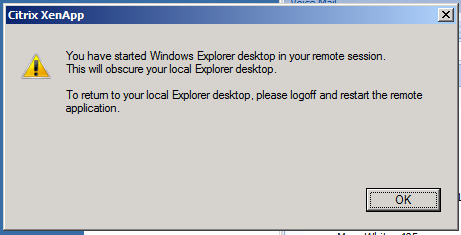
I recently rolled out a Citrix Xenapp 6 farm with a published application which was a desktop. When users started to logon they began getting the error in the above image.
I was using HPT5550 Thin Clients. So I flashed the thin clients with the latest firmware which was released in April 2011 and also updated the ICA Client to 11.02.I also noticed that some standard hot keys like alt-tab , ctrl c , ctrl v were not working.
So the simple fix is to untick “view in seamless windows” on the thin client ica connection.
I recently had a customer that had some problems with a HP 1/8 G2 Autoloader LTO 5 Drive.
We discovered some hardware problems and got the LTO 5 Drive replaced under warranty but they also began to run into some more problems with tape backup failures.
I had a support case with Microsoft and discovered a few things to help people in the future if they run into similar problems.
The easiest thing to do is to upgrade DPM2007 to 2010 which 9 times out of 10 will fix the problem and DPM 2012 will be with us soon! However its still always nice to fix tape problems when they occur and listed below are a few ways to help.
1.Open up the DPM Database which is normally servername\MS$DPM2007$
Then browse to a table tbl_MM_Drive and right click on it and click open then ensure that all items in the OperationOccuring field are set to 0 and the click save all.
2.Add a dword value “RSMCompatMode” in HKEY_LOCAL_MACHINE\SOFTWARE\Microsoft\Microsoft Data Protection Manager\Agent with a decimal value of 27. As per Microsoft KB978901
All tape inventories were failing for me prior to adding this DWORD to the registry.
3.Run DPMLibraryTest.exe to validate mounting and moving of tapes.
4. Run dpmbackup -db to create a backup of your DPM DB which you will need to do if you are upgrading to 2010.
5. One of the weaknesses of DPM is the inability to back up Oracle DB’s and Vmware. i365 have a plugin for DPM which can backup oracle & vmware. Yipee! You can read up on it HERE
6. Finally , Erasing tapes in DPM can sometimes take forever , so it would be nice to speed up that process and heres hows.
If your tape drive supports short erase, you can enable it on the DPM server by creating the DWORD UseShortErase under HKEY_LOCAL_MACHINE\SOFTWARE\Microsoft\Microsoft Data Protection Manager\Agent.
Set the value of the DWORD to 00000000.
After this value is set, all erase operations on the DPM server will be short erases. To revert to long erases, remove this registry key
I recently tried to download the latest XenApp 6 client. When I go to downloads , I see offline plugin and online plugin.
WHERE HAS THE ICA CLIENT GONE!!!
It was so easy to use and I thought by installing both offline plugin and online plugin I would get access to an ICA Client but it only shows Citrix Online Plugin in start menu/all programs. So I had a look in C:\program files\citrix\ica client and clicked on the application exe’s. Still no ICA Client.
So I did a bit of looking around on the web and i am not the only one confused.
There is a good article HERE on BrianMadden.com about the different Citrix Clients.
So I eventually found what I was looking for , I needed the Citrix Quick Launch Application which you can download HERE But even when you download it , it is not straight forward as you need to register TABCTL32.OCX They dont make it easy!!
All I wanted to do is test logins and roaming profiles.
If you dont want to go through all this hassle you could always just download mRemote which will let you connect to just about anything.

 Cloud-Secure.ai