"0x00000101 – CLOCK_WATCHDOG_TIMEOUT"

975530 – Last Review: August 10, 2010 – Revision: 14.0
Stop error message on a Windows Server 2008 R2-based computer that has the Hyper-V role installed and that uses one or more Intel CPUs that are code-named Nehalem: “0x00000101 – CLOCK_WATCHDOG_TIMEOUT”

I have a newly installed HP DL380G6 , completely up to date etc.. that has been randomly rebooting. I installed who crashed to review the memory dump and found that each time it happened this error code was generated CLOCK_WATCHDOG_TIMEOUT

So after some research on the web I found A Hot Fix available from Microsoft to fix the problem. You can get it HERE

Disable UAC in Group Policy


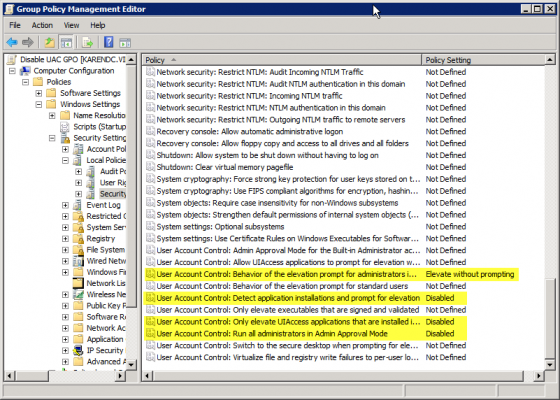
Sometimes applications can be fussy about UAC and this is how to disable it via group policy. I have not had a chance to test app-v but i am sure app-v can overcome problems with uac etc..

# User Account Control: Behavior of the elevation prompt for administrators in Admin Approval Mode – Set its value to Elevate without prompting.
# User Account Control: Detect application installations and prompt for elevation – Set its value to Disabled.
# User Account Control: Only elevate UIAccess applications that are installed in secure locations – Set its value to Disabled.
# User Account Control: Run all administrators in Admin Approval Mode – Set its value to Disabled

Entourage EWS Attachment Limits

I had a customer that had problems sending emails over 10mb via Entourage EWS via an SBS2008 Server.

So here is how to fix it.

In addition to running the appropriate cmdlets to change message size limits in Exchange, you’ll need to edit web.config found in C:\Program Files\Microsoft\Exchange Server\ClientAccess\exchweb\ews. Open with Notepad (or your favorite text editor) and search for maxrequestlength. Change the value to reflect the size in kilobytes desired, then save the change.

For good measure, edit web.config located in C:\Program Files\Microsoft\Exchange Server\ClientAccess\owa.

Once both files have been edited open a command prompt and run the following commands:

cd \Windows\System32\inetsrv

appcmd set config “SBS Web Applications/ews” -section:requestFiltering -requestLimits.maxAllowedContentLength:51200

appcmd set config “SBS Web Applications/owa” -section:requestFiltering -requestLimits.maxAllowedContentLength:51200

IIS RESET

51200 KB = 50mb

Companyweb Broken on SBS2008 after WSS3.0 SP2

A customer of mine recently had a problem when their companyweb stopped working. So I started to look into application event logs, services running etc.. and I discovered that a windows update (Service Pack 2 for WSS3.0) did not install correctly. It didnt finish installing and was only part installed.

Now this one absolutely broke my heart and I am not alone on this from my research on the web. So throughout my searches on the web I cam across this article from the SBS Team Blog.And another one from technet . But the simple fix is to download WSS SP2 and manually extract the contents using this command “wssv3sp2-kb953338-x64-fullfile-en-us.exe /extract:c:\extract” and then manually install each component. Now you will think the installation of each package is freezing as they are quite small in size the biggest component being 25mb but leave them alone to finish their installation, restart your server.

Make sure the bindings are correct in IIS Manager on the SBS Sharepoint site and voila your back up and running.

This took me a lot longer than I would have preferred to sort out but there you go. A Microsoft Update that breaks things if not installed correctly with no easy way to roll back.The update also changes Sharepoint authentication to kerbeos instead of NTLM.

Micrsoft Online Services & Iphone


First of all heres a video to setup iphone with Microsoft Online Services.

http://www.youtube.com/watch?v=yTctxZnOYVc

One thing which caught me out was the server name.The Emea OWA login URL is https://mail.emea.microsoftonline.com

But the actual server address for the iphone is red002.mail.emea.microsoftonline.com

Then test your active sync credentials via https://www.testexchangeconnectivity.com/

Once you have green ticks , all done.

SBS2008 Setup Checklist


I bought the first SBS2008 book that was released which was SBS2008 Unleashed by Eriq Oliver Neale and it was ok. But then the SBS2008 Blueprint book was published from SMB Nation and I found this book much easier to read and follow.

There are 2 Authors Harry B and Philip Elder , Philip is a SBS MVP and has a great blog which he keeps updated reguraly and of special interest is his SBS2008 Setup Checklist. It is currently on version 1.5 and I cant think of a better way of installing and configuring SBS2008.

You can see the setup guide here http://blog.mpecsinc.ca/2009/05/sbs-2008-setup-checklist-v111.html

Oracle (Sun) Virtual Box

I recently used Microsoft Virtual PC on a site but ran into problems with bridged network cards amongst other small issues. I gave up on Virtual PC and thought my only other alternative was VM Ware Player which is free but I could’nt get VM Ware tools installed into my VMWare Virtual PC and VM Work Station is a bit expensive.

But then Virtual Box came to my rescue and has worked perfectly. And its free! I dont know how long it will remain free after Oracles aquisition of Sun.But hey its free now and a doddle to setup.

Shadowprotect images .spf and .spi files can boot up straight into virtual box as if they were a vhd or vmdk.

Here is a video tutorial on using Virtual Box from David Davis on Virtualizationadmin.com

http://www.virtualizationadmin.com/player.asp?AYHfxlcC

Using Free NAS with Hyper-V


I ran into a situation where I needed to recover a lot of mailboxes via backup exec on an Exchange 2003 Server and needed to do it via a recovery storage group and exmerge.

But the problem was I did not have enough storage on the exchange server to recover with a RSG.And adding additional storage was not an option , next step for customer was a hardware upgrade for exch 2010.So luckily enough I had a Hyper-V Server with loads of storage so I did the following.

1. Created a new vm with a 500gb dynamic disk , added in a legacy adapter , 4gb ram , 4 virtual cpus.
2. Then started up the new vm and booted into the free nas os, selected the legacy adapter , set the legacy adapter to receive dhcp, took note of ip address.
3. Then logged into the free nas via the http://ip received from dhcp. User name: admin password:freenas
4.Configured freenas as per this article from Dave Lawlor
5. Then downloaded and installed latest microsoft iscsi initiator for Server 2003.
6. Connected to my freenas via iscsi and formatted my new volume.
7. Then moved my RSG to the new volume I created.

This was an interesting resolution to my problem as I couldnt locate the RSG on anything but a local drive and exchange thought my new volume was a local drive.

Now this problem was probably a once off but it is a really simple way for people to play around with iscsi and san technology and its free.

Storagecraft Shadowprotect 4


Shadowprotect 4 has been released. I was beginning to loose faith in Shadow Protect in terms of their development cycle in comparison to Acronis. Both products are very similar.

The reason I love Shadowprotect is because it has never let me down in the past and it’s simple GUI and speed of recovery.

Anyway there are a lot of really cool features in version 4 in particular head start restore and you can take a look at Storagecraft’s Webinar on Shadowprotect.

https://www1.gotomeeting.com/register/214409881

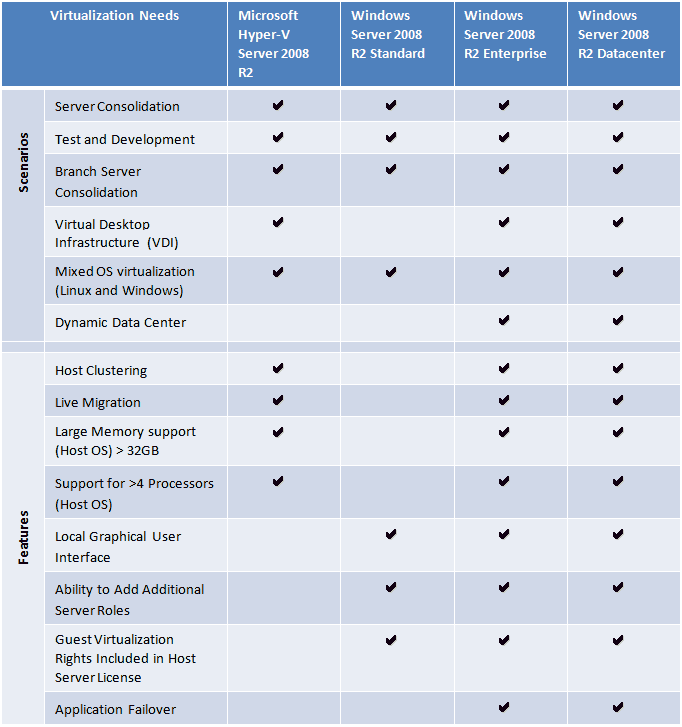
Which Version of MS 2008R2 to use for Hyper-V


Apart from server consolidation some of the other areas where you can use HYPER-V are,

* Test and Development
* Server Consolidation
* Branch Office Consolidation
* Hosted Desktop Virtualization (VDI)

Microsoft free HYPER Visor is good option for testing and R&D. If you are planning to consolidate more than 4 servers in one physical server then moving to Data center version will do huge cost saving to you.