
I have been using join me recently.It is so quick , simple and has a friendly interface.
Check it out https://join.me/


I have been using join me recently.It is so quick , simple and has a friendly interface.
Check it out https://join.me/
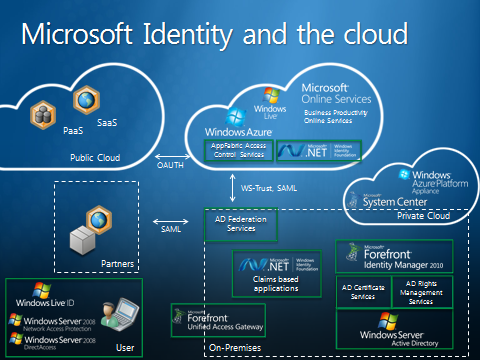
With Office 365 , Users will be able to use their Windows Active Directory accounts to sign in to their Microsoft Online Services like Exchange online, SharePoint Online and Lync Online.
I am currently testing this sign on method and I much prefer it to the BPOS SSO Tool.
I am not a fan of the current BPOS SSO method as it is not seemless where as Office 365 method is.
I first posted about broken vhd – avhd chains in December 2009, And since then I have helped many people throughout the world in recovering their data and made some friends along the way.
I have recovered data for people in france, germany , uk, australia, usa, brazil
A guy called Dave Loughner from Innovative Solutions in New York pointed out a great utility for recovering data from avhd & vhds.
It is Disk Digger and only cost $14.99, Best money you will ever spend if your really stuck. Dave tried about 30 recovery products before coming across Disk Digger.
As of writing this http://www.diskdigger.org is down but you can download it here
Also a point to note. The disk digger solution is absolutely the last resort as nothing is as good as merging all avhds and having a healthy server at the end.Using disk digger will get you back up to 50% of your data but not all.

A customers IIS in SBS2003 recently died and everything had to be re-installed as they used RWW all the time and were lost without it.So I went to add/remove programs and selected windows small business server and selected maintenance mode for server tools and then re-install , companyweb,networking & administration.
So when I ran the CEICW wizard it kept failing on firewall config and the error “0x80070003” was listed in the ceicw log.So upon some research on the web I was pointed in the direction of the companyweb identifier in iis.
TheHKEY_LOCAL_MACHINE\SOFTWARE\Microsoft\SmallBusinessServer\Intranet\companywebpath needs to match the number listed for the Companyweb Identifier in IIS.The default value is 4.And my reg key was correct.
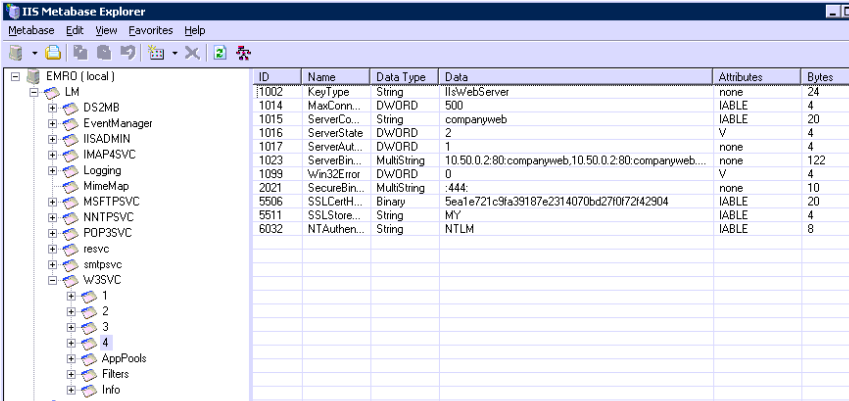
So how do you find out what the identifier value is in IIS? You need to download and install IIS 6.0 Resource Kit and open up meta database explorer.
So within metadatabase explorer which is displayed in the image above expand w3svc and you should see a number of sites.In the problem i was having the companyweb identifier was not there! So I logged onto another SBS Server which was working fine and exported the 4 key. Then re-imported it into IIS.Once it is imported into IIS you need to edit id 1023 as per image to suit that of the current server.
Then do an IIS reset and re-run the CEICW wizard.
Once you have re-ran the wizard browse default website and expand the sites within default website. Right click onthe properties of remote. Then go to documents and add in “default.aspx”
Voila RWW is backup and running.
But what about OWA.
Strangely enough the Exchange and exchange mobile application pools were not present in IIS so as per my above mentioned method I exported these applicatin pools from a healthy server and then edited the exchange sites like OMA , Exchweb to use the correct application pools and all worked fine.
I have not seen anything on the web about how to fix a problem like this, So hopefully this will help people. Sean
Simply change this key to 1
HKLM\SOFTWARE\TrendMicro\PC-cillinNTCorp\CurrentVersion\Misc.\Allow Uninstall = 0 original key
HKLM\SOFTWARE\TrendMicro\PC-cillinNTCorp\CurrentVersion\Misc.\Allow Uninstall = 1
new key
When email is being protected by an external cloud based solution the default connectiontimeout interval for exchange 07/10 is 10 minutes. And normally this is not enough for eg. Forefront Online , Postini, Messagelabs.
So here is some powershell commands to resolve the issue.
Firstly Get-ReceiveConnector | fl Id*,*connectiontime*
Change the ConnectionTimeOut value
Set-Receiveconnector -ConnectionTimeOut 00:20:00
Name of connector is specified by ServerName\receive connector name

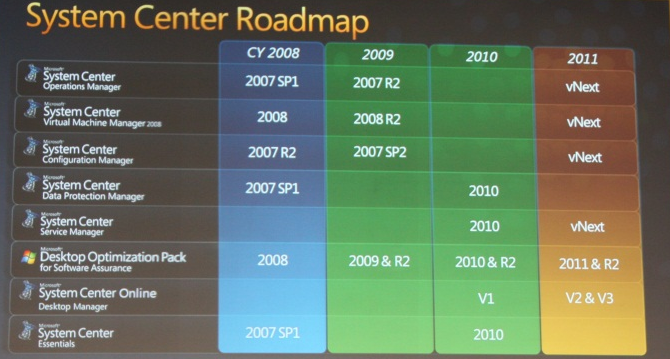
Microsoft have released System Center Essentials 2010 Plus Suite which includes DPM2010. This is an amazing bundle and offers real value for customers. I have just finished a network using both products and SCE 2010 is a super product as is DPM2010. They are both really easy to use powerful tools.
You can get info on the suite here
975530 – Last Review: August 10, 2010 – Revision: 14.0
Stop error message on a Windows Server 2008 R2-based computer that has the Hyper-V role installed and that uses one or more Intel CPUs that are code-named Nehalem: “0x00000101 – CLOCK_WATCHDOG_TIMEOUT”
I have a newly installed HP DL380G6 , completely up to date etc.. that has been randomly rebooting. I installed who crashed to review the memory dump and found that each time it happened this error code was generated CLOCK_WATCHDOG_TIMEOUT
So after some research on the web I found A Hot Fix available from Microsoft to fix the problem. You can get it HERE

